I Built an App With AI. Now What? Getting First Users
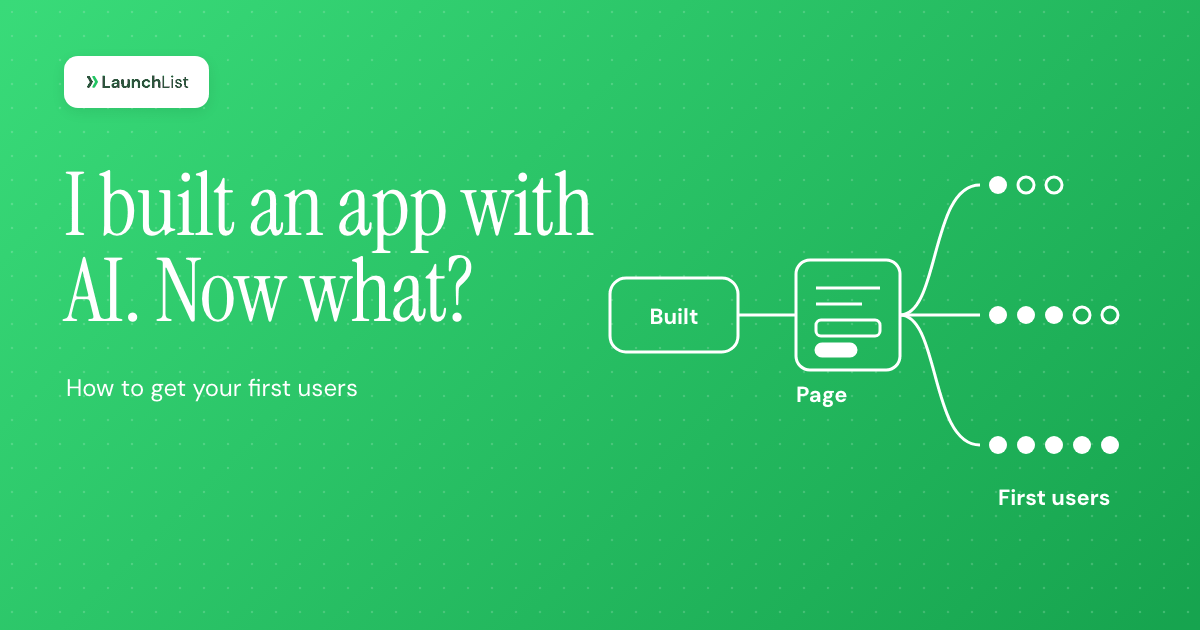
TL;DR: "I built an app with AI, it works on my machine, and nobody is using it. Now what?" If that is you, the answer is less mysterious than it feels. Getting users for an AI-built app works the same way it does for any app: by hand, first. Before you invite anyone, run a stranger test (the main action works end to end, sign up works, errors and phones are handled, and no secret keys or open database tables are exposed). Then pick one narrow user and one job, put up a page that collects interest while you keep building, and find your first 10 to 100 users yourself in the places they already talk, with personal messages rather than broadcasts. Measure whether those people do the one thing your app is for, talk to every one of them, and launch publicly only when strangers succeed without you. Below are the checklist, a 14-day plan, a channel comparison and five messages you can copy.
Why nobody comes after you ship
The tools changed how fast you can build. They did not change how people find things.
The numbers show the gap. In July 2025, Lovable said more than 100,000 new projects were being created on it every day. App stores tell the same story: Sensor Tower estimates reported by The New York Times put new App Store apps in the first half of 2026 at about 560,000, roughly double the year before, while downloads grew 2%. Appfigures counted new releases across both app stores up 60% year over year in the first quarter of 2026.
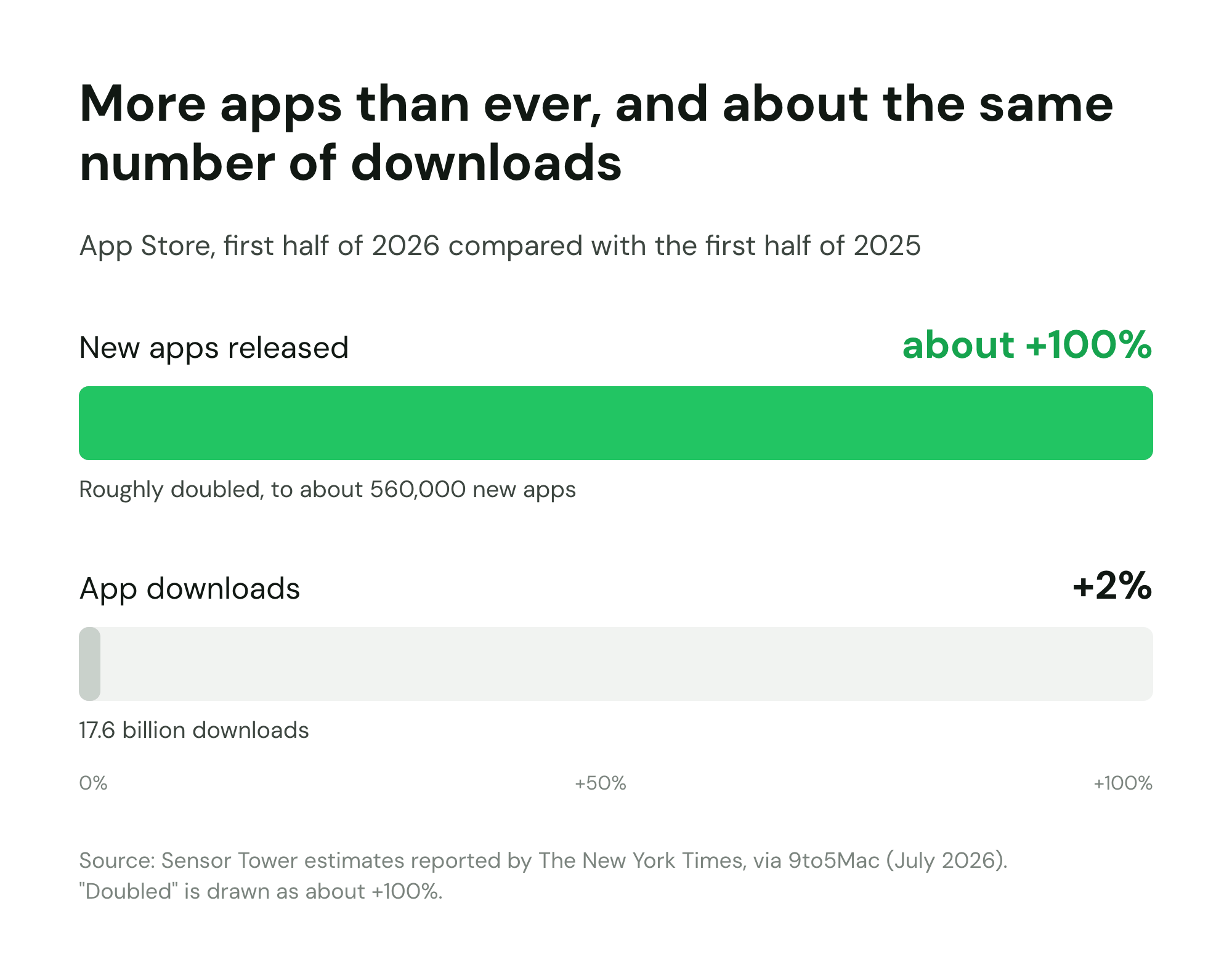
More apps, the same number of people, the same hours in their day. Building got cheap, and attention did not. "I built an app" used to be the hard part of the sentence; now it is the easy part. That is the whole "build it and they will come" trap: shipping an app makes it exist, and nothing about existing puts it in front of anyone.
The success stories you see prove this rather than disprove it. In March 2025, 404 Media reported that fly.pieter.com, a browser flight game Pieter Levels made with AI tools, was earning more than $50,000 a month by his own account. The headline finished the thought: "Yours probably won't." Levels already had a large online following. The AI made the game fast. His audience is what made it a business.
Whether you call it a vibe coded app or just your app, its first users will not come from the tool that built it. If you do not have an audience yet, you are not behind. You are at the step everyone starts at, and it is mostly manual. Paul Graham put it plainly in Do Things That Don't Scale back in 2013: "The most common unscalable thing founders have to do at the start is to recruit users manually." The rest of this guide is how to do that well.
Before you invite anyone: the stranger test
Your first users are the scarcest thing you have. If the first ten people hit a broken sign-up form, most of them will not come back for a second try, and you will not learn anything except that the form is broken. So spend an afternoon making sure the app works for someone who is not you.
AI-built apps have a specific failure mode here. They work beautifully along the path you tested while prompting, and break on every path you did not. You know which button to press. A stranger does not.
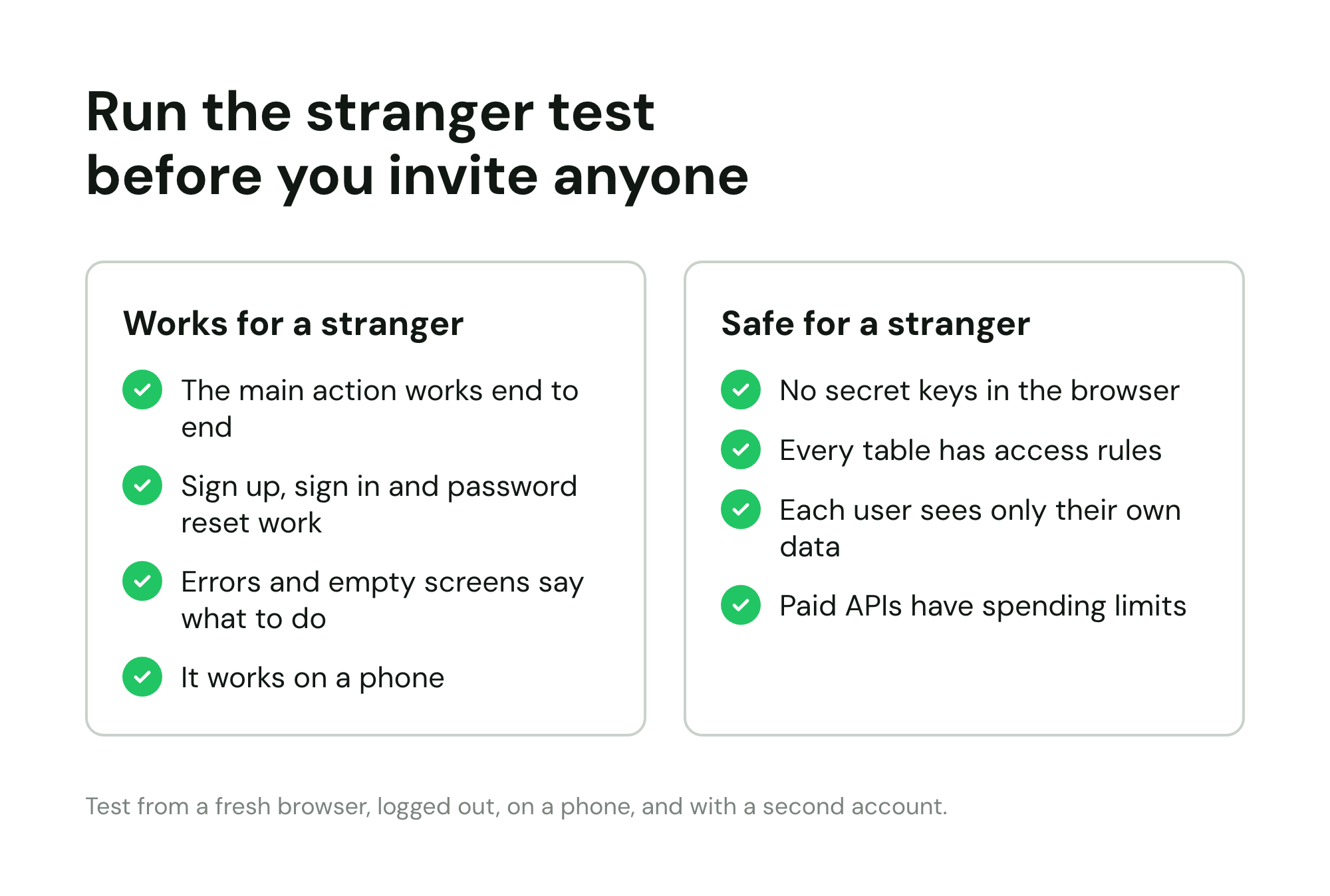
The main action works end to end
Name the one thing your app is for, in a verb: "turn a recipe into a shopping list", "book a session", "generate a cover letter". Do that action from a fresh browser, logged out, with no saved data, and follow it to the end. Does the result arrive? Does the email send? Does the file download? Then do it again with odd input: a very long name, an empty field, an emoji, a file twice the size you expect.
Sign up, sign in and password reset
Create a new account with an address you have never used. Confirm the email arrives and is not in spam. Sign out, sign back in, reset the password. If you added Google sign-in, try it with a second Google account. Sign-up is the step most often generated once and never tested again.
Errors and empty screens say what to do
Turn off your Wi-Fi halfway through the main action. Open the app as a new user with no data. What a stranger sees in those moments decides whether they stay. A blank screen or "Something went wrong" leaves them nowhere to go. "You have no projects yet. Create your first one" gives them a next step.
It works on a phone
Most links you share will be opened on a phone, inside a social app's browser. Open yours that way. Check that buttons are reachable, text is readable without zooming and nothing important is cut off.
Basic security for an AI-generated app
This is the part to take seriously, without panic. Here is what has actually been found:
- In March 2025, Matt Palmer scanned 1,645 apps from Lovable's public showcase and found 303 endpoints across 170 of them (about 10%) where database access rules were missing or wrong, exposing tables such as users, transactions and subscriptions. It was filed as CVE-2025-48757, rated 9.3 out of 10. Lovable disputes it, on the grounds that each customer is responsible for protecting their own app's data. Whoever is right, the data sat in the customers' apps.
- In October 2025, the security company Escape analyzed more than 5,600 public apps built on AI app builders and reported more than 2,000 vulnerabilities, more than 400 exposed secrets such as API keys in the code sent to the browser, and 175 cases of exposed personal data, including medical records and bank account numbers. Most were reachable without logging in.
- In July 2025, Wiz found a flaw in the Base44 platform itself that let outsiders register for private apps using nothing but an ID visible in the app's address. Base44's owner, Wix, fixed it within a day of the report and found no sign it had been used.
The last one is a reminder that some problems belong to the platform, and you can only keep your tools up to date. Most of what the researchers found, though, was configuration in the app, and you can check that in an hour. Whichever tool you used, go through these:
- No secret key in the browser. Open your live app, view the page source and the network requests in your browser's developer tools, and search for "key", "secret" and "token". A publishable key meant for the browser is fine. A secret or admin key is not. Supabase's own documentation is blunt about it: "Never use a secret key in the browser or expose it to customers."
- Every table has access rules. If your app talks to its database straight from the browser, each table needs rules that say who can read and write which rows. The same Supabase guide says: "Enable RLS on every table in an exposed schema." Other databases have their own version of this; the principle is the same.
- Each user sees only their own data. Make two accounts. Log in as the second and try to open something that belongs to the first, by changing an ID in the address or a request. If you can see it, a stranger can too.
- Checks run on the server, not just in the page. Hiding an admin button in the interface does not stop someone calling the action directly. Anything that costs money or touches other people's data should be checked on the server.
- Paid APIs have limits. If your app calls an AI model, a maps API or an email service on your account, set a monthly spending cap with the provider and a rate limit in the app, so one bored visitor cannot run up your bill.
You can also ask the AI tool you built with to review the app against this list, then verify its answers yourself with the two-account test. It is a good first pass, not a sign-off.
Watch one person use it
Finally, hand the app to someone who has never seen it, give them the one-sentence goal and watch without helping. Jakob Nielsen's long-standing finding is that testing with five users uncovers about 85% of usability problems. You do not need five yet. One honest session will show you the three places everyone gets stuck.
Pick one narrow user and one job
"I built an app for anyone who wants to be more productive" reaches nobody, because nobody recognizes themselves in it. Your first users need to read your one-line description and think "that's me".
Fill in this sentence before you write a single post:
[App] helps [a specific kind of person] [do one job] without [the thing that annoys them today].
"Helps freelance designers send invoices without opening a spreadsheet" is a sentence a freelance designer stops for. It also tells you where to look for users (design communities, freelance forums) and what to measure (invoices sent).
Two tests for whether you have narrowed enough:
- Can you name ten real people who fit? Not a demographic, ten names, or ten usernames in a community you can find in an afternoon.
- Do they already try to solve this? People who patch the problem today with a spreadsheet, a workaround or a paid tool are the ones who switch. People who have never noticed the problem will not start caring because your app exists.
If you are not sure your idea clears that bar, it is cheaper to find out now than after a launch. Our roundup of idea validation tools covers the methods and the tools that make them quick.
Ship the page, not the launch
Most founders treat launch as a single day. It works better as two things: a page that starts collecting interest now, and a public launch weeks later, once you know the app works for strangers.
The page does three jobs while you keep building:
- It gives every message a destination. Each post, reply and DM in the next section needs one link to send people to. If the app is not ready for strangers, that link should not be the app.
- It keeps the people you reach. Someone who reads your post on Tuesday and is busy forgets by Wednesday. A signup means you can write to them when it is ready.
- It tells you whether your one sentence works. Visits that do not turn into signups mean the page has not made it clear who the app is for, before you have spent a week on features.
The page needs very little: a headline that is your one sentence, one line on the problem, a screenshot or a short screen recording of the main action, a form, and optionally one question ("What do you use for this today?"). That question is the start of every conversation in the next section. If you are new to the idea, here is what a pre-launch waitlist is and how it works.
You can make the page with the same AI tool that built your app, use a free waitlist landing page builder, or start from one of these waitlist landing page templates. If you would rather keep the signup form inside the app you already built, here is how to add a waitlist to an app built with AI. For the narrower case of testing demand before building more, there is a guide to the idea validation landing page.
One thing a page cannot do: count as a launch on every board. Hacker News, for example, lists sign-up pages as off topic for Show HN and asks that projects be usable without registration. Use the page to collect interest from the people you reach yourself, and save the boards for when there is something to try.
Find your first 10 to 100 users by hand
This is the honest answer to how to get users for your app when nobody knows it exists, and it is the part no tool does for you. Graham's essay has the two classic examples: Stripe's founders, when someone agreed to try the product, would say "Right then, give me your laptop" and set them up on the spot, and Airbnb's founders went door to door in New York, signing up hosts and helping them improve their listings. The point is not the specific trick. It is that the first users came one at a time, from a founder who went to them.
Start with 20 names
Write down 20 people who fit your one sentence: colleagues, former classmates, people you follow who complain about this problem, members of a group you are already in. Message each one personally (template 1 below). Ask for their opinion before you ask them to sign up. Some will try it, some will introduce you to someone better, and a few will tell you the problem is not as painful as you thought. All three are useful.
Friends and family who do not fit your one sentence are a trap. They will say nice things and never use it, and their politeness is easy to mistake for demand.
Go where your users already talk
Every audience gathers somewhere: a subreddit, a Discord or Slack community, a forum, a LinkedIn niche, a Facebook group, a Stack Exchange site. Find the two or three where people ask for help with the problem you solve. Then, for a week, just be useful there. Answer questions you know the answer to. When someone describes exactly the problem your app solves, reply to the question first, and mention the app only if it genuinely helps (template 2).
Read each community's rules on self-promotion before you post anything about your app. Many allow it only on certain days, in a specific thread, or after you have taken part for a while. Breaking the rule once can get you banned from the place where your best users are.
Send messages that do not read like spam
Personal outreach works when the message is clearly about the other person. Mention the specific thing they said or do, keep it under 80 words, ask a question they can answer in one line, and do not include a link until they say yes. The difference between outreach and spam is not the channel. It is whether you could have sent the same message to a thousand people.
Post a show-and-tell where it is welcome
Many communities have a weekly "what are you working on" or "show your project" thread. A short post that leads with the problem, shows the app in one screenshot or GIF and asks a real question gets far more replies than an announcement (template 3). Building in public on X, LinkedIn, Bluesky or Threads works the same way: short, specific updates about what you learned from users, not about features.
Launch boards: when they help
Product Hunt, Hacker News, BetaList, Indie Hackers and the directories are worth doing, but they are a burst, not a pipeline. They work best after the stranger test, once you have a handful of users who can vouch for the app and a page that turns visits into signups. When you get there, we ranked where to launch your startup by what each platform actually delivers, collected Product Hunt alternatives that still drive real traffic, and checked startup directories in 2026 to see which are still alive. For the long tail, there is a list of 99 places to promote your startup for free.
The channels compared
| Channel | Effort | How fast you hear back | Fit for your first 10 users | Good for |
|---|---|---|---|---|
| People you know who fit | Low | Hours to a day | High | Honest first feedback, introductions |
| Replies in communities | Medium | Days | High | Finding people mid-problem |
| Direct messages to strangers who posted the problem | Medium | Days | High, if the message is specific | Users who already feel the pain |
| Show-and-tell threads | Low | A day | Medium | Feedback and a few curious signups |
| Building in public (X, LinkedIn, Bluesky) | High, ongoing | Weeks | Low at first, grows | Slow, compounding attention |
| Launch boards (Product Hunt, Show HN) | High, one day | Same day | Low to medium | A burst of traffic once it works |
| Directories | Low per listing | Weeks to months | Low | Backlinks and a slow trickle |
| Content and SEO (answers to the exact questions your users search) | High, ongoing | Months | Low at first, grows | Signups that keep arriving without you posting |
| Partnerships (newsletters, communities, complementary tools) | Medium | Weeks | Medium to high, if the audience matches | Borrowing an audience someone else already built |
| Paid ads | Low effort, costs money | Same day | Low | Testing messages later, not finding first users |
The rows at the top are slower to scale and faster to teach you something. For the first 50 users, that is the right trade; the content and partnership rows start to earn their effort on the way to 100.
From 50 to 100 users
The first 50 come from you. The next 50 should start to come from what you learned getting them. Look at the people who stayed and ask where they came from: that channel gets most of your time now. Ask each active user one question, "Who else do you know who fights with this?", because an introduction from a user converts far better than any post. This is also the point to start the slower rows of the table above: write one honest answer a week to a question your users search for, and offer something useful to a newsletter or community that already reaches them. None of it replaces the personal messages yet. It just means the hundredth user is less likely to depend on you remembering to send one.
Five messages to copy
Replace the bracketed parts. Keep them short, and never send the same one twice without changing the first line.
1. To someone you know who fits
Hi [Name],

I've been building something for [specific kind of person] who [problem], and you're the first person I thought of.

It's rough, but it [does the one job]. Would you try it for 10 minutes this week and tell me where it breaks?

No pressure if not. And if you know someone who fights with [problem] more than you do, I'd love an intro.

[Your name]
2. Reply to someone who described the problem
[Answer their actual question first, in two or three sentences.]

I ran into the same thing with [their situation], which is why I've been building a small tool that [does the one job]. Happy to share it if it would help, but the steps above should get you most of the way either way.
3. A show-and-tell post in a community thread
Title: I built an app that [does the one job] for [specific kind of person]. Looking for honest feedback

Every week I [describe the annoying manual process in one sentence], so I built [App] to [result].

What it does today:
- [Main action]
- [Second thing]

What it doesn't do yet: [known gap].

[Screenshot or GIF]

Two questions for anyone who [does this job]:
1. How do you handle this now?
2. What would stop you from switching?

Link: [page]
4. A direct message to a stranger who posted the problem
Hi [Name], I saw your post in [community] about [specific problem they described].

I'm building a small tool for exactly that and I'm talking to people who deal with it before I go further. Could I ask you two quick questions about how you handle it today?

No link, no pitch unless you want one.

[Your name]
5. A note to every new signup
Subject: Quick question about [App]

Hi [First name],

Thanks for signing up for [App]. I'm [Your name], and I'm building it myself.

One question, and a one-line reply is perfect: what made you sign up, and what are you using for [the job] today?

I read every reply.

[Your name]
The fifth message matters more than it looks. People who answer it become your first interviews. If you want a structure for those conversations, Rob Fitzpatrick's The Mom Test is the standard short book on getting honest answers from people who would rather be polite.
For more on growing a signup list once these first conversations are going, read how to get your first 100 waitlist signups and how to promote your waitlist across 15 channels.
A 14-day plan for your first users
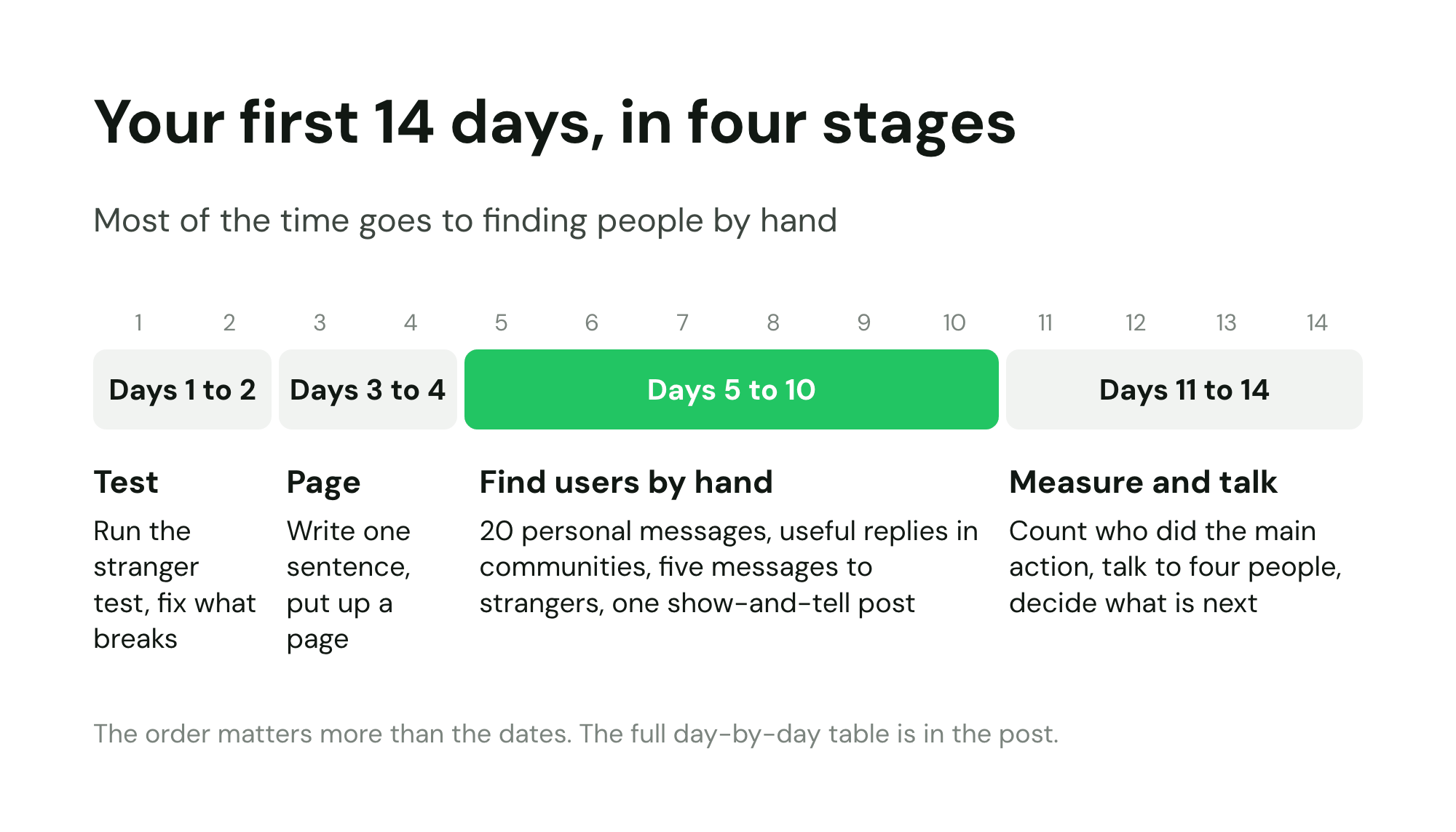
If you want one schedule for how to get your first users, use this one. Two weeks is enough to go from "it works for me" to a handful of strangers using it and a clear sense of what to fix. Treat the days as an order, not a deadline.
| Day | Do this | Done when |
|---|---|---|
| 1 | Run the stranger test: main action, sign-up, errors, phone | You have a list of what breaks |
| 2 | Fix the breaks and run the five security checks | Two-account test passes, no secret keys in the browser |
| 3 | Write your one sentence and list 20 names | Ten real people or usernames fit the sentence |
| 4 | Put up a page with a form and one question, and watch one person use the app | The page is live and you have notes from one session |
| 5 | Send template 1 to your 20 names | 20 personal messages sent |
| 6 | Join two or three communities and answer five questions | Five useful replies, no links |
| 7 | Reply to the people who wrote back and set up the ones who said yes | First people using it with you watching or on a call |
| 8 | Send template 4 to five strangers who posted the problem | Five specific messages sent |
| 9 | Post one show-and-tell (template 3) where the rules allow | One post live, every comment answered |
| 10 | Send template 5 to every signup so far | Every signup has a personal note |
| 11 | Count signups, who did the main action and who came back | You have the three numbers below |
| 12 | Talk to three people who used it and one who did not | Four conversations written up |
| 13 | Fix the single biggest thing that stopped people | One fix shipped, nothing else |
| 14 | Decide: more of the same channel, a new channel, or a sharper sentence | A written plan for the next two weeks |
Measure whether signups do the main action
A signup is a promise. The app's main action is the proof. The share of new people who reach it is called activation, and it is the first number that tells you whether your app works for strangers.
Count three things, by person, not by percentage while the numbers are small:
- Signups. People who created an account or joined your list.
- Activated. People who did the main action at least once: made the shopping list, booked the session, sent the invoice.
- Came back. People who did it again in their second week without you reminding them.
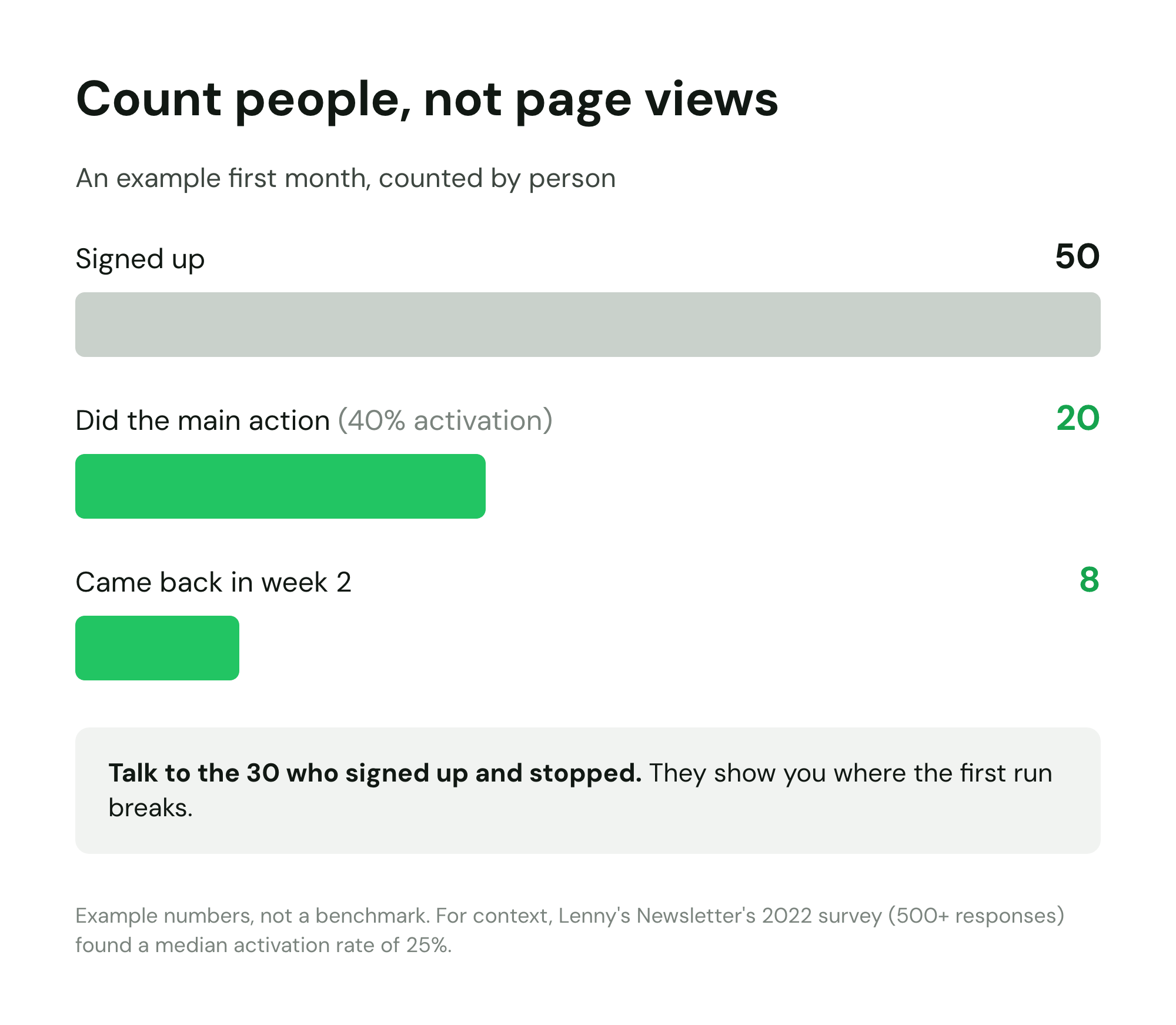
For a rough sense of scale, Lenny Rachitsky's activation benchmark survey (more than 500 responses) found an average activation rate of 34% and a median of 25%; for SaaS alone, 36% and 30%. Treat that as context, not a target. With 50 signups, every single person matters more than the percentage: the 30 who signed up and stopped are telling you exactly where the first run breaks, if you ask them.
What to ignore at this stage:
- Page views and impressions. They measure your post, not your app.
- Likes, upvotes and "this is cool" comments. Pleasant, and a poor predictor of use.
- Total signups on their own. A thousand signups and nobody activating is a worse position than 30 signups and 15 regulars, because the second one tells you what works.
- Feature requests from people who never activated. Build for the people who use it.
If your signups arrive through a page, tag each link you share with its channel (for example ?source=reddit) so every signup carries where it came from. A waitlist analytics view that ranks signups by the channel that first brought each person in will then tell you which channel to repeat; on LaunchList that breakdown is on the Grow plan.
When to launch publicly
Launch day is a burst of attention. It is worth spending only once the app can turn attention into users. A reasonable bar before you post on the big boards:
- Strangers activate without you. At least 10 to 20 people you did not hand-hold have done the main action.
- Some come back unprompted. A few use it again the next week without a reminder.
- You know your best channel. You can say which of your messages or communities brought the people who stayed.
- The page converts. Visitors who match your one sentence sign up at a rate you are not embarrassed by, and the people waiting know what they are waiting for.
For a phone app, the store listing is a channel of its own. Put the words your users would search for in the listing's title and description (and the keyword field, on the App Store), and make the first two or three screenshots show the main action rather than a logo or a login screen. Most people decide from those screenshots without reading a word.
If you have a list of people waiting, you do not have to open the doors all at once. You can run an early access program and let them in a few at a time, sized by how many new users you can support each week. When you are ready for the big day, work through the SaaS launch checklist or, for a phone app, the mobile app launch checklist. And if you want to see the tools founders use at each stage, there is a guide to the tools to launch a startup by stage.
Should you charge from day one?
Briefly: charging early teaches you more than anything else on this list, because paying is the clearest evidence the problem is real. "I'd use that" costs nothing to say. A card number does.
That does not mean you must charge your first five users. A common pattern is to keep the first handful free in exchange for feedback calls, then charge from the next group, often at a founding price that is lower for the people who joined early. Whatever you pick, decide before you invite people and write the terms down, including what happens when the founding price ends.
When you get there, see how to convert a waitlist into paying customers, and use the pre-launch MRR calculator to see what your list could be worth at a few prices. If people start paying while the app is still a side project, read when to turn a side project into a startup.
What not to do
- Do not spam. Posting the same link in twenty communities in an afternoon gets you banned from the places where your users are, and they remember the name.
- Do not buy users, reviews or followers. Beyond being useless (bought accounts never activate), in the US it can be illegal: the FTC's rule on fake reviews, announced in August 2024, prohibits buying fake reviews and buying fake indicators of social media influence.
- Do not ask friends to upvote. Launch boards detect it, and Hacker News says so directly: "Please don't ask friends to upvote or comment."
- Do not launch everywhere on day one. Five boards on the same day means five comment threads you cannot answer well and no way to tell which one worked. Pick one, do it properly, and learn from it.
- Do not build features to fix a traffic problem. If nobody is arriving, a new feature will not change that. If people arrive and leave, talk to them before you build anything.
- Do not judge the idea by your first post. One post with no replies tells you about that post, not about your app. Change the sentence or the community, and try again.
- Do not hide what it is. If the app is early, say so. People forgive rough edges they were warned about. They do not forgive being misled.
Where LaunchList fits
LaunchList is pre-launch waitlist software for founders: it handles the "ship the page" step and what comes after it. It does not build or host your app, and it does not find users for you. The manual work above is still yours. What it does:
- A hosted page from one sentence. Describe what you are launching and the AI writes a page you can then edit block by block in the waitlist page editor. It goes live at its own launchlist.page address, so you have a link to share before your app is ready for strangers.
- A form inside the app you already built. If you would rather keep signups in your own app, you copy two lines from Embed & API and add them to your site, or paste them into your AI builder's chat inside the prompt LaunchList gives you, and the builder adds the form.
- A place in line and a referral link for every signup. Each person sees their position when they join and gets a link of their own; friends who join through it move them up. Every signup also gets a confirmation email, so the list holds people you can reach.
- Your assistant can run it. The waitlist MCP server lets an AI assistant such as Claude, ChatGPT, Cursor or Codex look up your signups, invite people and edit your page as a draft. You can also connect ChatGPT to your waitlist from its plugin directory. A page goes live, and an email goes out to your list, only after you say yes.
- An email when you are ready. When the doors open, you can email the whole list or a segment, starting on the Collect plan.
Every way of collecting signups works on the Free plan, so you can put up the page today and keep building the app behind it.
First users FAQ
I built an app with AI. Now what?
Check that it works for a stranger before you invite one: the main action works end to end, sign up works, errors are handled, it works on a phone and no secret keys or open database tables are exposed. Then write one sentence on who it is for, put up a page that collects interest, and find your first 10 to 100 users by hand in the places they already talk. Launch publicly only once strangers use it without your help.
How do I get users for an app built with AI?
The same way as for any app: by hand at first. Message 20 people you know who fit, join the communities where your users already ask for help, reply to people who describe the problem your app solves, and post a short show-and-tell where it is allowed. The fact that AI built it changes how fast you shipped, not how people find it.
How many users do I need before I launch publicly?
There is no magic number, but a useful bar is this: at least 10 to 20 strangers (not friends) have done the main action without your help, a few came back the next week without a reminder, and you know which channel brought the ones who stayed. That usually takes a few weeks of manual work, not a few days.
Where should I launch an AI app?
Start where your specific users already gather: a subreddit, a Slack or Discord group, a forum or a professional network. Launch boards like Product Hunt, Hacker News (Show HN) and startup directories come later, once the app works for strangers. Show HN in particular is for things people can try, and its rules list sign-up pages as off topic.
Is my AI-built app safe to share with strangers?
Check before you share it. Security researchers have found apps from AI builders with database tables anyone could read, secret keys in the code sent to the browser and login checks that only ran in the browser. Make sure no secret key ships to the browser, every table has access rules, each user can only see their own data (test with a second account) and paid APIs have spending limits.
Should I tell people my app was built with AI?
You do not have to lead with it, and you should never hide it if someone asks. Users care whether the app solves their problem, works and keeps their data safe. How it was built is your story, not theirs, so talk about the problem it solves.
Should I charge my first users?
Charging even a small amount early tells you more than any number of free signups, because paying is the clearest sign the problem is real. Many founders keep the first handful free in exchange for feedback, then charge from the next group. Whatever you choose, decide it before you invite people, and put the terms in writing.
Do I need a waitlist if my app already works?
Not always. If the app works for strangers and you can support everyone who arrives, let them straight in. A signup page helps when the app is not ready for strangers yet, when you want to let people in a few at a time, or when you are still deciding who it is for. It also keeps the people a post brings you, instead of losing them when the post scrolls away.
How long does it take to get the first 10 users?
With a narrow audience and direct outreach, often one to two weeks of steady effort: about 20 personal messages, a few useful replies in communities and one show-and-tell post. Without a narrow audience it can take much longer, because nobody recognizes themselves in a message meant for everyone.
What if nobody signs up?
Look at the step before the signup. If nobody opens your messages, the audience is wrong. If people visit but do not sign up, the page does not say clearly who it is for. If people sign up but never use the app, the first run is the problem. Each failure points to a different fix, and none of them is building more features.