How to Run an Early Access Program: 12 Steps and 14 Examples
TL;DR: To run an early access program, pick one goal, then let people in from your waitlist in small waves sized by how many new users you can actually onboard each week (support hours divided by hours per user, plus 30 to 50% extra invites for people who never show up). Choose who gets in by fit first, referrals second and a few wildcards, give each person a personal invite that expires, and tell everyone still waiting where they stand. Ask every user the Sean Ellis question, "How would you feel if you could no longer use this product?", and end early access when about 40% answer "very disappointed", support load is stable and your infrastructure can take everyone. Below are the 12 steps with the math, 14 real early access program examples and three emails you can copy.
What an early access program is
An early access program is a limited, deliberate release: people who asked for your product get it before everyone else, a group at a time, and in return they accept rough edges and tell you what is broken. The limit is the point. You control how many people arrive, which people they are and how fast they come.
One naming trap: in games, "Early Access" means something else. On Steam it is a store category where people pay for an unfinished game, under rules we come back to in the pricing step. This guide is about the software and startup meaning: a gated release from a waitlist.
Early access vs beta vs soft launch
The three terms get used interchangeably, but they answer different questions. A beta launch is about the state of the product. A soft launch is about how loudly you open. Early access is about who is allowed in.
| Early access | Beta | Soft launch | |
|---|---|---|---|
| What it describes | Who gets in, and when | How finished the product is | How quietly you open |
| Who can use it | A chosen group, let in in waves | Anyone in the beta (closed or open) | Anyone who finds it |
| Product state | Anything from rough to finished | Works, not finished | Finished enough to sell |
| Main purpose | Control load, pick the right users, learn | Find bugs and gaps | Test the market before announcing |
| Typical length | Weeks to over a year | Weeks to months | Weeks |
| Ends when | Exit criteria are met | The product is stable | You announce |
You can combine them. Gmail was an invite-only early access program running on a product labeled beta for five years. Most early access programs for SaaS are closed betas with an invite system on top.
When to run an early access program, and when not to
Run one when something is genuinely scarce. Four things usually are:
- Your time. Onboarding new users one by one, answering their questions and fixing what they hit has a weekly ceiling.
- Capacity. Servers, API quotas, inventory or human review that cannot scale overnight. Mailbox, Manus and OpenAI's Sora app all limited access for this reason.
- Product readiness. It works for some use cases and not others, and you would rather 50 people hit the gaps than 5,000.
- Learning. You need to watch a small group closely to find out who the product is really for.
Do not run one when none of those is true. If your product is stable, self-serve and cheap to run, an invite gate only slows growth and turns people away. And do not run one as theater. "Only 100 spots left" on a list that never closes is fake scarcity, and people can tell. Scarcity works on people (more on the research below), but an invite-only launch built on a limit that does not exist trades launch-week attention for a reputation problem.
A quick test: if you could let everyone in tomorrow without anything breaking, you are running a waitlist with a delay. Open the doors.
How to run an early access program in 12 steps
The steps below assume you already have, or are about to start, a waitlist. If you are starting from zero, what a pre-launch waitlist is and how it works covers the basics.
1. Pick one goal for the program
Every other decision follows from the goal, so pick one before you design anything. The four common ones:
- Feedback and product-market fit. You want to learn who loves the product and why. Optimize for fit and conversation, keep cohorts small, and measure the Sean Ellis score.
- Capacity. You cannot serve everyone yet. Optimize for a steady, predictable flow, and let people in by position with a clear queue.
- Word of mouth. You want each person in to bring others. Give invites to the people you let in, reward referrals and make access feel earned.
- Revenue. You want to prove people will pay. Charge from day one or offer founding member pricing, and measure conversion, not signups.
You can serve two goals, but rank them: shareable invites for word of mouth work against small, hand-picked cohorts for feedback.
2. Size the first cohort with arithmetic
Most programs let in too many people in the first wave, get swamped and stop replying to anyone. Size waves from your capacity instead of from the length of your list:
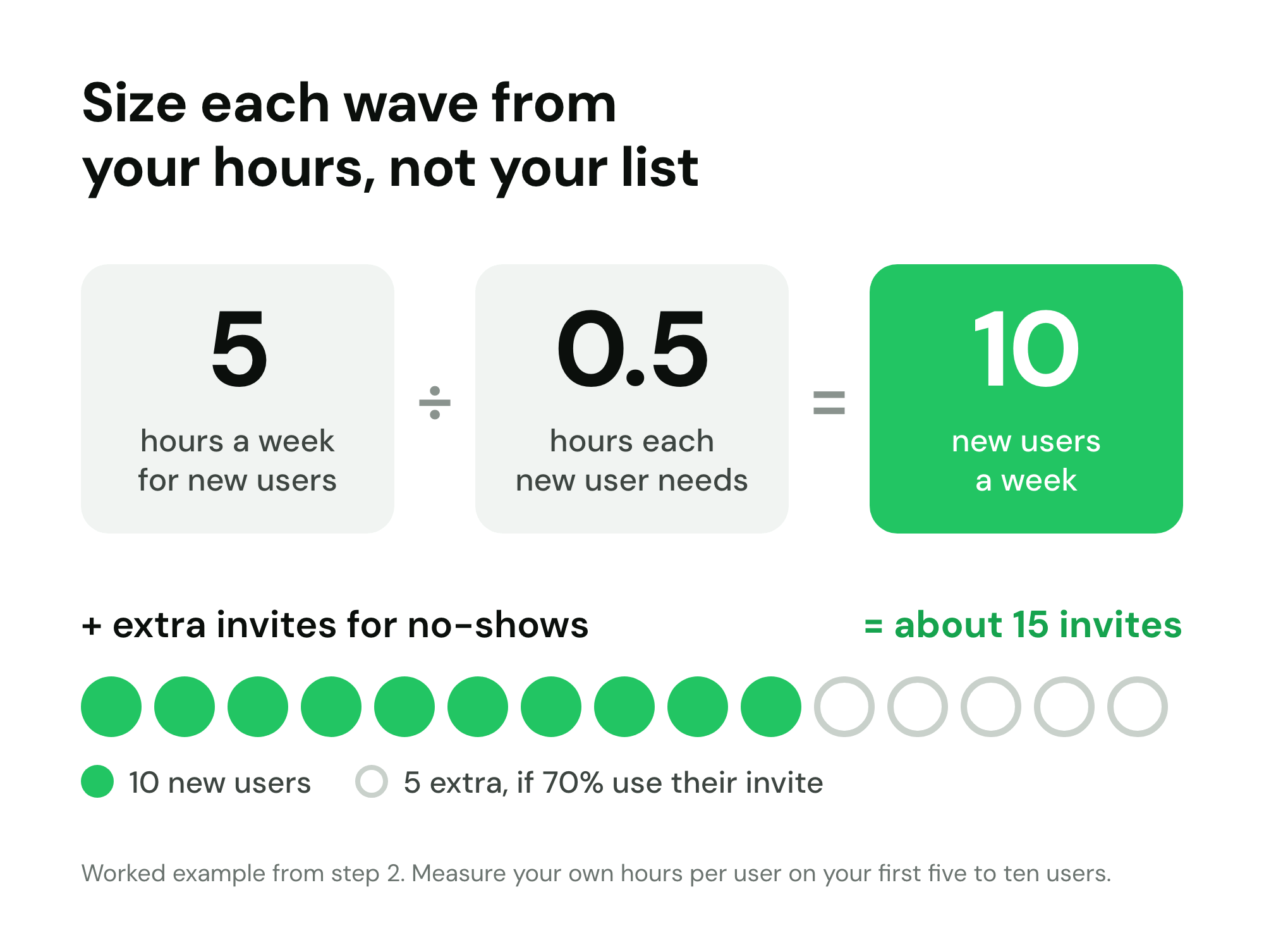
New users per week = hours you can spend on new users per week ÷ hours each new user needs.
"Hours each new user needs" means onboarding plus the support and bug fixing they cause in their first two weeks. Measure it on your first five or ten users rather than guessing. Superhuman spent 30 minutes in a one-on-one onboarding call with every new customer, according to founder Rahul Vohra on Mixergy, so half an hour is a realistic figure for a hands-on product.
Worked example: you have 5 hours a week for new users, and each needs about 30 minutes. 5 ÷ 0.5 = 10 new users a week. That happens to be the pace Linear ran at: it handpicked roughly 10 invites a week from its waitlist during its beta.
Then oversubscribe, because not everyone you invite will show up. UX for the Masses suggests that if you want feedback from at least 25 customers you should recruit "perhaps 30-40". Expect lower numbers for active feedback than for sign-ins: Centercode, a beta-testing vendor, puts average participation in beta tests at about 30%. Plan on 60 to 80% of hand-picked, recently active people using their invite, and fewer if the list is old.
| Hours a week for new users | Hours per new user | New users a week | Invites to send (at 70% use) |
|---|---|---|---|
| 2 | 1 | 2 | 3 |
| 5 | 0.5 | 10 | 15 |
| 10 | 0.5 | 20 | 29 |
| 10 | 0.25 | 40 | 58 |
| 20 | 0.5 | 40 | 58 |
If your constraint is servers or review time rather than hours, run the same division with that. And recompute after every wave: as onboarding improves, the hours per user drop.
3. Collect signups with qualifying questions
You cannot pick the right people later if you only collected an email address. Your early access waitlist is the pool you will draw every wave from, so ask a few qualifying questions at signup, while people are motivated:
- Role or type of user. "What best describes you?" with four or five options. This is the field you will filter on most.
- Use case. "What would you use it for first?" Open text is fine; it tells you who has a real job for the product.
- Current tool. "What do you use today?" People switching from a named tool are easier to onboard and easier to price.
- Urgency. "When do you need this?" with options from "this week" to "just curious". The "this week" group activates fastest.
Keep it to two to four qualifying questions on the signup form. Each extra field costs some signups, so ask only what you will use to choose.
The page itself matters too. An early access signup page should say plainly what people are signing up for, roughly when access starts and what they will get. For layout and copy, see the guide to the waitlist landing page and these waitlist landing page examples that convert.
4. Choose who gets in first
There are four ways to order the queue, and each rewards something different:
- First come, first served. Simple and fair-looking. It rewards speed, not fit, and your earliest signups are often friends, competitors and the curious.
- Referral rank. People who bring the most signups go first. It rewards network size and creates a growth loop, but your loudest promoters are not always your best users. A well-built waitlist referral program also needs fraud protection, or the top of the queue fills with fake accounts.
- Fit score. You score each signup on the qualifying answers and invite the best match. It produces the best feedback and the least shareable story.
- Hand-picked. You read the answers and choose. Linear did this, inviting people based on what they said in its signup survey. Superhuman went further and segmented users by who said they would be "very disappointed" without the product, then built for that group.
Use a mix. A split that works for most B2B and prosumer products:
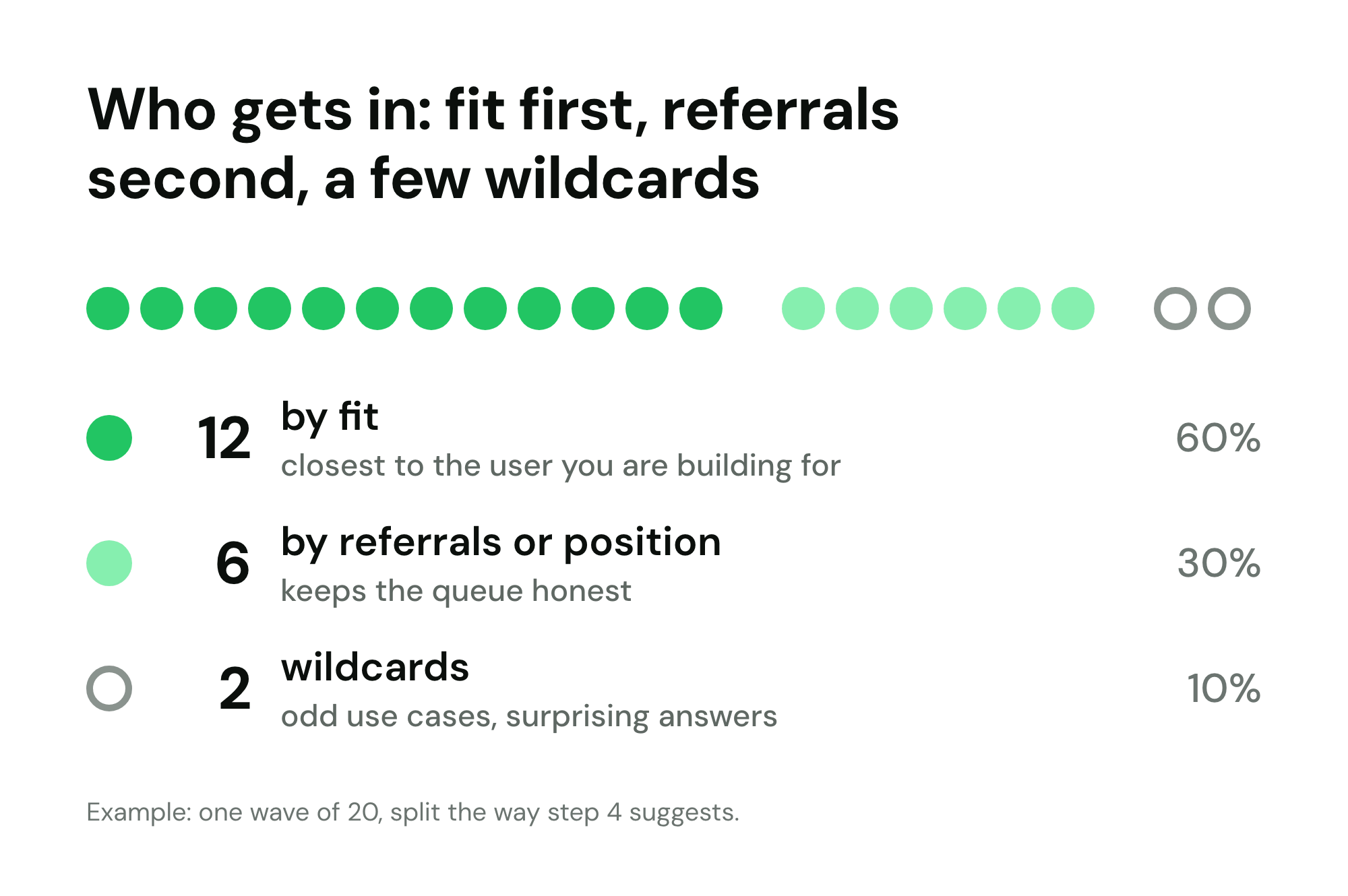
- About 60% by fit. The people closest to the user you are building for. This is where your learning comes from.
- About 30% by referrals or position. It keeps the queue honest (people can see that moving up works) and rewards the people promoting you.
- About 10% wildcards. Odd use cases, unusual industries, people who wrote something surprising. Some of the best product discoveries come from users you would not have picked.
In a wave of 20 that is 12 by fit, 6 by referrals and 2 wildcards. Whatever the split, say on the waitlist page how it works, and never imply a pure queue while hand-picking around it.
5. Release access in waves
Waves turn early access into a controlled experiment. Three rules make them work:
Fixed cadence. Pick a day and a size: "15 people every Tuesday". You can plan support time, and tell the people waiting something concrete.
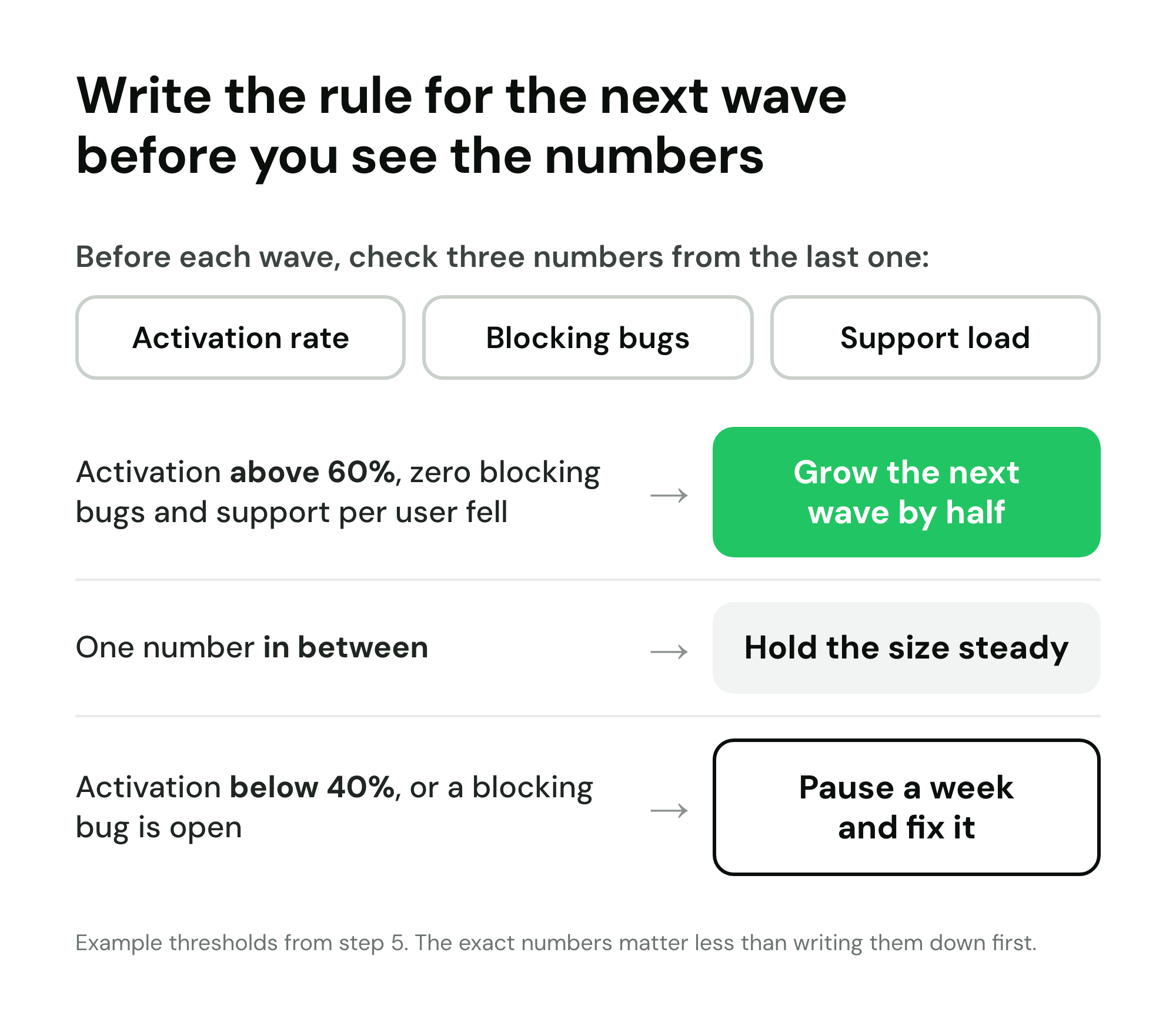
A gate between waves. Before each wave, check three numbers from the last one:
- Activation rate: what share of last wave reached the first meaningful action (sent their first invoice, imported their first file).
- Open bugs: how many problems the last wave reported that are still unfixed, especially ones that block activation.
- Support load: tickets or messages per active user in the past week.
Speed up or pause on rules you wrote in advance. For example: if activation is above 60%, blocking bugs are zero and support per user fell, increase the next wave by half. If activation dropped below 40% or a blocking bug is open, pause for a week and fix it. If one number is in between, hold the size steady. The thresholds matter less than writing them down before you see the data.
When you are ready to turn early users into paying customers, the waitlist conversion sequence covers the emails and timing in detail.
6. Decide how invites work
An invite is a small mechanism with large consequences. The main options:
- Personal one-use codes. One code, tied to one person, works once. It is the safest default: you know exactly who got in, codes cannot be passed around, and you can measure who used theirs. It is the right default for early access invite codes.
- Shared codes. One code for a group, such as "PODCAST50" for a podcast audience or a code for everyone at one company. Useful for partners and communities. Always set a seat limit, and ideally an end date, or a shared code posted publicly lets everyone in at once.
- Open links. Anyone with the link gets in. Fine for the final wave, risky before it.
- Queue-skip tickets. Monzo used "golden tickets": links its users could share that let a friend skip the queue, refreshed automatically.
Then three settings:
- Expiry. One to two weeks. It keeps waves predictable and frees unused seats. Send one reminder a couple of days before expiry, and when a code does expire, offer a new one rather than sending the person to the back.
- Invites per user. If you give people you let in invites of their own, cap them. Gmail gave active members three more invites in June 2004, a number small enough to feel valuable.
- Abuse. If access is valuable, someone will sell it. Gmail invites sold on eBay; Manus codes were resold for thousands of dollars. Personal codes tied to an email address, used once, make resale pointless.
7. Price early access: free, founding member pricing or paid
The price of early access decides what kind of signal you get back.
- Free. The most users and feedback, and almost no information about willingness to pay. Good for learning or capacity testing, bad when you need to know whether the product is a business.
- Founding member pricing. Early users pay, but less: for example, a discount locked for 12 months, or for as long as they stay subscribed. It rewards people for trusting an unfinished product and gives you a real conversion number. Write down the terms (how long, which plan, what happens if they cancel and return), because a vague "early bird" promise becomes a support argument a year later.
- Paid from day one. Superhuman charged everyone $30 a month during its invite-only years. The group is smaller and the signal is the clearest you can get: these people pay. It suits products that save money or time in an obvious way.
Prices can also move the other way. Perplexity's Comet browser was first available only on its $200 a month Max plan, then through a waitlist, and then free for everyone on 2 October 2025. Starting high and opening up is easier than starting free and charging later.
Steam's rules for paid Early Access games make a useful sanity check for any paid early access program: the product must be usable at the time of purchase, you must not make specific promises about future features, and you may not run a permanent discount while in early access. The principle behind all three: people should buy what exists today, not a roadmap.
If you are deciding between these, model the outcomes first. The pre-launch MRR projector turns a waitlist size, a conversion rate and a price into expected monthly revenue, so you can compare a founding member discount with full price before you announce either.
8. Keep the people still waiting warm
In most programs, the people still waiting outnumber the people let in, often by ten to one or more. They are your launch audience, and silence loses them.
- Show an honest position. Robinhood showed each person how many people were ahead of them. A queue position is only motivating if it is true and if it moves.
- Give a rough timeline. "We are letting in about 15 people a week, and there are 340 people ahead of you" is more useful than "soon". People can do that math themselves, and they will trust you more for letting them.
- Say what moves people up. Referrals, answering the survey, being in a specific role. If the rule exists, publish it.
- Give people a page to check. A personal status page where each person sees their position, their referral link and any rewards stops them emailing you to ask.
- Reward progress. Small, earned rewards at referral milestones (earlier access at 3 referrals, a founding badge at 10) give people a reason to stay involved. See how to design rewards and milestones and what makes good milestone rewards.
- Send updates on a schedule. Every two to four weeks, a short note on what shipped, what the early users found and roughly when the next waves go out. For more ideas, see 5 proven strategies to boost waitlist engagement.
9. Set expectations in writing
Every person you let in should get a short written agreement, in the invite email or on the first screen. Not a legal contract: a plain list of what early access means. It should cover:
- What is unfinished. Name the known gaps. "Exports are CSV only; integrations are not built yet."
- Data. Whether data created during early access carries over, and whether you might reset anything.
- What you are asking for. "A 15-minute call in your first two weeks, and a four-question survey after 30 days."
- That access can change. You may remove access for people who never use it, so the seat can go to someone who will.
- What happens to pricing. What they pay now, what they will pay after early access, and when that changes.
Writing it down prevents expectation debt: implied promises ("I thought this would be free forever") that turn loyal early users into angry ones on launch day.
10. Run a weekly feedback loop
The best known tool here is the Sean Ellis test. Ask every active user one question: "How would you feel if you could no longer use [product]?" with three answers: very disappointed, somewhat disappointed, not disappointed. In Ellis's experience, companies that struggled to grow almost always had fewer than 40% answering "very disappointed", and companies with strong traction almost always exceeded it.
Superhuman's story with the test, as told in First Round Review, is the best worked example:
- The first score, in summer 2017, was 22%.
- Segmenting to the users who loved the product most (and ignoring those who would never be a fit) raised it to 33%.
- Building for that segment, and on what held the "somewhat disappointed" group back, took it to 58% within three quarters.
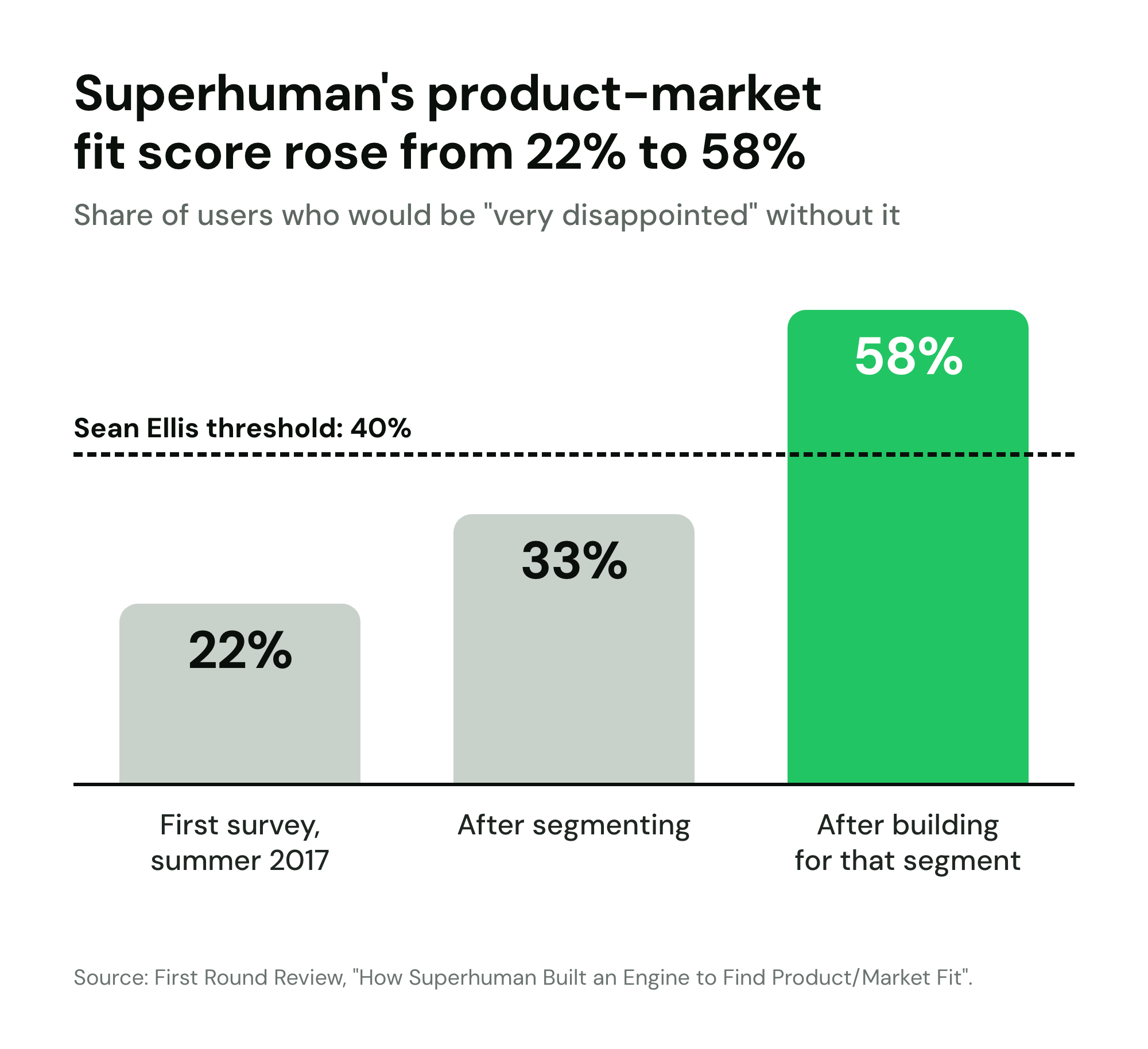
The same article notes you start to get directionally correct results at around 40 respondents. So in a small program, wait until about 40 people have used the product for at least two weeks before you trust the score.
A weekly rhythm that fits a small team:
- Monday: read every piece of feedback from the past week and tag it (bug, missing feature, confusion, praise).
- Midweek: two or three 15-minute calls with recent users, ideally from the last wave.
- Friday: ship at least one visible fix from the feedback, and tell the people who asked for it.
- Monthly: send the Sean Ellis survey to everyone active for more than two weeks.
The Friday reply matters as much as the fix: people who see their feedback shipped give more of it.
11. Measure the program
Track a small set of numbers per wave, not just overall, so you can see whether each wave is better than the last. Your waitlist analytics should already give you signups, sources and referrals; the rest usually comes from your product.
| Metric | How to calculate | Benchmark or rule of thumb | Source |
|---|---|---|---|
| Invite acceptance (code use rate) | Codes used ÷ invites sent, within the expiry window | 60 to 80% for hand-picked people; UX for the Masses recruits 30 to 40 to keep 25 | UX for the Masses |
| Feedback participation | Users who gave feedback ÷ users let in | About 30% is average in beta tests | Centercode |
| Activation | Users who reach the first meaningful action within 7 days ÷ users let in | Set your own bar before wave 1; under half usually means onboarding is the problem | Rule of thumb |
| Week-1 retention | Users active in their second week ÷ users let in | Should rise wave over wave as you fix things | Rule of thumb |
| Product-market fit score | "Very disappointed" answers ÷ all answers | 40% or more; Superhuman went 22% to 58% | First Round Review |
| Referral share | Signups that came through a referral ÷ all signups | Harry's reached 77% with a campaign built entirely around referrals; treat that as a ceiling | Tim Ferriss |
| Waitlist to user | Active users ÷ waitlist size | Linear: about 10% of roughly 10,000 in its first year | First Round Review |
| Support load | Tickets or messages per active user per week | Flat or falling between waves | Rule of thumb |
If referrals are a big part of your plan, track your viral coefficient too: the k-factor guide shows how to calculate it and what a realistic number looks like.
12. Decide when early access ends
Early access with no end date drifts: people stop believing the timeline and the waitlist goes cold. Set exit criteria at the start and review them monthly:
- Product-market fit. A Sean Ellis score of 40% or more, from at least 40 responses.
- Support load. Tickets per active user flat or falling for three consecutive waves.
- Infrastructure. Your systems can take the whole waitlist arriving in one day. Mailbox dropped its reservation system only after about ten weeks of engineering to handle more than 100 million messages a day.
- Self-serve onboarding. A new user can reach activation without talking to you.
- A growth signal. Linear opened to the public when it reached roughly 1,000 daily active users.
There is a second, less comfortable trigger: growth stalling. Clubhouse ended its invite system in July 2021, months after its monthly downloads had dropped sharply. If the gate is the main thing slowing you down, remove it.
When you do end early access, the launch itself is a separate project. The SaaS pre-launch marketing playbook covers the run-up, and the SaaS launch checklist covers launch day.
Early access program examples
Fourteen programs, from 2004 to 2025, each with the one mechanic worth copying or avoiding.
Gmail (2004): invites as a capacity valve
Gmail started with about 1,000 invited opinion leaders, with trials beginning on 21 March 2004. On 1 June 2004 active members got three more invites each, and invites sold on eBay for up to $150 before resale collapsed as supply rose. Invites were no longer needed from 14 February 2007, and Gmail left beta on 7 July 2009 (Wikipedia).
Lesson: rationing invites to active users grows a product through the people who already use it, and any scarce invite will be resold.
Dropbox (2008): a demo video and a closed beta
A demo video posted to Digg drove 75,000 waitlist signups in 24 hours, against an expectation of 15,000 at most. Dropbox then ran a Gmail-style closed beta so the whole list did not arrive at once on a product that still had bugs (TechCrunch). Its later referral program is covered in our Dropbox referral program case study.
Lesson: a big waitlist is a reason for a gate, not a reason to remove one.
Mailbox (2013): a reservation number built for capacity
Mailbox gave every signup a reservation number and a live count of the line, because its servers could only take so many new users at once. The waitlist reached the hundreds of thousands. Dropbox acquired Mailbox in March 2013, and on 16 April 2013 Mailbox dropped the reservations after about ten weeks of engineering to handle more than 100 million messages a day (TechCrunch).
Lesson: when the scarcity is real and visible, people accept the wait, and the gate comes down when the constraint is solved.
Robinhood (2013 to 2015): show people how many are ahead
By May 2014 Robinhood had about 300,000 people on its list, with about 1,000 joining a day. Each person saw how many people were ahead of them, and referrals moved them up (Lloyd Melnick).
Lesson: a visible, moving position plus a clear way to improve it turns waiting into something people act on.
Harry's (2013): tiered referral rewards with fraud checks
Harry's collected more than 100,000 emails in a week, about 85,000 of them valid, and 77% came from referrals: about 20,000 people referred about 65,000 friends. Rewards were tiered at 5, 10, 25 and 50 referrals, and more than 200 people reached the top tier. To limit fraud, it allowed only two signups per IP address and bounced invalid addresses (Tim Ferriss).
Lesson: referral tiers work when the first one is reachable, and the fraud rules have to be in place before launch, not after.
Monzo (2018): golden tickets that skip the queue
Monzo gave its users "golden ticket" links that let a friend skip the queue, and refreshed them automatically after use. It brought them back on 10 January 2018.
Lesson: a queue-skip in the hands of people you already let in is a referral mechanic with a built-in limit.
Superhuman (2017 to 2020): survey-based selection and paid from day one
Superhuman used a survey to decide who got in, measured product-market fit with the Sean Ellis question and raised its score from 22% to 33% to 58% (First Round Review). Every customer got a 30-minute one-on-one onboarding and paid $30 a month, and by January 2020 the waitlist was north of 250,000 (Mixergy).
Lesson: a slow, high-touch program can still produce a huge waitlist, as long as each person let in becomes a strong advocate.
Linear (2019 to 2020): handpicked from survey answers
Linear ran an invite-only beta from April 2019 with its waitlist up for almost a year. About 10,000 people signed up and answered a short survey on why they wanted it and what problems they had with current tools. The team handpicked about 10 invites a week, about 10% of the list became users in the first year, and Linear opened publicly at around 1,000 daily active users (First Round Review).
Lesson: 10 people a week is enough to build a company on, if they are the right 10.
Clubhouse (2020 to 2021): the invite-only hype curve
Clubhouse was invite-only from March 2020 to 21 July 2021. Its founders said invites let them add users in waves. Meanwhile, downloads fell from 9.6 million in February 2021 to 922,000 in April 2021, according to Sensor Tower (The Next Web).
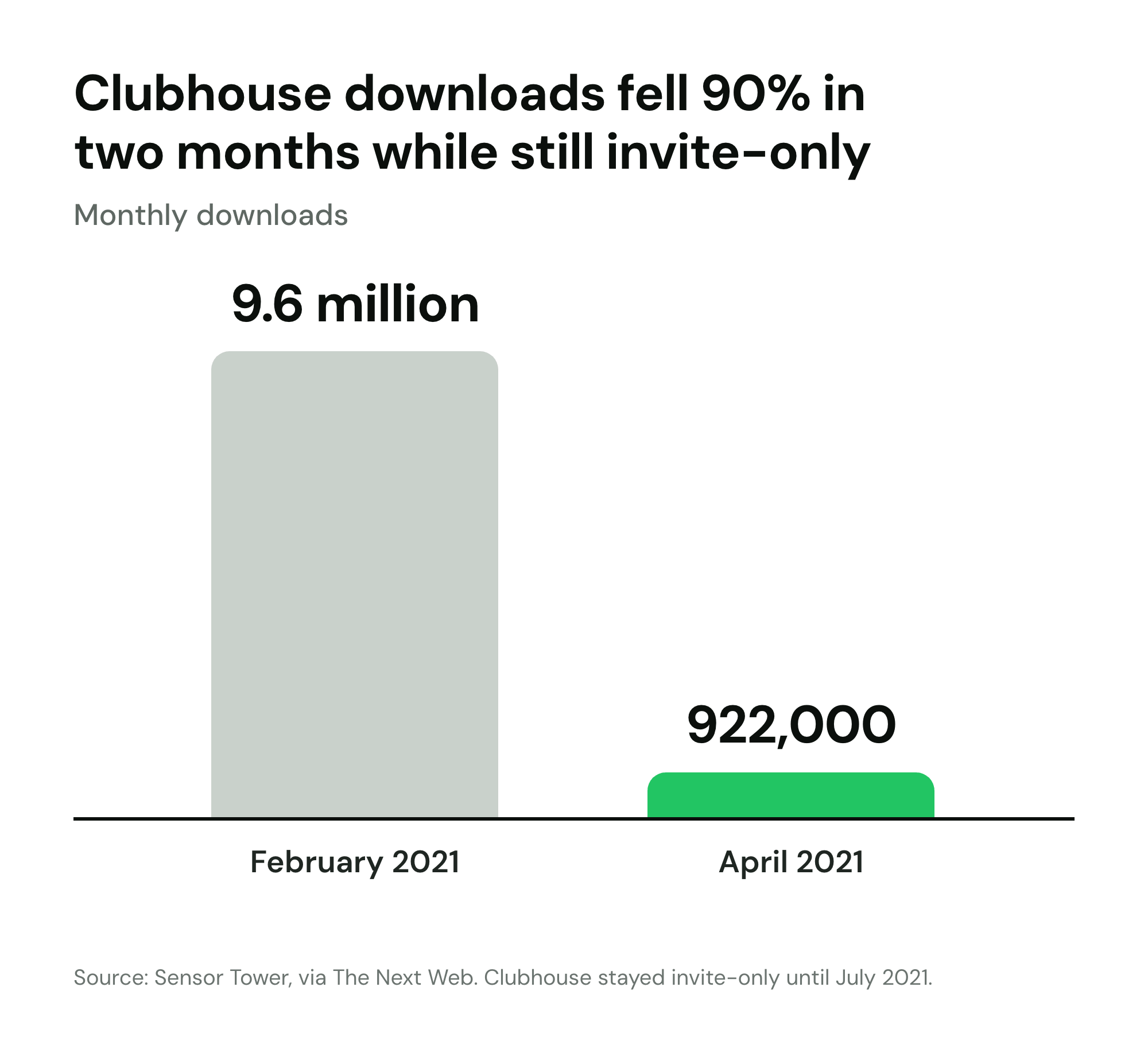
Lesson: exclusivity can drive curiosity, but if it outlasts the curiosity, the gate keeps out people who have stopped wanting in.
Arc (2021 to 2023): more than a year invite-only
The Browser Company kept Arc invite-only for more than a year and opened it to everyone as version 1.0 on 25 July 2023 (TechCrunch).
Lesson: a long program is fine when the product is changing fast and the team is clear that the gate is temporary.
OpenAI Sora app (2025): invite codes at consumer scale
OpenAI launched the Sora app on iOS on 30 September 2025, in the US and Canada, behind invite codes. It still passed 1 million downloads in under five days and was number one on the US App Store by 3 October (TechCrunch).
Lesson: an invite gate does not cap a launch when demand is high; it spreads the load.
Manus (2025): when codes become a market
Manus limited access with invite codes, citing server capacity. Codes were resold for ¥999 to ¥50,000 (about $137 to $6,900), and the company said 2 million people joined its waitlist in seven days, a figure it reported itself (Global Times).
Lesson: transferable codes for a product in demand create a resale market; tie codes to a person.
Perplexity Comet (2025): from premium to free
Comet was first available only on Perplexity's $200 a month Max plan, then through a waitlist that Perplexity said held millions, and then free for everyone on 2 October 2025 (Engadget).
Lesson: price itself can be the gate, and lowering it in steps is a way to open up gradually.
Steam Early Access: paid access to unfinished games
On Steam, "Early Access" means paying for a game in development. Valve's rules require a playable game at purchase, ban specific promises about future features and forbid a permanent discount during early access (Steamworks).
Lesson: if people pay for early access, sell the product as it is today, not the roadmap.
The examples at a glance
| Company | Mechanic | The one lesson |
|---|---|---|
| Gmail | Rationed invites to active users | Scarce invites get resold |
| Dropbox | Video-driven waitlist, closed beta | A big list needs a gate |
| Mailbox | Live reservation number | Real limits make waiting acceptable |
| Robinhood | Position shown, referrals move you up | Visible progress drives action |
| Harry's | Referral tiers at 5/10/25/50 | Fraud rules before launch |
| Monzo | Golden tickets that skip the queue | Built-in limits on sharing |
| Superhuman | Survey selection, paid, 1:1 onboarding | Small and high-touch can scale |
| Linear | Handpicked 10 a week | The right 10 beat the first 1,000 |
| Clubhouse | Invite-only for 16 months | Exclusivity has a shelf life |
| Arc | Invite-only for over a year | Long is fine if the gate is temporary |
| Sora app | Invite codes, two countries | A gate spreads load, it does not cap demand |
| Manus | Capacity-limited codes | Tie codes to a person |
| Perplexity Comet | Paid gate, then waitlist, then free | Price can be the gate |
| Steam Early Access | Paid access to unfinished games | Sell what exists today |
Why invite-only launches fail: seven mistakes
An invite only marketing strategy can work, as the examples show. These are the ways it goes wrong.
- Fake scarcity. The research behind scarcity is real: in a classic study by Worchel, Lee and Adewole (1975), people rated cookies from a jar of 2 as more desirable than the same cookies from a jar of 10, and more so when the supply had dropped because others wanted them. But the effect depends on the limit being believable. A "limited beta" anyone can join on request teaches people your limits are not real.
- Hype that outlasts the product. Clubhouse's gate was worth most when curiosity peaked; by the time it opened, much of the curiosity had gone.
- Resale markets. Gmail and Manus codes were sold, so the people who got in were the ones who paid a reseller. Personal, one-use codes stop it.
- Referral gaming. If referrals move people up, some will create fake accounts to climb. Credit a referral only after the friend confirms, and cap signups per IP address.
- Expectation debt. Unwritten promises (free forever, every feature included) pile up and come due at launch. Step 9 prevents it.
- Letting everyone in at once. The opposite failure: the team opens the gate fully, gets thousands of users in a day and spends the week on outages instead of learning.
- No exit date. Without exit criteria, early access becomes the permanent state, and the eventual launch reaches a list that has forgotten why it signed up.
Early access email copy: three emails to copy
Three plain-text emails cover most of a program. Replace the bracketed parts and keep them short.
1. The invite
Subject: You're in: your early access to [Product]

Hi [First name],

You signed up for [Product] on [signup date], and your access is ready.

Your personal invite code: [CODE]
Use it here: [link]
It works once, for you, until [expiry date].

What to expect:
- [Product] does [core job] today. [Known gap] is not built yet.
- I'll ask for a 15-minute call in your first two weeks. It's how we decide what to build next.
- Early access is [free / $X a month] until [date or condition]. After that, [what happens].

If something breaks, reply to this email.

[Your name]
[Role], [Product]
2. The update for people still waiting
Subject: Where you are on the [Product] list

Hi [First name],

A quick update while you wait.

Your position: [number]
People let in so far: [number]
Our pace: about [number] people a week, so your turn is likely around [month].

What changed this month: [one or two things the early users shaped].

Want in sooner? Each friend who joins with your link moves you up: [referral link].

[Your name]
3. Early access is ending
Subject: [Product] opens to everyone on [date]

Hi [First name],

On [date], [Product] opens to everyone, and the invite list closes.

Because you were here early:
- [Founding member price, and for how long]
- [Anything else you promised, stated exactly]

Nothing changes in your account. [Any action they need to take, or "You don't need to do anything."]

Thank you for putting up with the rough edges. [One specific thing early users changed in the product.]

[Your name]
If you want the first one ready to send rather than plain text, see the invite email designed and ready to send. For the rest of the program, these waitlist email templates that get opened cover 12 more moments, from the welcome email to launch day.
Early access program best practices
A short checklist to run before your first wave:
- One goal, written down, and ranked if there are two.
- Weekly capacity measured, and wave size computed from it (step 2), with 30 to 50% extra invites.
- Two to four qualifying questions on the signup form.
- A written selection rule (for example, 60% fit, 30% referrals, 10% wildcards) and a public sentence that explains it.
- Personal, one-use invite codes with a one-to-two-week expiry and a reminder before it.
- A fixed wave day and a gate: activation, open blocking bugs, support load.
- A written expectations note in every invite: gaps, data, feedback asked, pricing now and later.
- The Sean Ellis survey scheduled for every user active for more than two weeks.
- An honest position and timeline for everyone still waiting, and an update at least monthly.
- Exit criteria agreed before wave 1, with a monthly review date in the calendar.
How to run an early access program in LaunchList
LaunchList is pre-launch waitlist software for founders, and early access is built into it. Here is how the steps above map onto it.
- Stages. Every signup lands in a waitlist with stages: Waitlist, Invited, Joined, Converted and Declined. Inviting someone moves them to Invited; using their code moves them to Joined. The audience view shows where everyone is.
- Personal invites on every plan. Each personal code works once, for the person it was sent to. Personal invites are on every plan, including the Free plan, which includes a fixed number of invites; pricing has the numbers.
- Waves. Invite one person from their row, or select up to 1,000 at once on Signups, using a filter or a segment. "Invite people" can also pick for you: subscribed people still on the waitlist, most referrals first, then in signup order.
- Claiming access. Each person gets an email linking to their private status page, where their code waits beside a "Claim access" button. Claim access can send them to your own signup page with the code attached, or your app can redeem the code with one API call.
- Expiry. Codes expire after 14 days unless you set another window or none. Expired codes can be replaced in one go with "Invite all again".
- Measuring waves. Analytics shows each batch you invited together and what share used their code. Invite emails do not count toward your monthly email allowance.
- Shared codes and automatic invites. Shared codes (with a seat limit, an optional end date and allowed email domains) and invites sent automatically through automations are on the Launch plan and the Grow plan.
- Keeping people warm. Referral links, live position and a leaderboard work on every plan, and the status page shows each person their own position. Referral milestone rewards are available too.
- Connecting your app. Webhooks fire when a code is issued, redeemed, revoked or expired, and there is a public API and an MCP server.
If you are setting up your first wave, you can start a waitlist on LaunchList and invite your first group from it.
Early access program FAQ
What is an early access program?
An early access program lets a limited, chosen group use a product before it opens to everyone. People usually join a waitlist, the team lets them in in small groups, and in return they give feedback, tolerate rough edges and often get a better price. The limit exists because something is genuinely scarce: onboarding time, server capacity or product readiness.
What is the difference between early access and a beta?
A beta describes the product: it works but is not finished. Early access describes who gets in: a limited group, let in on purpose. Most early access programs run on a beta product, but a finished product can still use early access to control how fast people arrive, and an open beta has no access limit at all.
How many people should I let into early access?
Divide the hours you can spend onboarding and supporting new users each week by the hours each new user needs. Five hours a week at 30 minutes per user is 10 new users a week. Then send more invites than that, because not everyone accepts: UX for the Masses suggests recruiting 30 to 40 people to end up with 25 active ones.
How long should an early access program run?
Until it meets the exit criteria you set at the start, not until a date feels right. Linear stayed invite-only for about a year and Arc for more than a year, while some programs need only a few weeks. Set a review date every month and check the criteria: a product-market fit score of 40% or more, stable support load and infrastructure that can take open signups.
Should early access be free?
It depends on your goal. Free access gets you the most feedback and the weakest signal about willingness to pay. Founding member pricing (a discount for joining early) tests payment while rewarding risk. Paid from day one, like Superhuman at $30 a month, gives the clearest signal and the smallest group. If revenue or pricing is what you need to learn, charge something.
What is founding member pricing?
Founding member pricing is a discounted price offered to the first customers, usually locked for a fixed period or for as long as they stay subscribed. It rewards people for trusting an unfinished product. Put the exact terms in writing, including what happens after the period ends, because a vague 'early bird deal' becomes a support problem a year later.
How do I choose who gets early access first?
Use a mix rather than one rule. A practical split is about 60% chosen for fit (their answers to your signup questions match the user you are building for), 30% by referrals or waitlist position, and 10% wildcards who look unusual. First-come order alone rewards speed, not fit, and referral rank alone rewards people with big networks.
Should early access invite codes expire?
Yes. An expiry, typically one to two weeks, keeps your waves predictable and lets you hand an unused seat to someone else. Send one reminder before the code expires and, when it does, offer to send a new one rather than dropping the person to the back of the line.
When should I end early access?
When three things are true: enough of your users would be very disappointed to lose the product (the Sean Ellis test, with 40% as the usual bar), your support load per user is flat or falling between waves, and your infrastructure can take everyone at once. Mailbox ended its reservations only after about ten weeks of work to handle more than 100 million messages a day.
Does fake scarcity work for an invite-only launch?
Briefly, and then it costs you. People notice when 'limited spots' never fill or when everyone gets in on the same day, and the trust you lose carries into launch. Limit access only when something is actually limited, and say what it is.