Fake Door Test: What It Is, How to Run One and What Counts as a Pass
TL;DR: A fake door test puts a product you haven't built in front of people as if they could have it, usually as a page with a "Join the waitlist" button, and counts how many strangers walk through. It measures what people do, not what they say they would do. Run one in six steps:
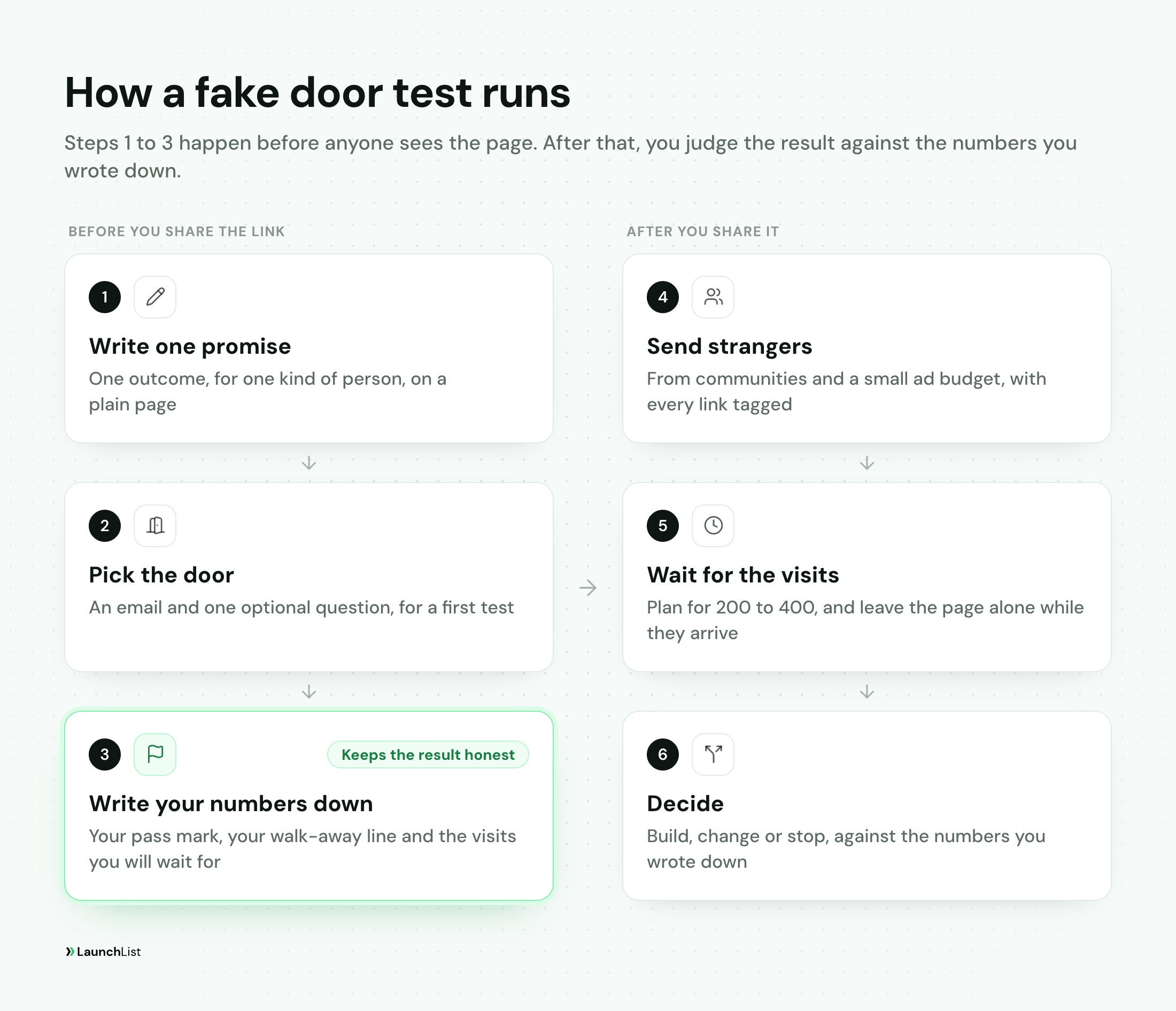
- Write one promise. One outcome, for one kind of person, on one plain page.
- Pick the door. An email address and one optional question is enough for a first test.
- Write your numbers down first. A pass mark, a walk-away line and how many visits you will wait for.
- Send strangers. Friends and followers make any page look good, so their signups don't count.
- Wait for the visits. Plan for 200 to 400, and read the result as a range, not a single number.
- Decide, and tell the people who joined. Climb to a deposit, run it again or let the idea go.
This guide covers the test itself: the method, the numbers, how to run it honestly and real examples. The wider method for testing an idea, from interviews to pre-sales, is in our guide to idea validation tools, and a day-by-day plan with a waitlist test inside it is I have an app idea. Now what?. Sources were checked on November 9, 2026.
What is a fake door test?
A fake door test is an experiment in which you show people a product, a feature or a price as if it already exists, then count how many try to use it before you build anything. The door is whatever they act on: a "Join the waitlist" button, a plan on a pricing page, a "Pre-order" button. Behind it is no product yet, only an honest note that it is on the way and a way to hear when it is ready.
Alberto Savoia, who developed pretotyping at Google, lists the fake door among his cheap tests of whether an idea is worth building. His one-page reference for a Stanford course describes it as "creating artifacts that suggest that the product exists and it's available to see if people would buy it." His reason to test first is what he calls the Law of Market Failure: most new products "will fail in the market," as he puts it on his site, "even if competently executed."
The test works because it counts behavior. Ask someone in an interview whether they would use your product and they will often say yes, because yes is polite and costs nothing. Ask for an email address and you learn what they want enough to act on.
Fake doors show up in two places:
- Before a product exists. The door is a landing page, a coming soon page or an ad, and the question is whether the idea is worth building at all. Most of this guide is about this one.
- Inside a product people already use. The door is a button for a feature that isn't built, and the question is whether enough users want it.
Fake door, painted door, smoke test: one test, several names
| Name | What people usually mean by it |
|---|---|
| Fake door test | Any door to something that isn't built yet |
| Painted door test | The same test, often a button inside an existing product: a door painted on a wall |
| Smoke test | A landing page or an ad for a product that doesn't exist yet |
| Pretotype | Savoia's word for the family of cheap tests the fake door belongs to |
Optimizely's glossary defines a painted door test "(or fake door test)" as "an experiment where a feature is advertised to users before it exists to gauge demand and interest." Eric Ries used the smoke test name in his 2009 guide to minimum viable products, about a feature his team spent two weeks building that nobody wanted: "At a minimum, a simple AdWords smoke test would have revealed how utterly bad the concept was." In software engineering, a smoke test also means a quick check that a new build runs at all. That is a different thing.
When to run a fake door test, and when not to
A fake door answers one question well: do strangers want this promise enough to take a step toward it? That makes it the right test for:
- A new product idea, before you write code.
- One promise against another. "Stop chasing late invoices" and "Invoicing for designers" can get very different results for the same product.
- A price. Put it on the page, or make people pick a plan before they reach the form.
- An audience. The same page sent to two communities tells you who wants it more.
It is the wrong test when the question is something else:
- Will people keep using it? A door measures arrival, not retention. That needs a working product, even a rough one.
- Can people use it? That is a prototype question. Our guide to MVP vs prototype vs proof of concept covers which to build.
- You can't reach a few hundred strangers who have the problem. For a product with 30 possible buyers, talk to them with good customer discovery interview questions, then ask for a commitment, as in how to pre-sell a SaaS.
- Believing it exists could hurt someone. Medical, financial and legal services are the obvious cases. Test the problem with interviews instead.
- You don't have an idea yet. Start with how to find a SaaS idea.
In the usual order of validation, the fake door comes after you have talked to people about the problem and before you ask anyone for money. If you want to know which part of your idea the page most needs to prove, the free idea validation scorecard finds the weakest part of what you already know.
How to run a fake door test before launch
1. Write one promise
The page has one job: make a specific promise and offer the door. Say you are testing a tool that chases late invoices for freelance designers. The page needs:
- A headline that states the outcome, not the category. "Stop chasing late invoices" tests a promise. "Invoicing software" tests nothing.
- Who it is for, in one line, so the right people recognize themselves.
- Three short lines on how it works, enough to be believable.
- The price, if price is part of the question.
- One door, and one honest sentence about where things stand: "We're building this now. Join the waitlist and we'll email you when it opens."
Keep it plain. Kromatic's Real Startup Book, in its guide to the landing page test, advises against countdown timers and limited-time offers, because they raise the conversion rate without telling you whether the idea works. The same goes for invented proof: a made-up testimonial or user count is dishonest, and it means you measure how persuasive the fake proof is instead of how much people want the product.
2. Pick the door
Every door asks for something. The more it asks, the fewer people walk through, and the more each one means:
| Door | What the visitor does | What it tells you |
|---|---|---|
| Click | Presses a button like "Get started" | They are curious |
| Joins the waitlist | They want to hear more | |
| Email and one question | Joins and says what they use today | Interest, and who they are |
| Referral | Shares their link and a friend joins | They want it enough to tell someone |
| Deposit | Pays, refundably | They will pay |
For a first test, ask for an email and one optional question, such as "What do you use for this today?" A click alone is too cheap to mean much. Asking for money first has the opposite problem: a low result could be the idea or the price, with no way to tell which. Once the email door passes, ask for a deposit; how to pre-sell a SaaS covers that step.
3. Write your numbers down before you share the link
Once you have seen a number, every result starts to look like a yes. So write three numbers down first, and date them.
The pass mark. Savoia's method puts it in one line: "X % of Y will do Z." X is the share that would make the idea worth building, Y is an audience you can actually reach, and Z is the exact action. For the invoice tool: at least 10% of freelance designers who arrive from design communities will join the waitlist.
Pick X from your own math, not from someone else's page. If the places you can reach send about 1,500 visitors a month and a launch is only worth doing with 150 interested people a month, your pass mark is 10%. Rates from other people's pages tell you little, because the rate depends on the traffic, the promise and what the door asks for. One of Savoia's rules on pretotyping.org says the same thing: "Trust only in Your Own DAta."
The walk-away line. The rate at which you would drop the idea or rethink it. For the invoice tool, 4%: at that rate the same traffic brings 60 people a month, too few to build on.
The number of visits you will wait for before deciding. Step 5 shows how many.
4. Send strangers to the page
This is where most fake door tests quietly fail. A page your friends, followers and coworkers visit will convert well and tell you nothing, because they are reacting to you. As Kromatic's guide puts it, "If you only test with your existing audience, you're measuring how much your current followers like you, not whether a market exists."
You need people who have the problem and have never heard of you:
- Communities where the problem lives: subreddits, forums, Slack and Discord groups. Read each one's self-promotion rules first, and post about the problem, not an ad.
- A small ad budget, for the test only. You are buying a clean measurement, not signups.
- Newsletters and directories in your niche.
Tag every link with where it went (?utm_source=reddit, ?utm_source=ads) so you can read each source on its own. Our guides to getting your first 100 waitlist signups and promoting your waitlist list more places.
While the test runs, don't change the page. Every edit splits your visits into two smaller tests. Write down what you would change and save it for the next round.
5. Wait for enough visits, and read the result as a range
A signup rate measured on a few dozen visits is mostly noise. Here is how wide the honest range is for a page where 10% of visits signed up, calculated with the Wilson method for proportions at 95% confidence:
| Visits | If 10% signed up, the true rate is likely between |
|---|---|
| 50 | 4.3% and 21.4% |
| 100 | 5.5% and 17.4% |
| 200 | 6.6% and 14.9% |
| 400 | 7.4% and 13.3% |
| 1,000 | 8.3% and 12.0% |
- Plan for 200 to 400 visits from strangers before you decide. Kromatic's guide gives "200 unique visitors" as the minimum "for a directional signal", and by 400 the range is narrow enough to separate a promising idea from a weak one.
- Under 100 visits, only extreme results count. Two signups from 90 visits, or 40 from 90, tell you something. Nine from 90 doesn't: the range runs from about 5% to 18%.
- Count strangers only. Leave out your own test signups, and watch for bots, which can make a weak page look strong.
How long that takes depends on where the visits come from: a small ad budget can get there in a week, and community posts often take longer. If a month passes and you still haven't reached your visit count, that is a finding too: you don't yet have a way to reach the audience.
What counts as a pass
Compare the range, not the single number, with the lines you wrote down. Using the invoice tool, with a 10% pass mark, a 4% walk-away line and 300 visits:
- Pass. 48 signups is 16%, and the range is about 12% to 21%. All of it sits above 10%.
- Unclear. 24 signups is 8%, and the range is about 5% to 12%. It crosses the pass mark, so the test can't tell you yet.
- Fail. 4 signups is 1.3%, and the range is about 0.5% to 3.4%. All of it sits below the walk-away line.
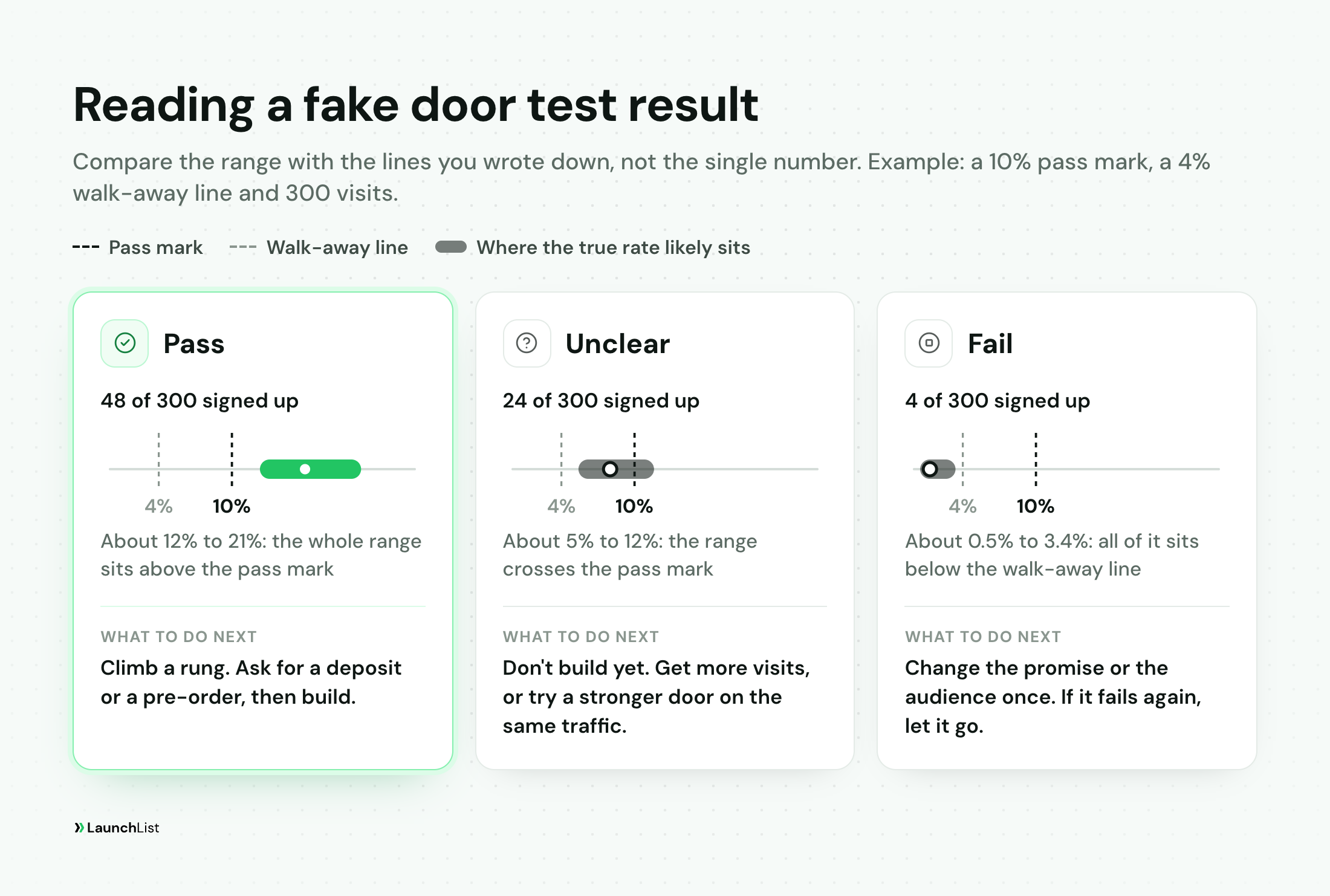
A range that sits between your two lines is a fail for this promise, not yet for the idea: change the promise or the audience and run one more round. A clear fail isn't wasted work. You just got back the months you would have spent building the wrong thing, for the price of a few weeks and a few hundred visits.
Read two more signals beside the rate. Referrals: if signups share a link and their friends join, people want it enough to tell someone. And the answers to your one question, which tell you who signed up and what they use today.
How to run a fake door test honestly
The usual criticism of fake door tests is that they trick people. Run badly, they do. A "Buy now" button that leads to an error page, or a checkout that takes a card number and then announces there is no product, costs you trust with exactly the people you most want. PostHog's tutorial on the in-product version warns that "Showing users something non-existent could disappoint them and hurt your reputation."
What matters most is what the person sees after they walk through. Savoia's reference makes the point with a made-up case: put McSpaghetti on a McDonald's menu without cooking any pasta, and if someone orders it, "say that it's not currently available, apologize and offer them a free burger instead." The honest version measures demand just as well:
- Say it's coming. The page can describe the product vividly and still say it isn't available yet. "Join the waitlist" is a door that tells the truth, which is why a waitlist is the natural fake door.
- Show the truth right after the click. The next screen says plainly where things stand. Never a fake error, and never a "sold out" you made up.
- Make money refundable, and say until when. If the door takes a deposit, say it's refundable, say by what date you will ship or refund, and keep to it.
- Don't invent proof. No made-up testimonials, logos or counters. If you show a signup count, show the real one.
- Tell people what you decided. If you build it, they hear first. If you don't, email them, thank them and delete their details. The GDPR's storage limitation principle (Article 5) says personal data should be kept "for no longer than is necessary for the purposes for which the personal data are processed."
Fake door test examples
Buffer: a pricing page between the promise and the email
Joel Gascoigne had started coding Buffer, a tool for scheduling tweets, when he stopped to test whether anyone wanted it. He put up a two-page site: one page explaining the idea, one asking for an email address. In his own account, its aim was "to check whether people would even consider using the app." He tweeted the link, and a few people gave their email and sent feedback.
Then he added a page between the two that showed pricing, so people chose a plan before they reached the form. "The extra step tests the pricing (by detecting which plan they click on) and also tests further the demand for the product." The result: "people were still clicking through and giving me their email and a small number of people were clicking on paid plans." He built the first version in evenings and weekends over seven weeks, launched on November 30, and had his first paying customer within four days.
Two lessons. The pricing step tested willingness to pay without taking a payment. And his traffic was his own tweet, so the first page was a light check on warm traffic; a founder without an audience needs the strangers from step 4.
Dropbox: a demo video and a beta waiting list
Dropbox's software couldn't be shown working in prototype form, so Drew Houston made a video instead: in Eric Ries's words, "a simple three-minute demonstration of the technology as it is meant to work." He aimed it at the Digg community, with about a dozen in-jokes for that audience. "It drove hundreds of thousands of people to the website," Houston recalled in the excerpt from The Lean Startup published by TechCrunch. "Our beta waiting list went from 5,000 people to 75,000 people literally overnight."
The door was the beta waiting list. The video did the job of the landing page: it showed the promise clearly enough for people to decide whether they wanted it. What Dropbox did after launch is a different story, told in our Dropbox referral program case study.
Inside a product: a button for a feature that isn't built
For a product that already has users, the door is a button or menu item for the feature you are considering. PostHog's tutorial builds one: when users interact with it, "you tell them it isn't available (yet)," then count the clicks and add a short survey to learn what people wanted. It also suggests using feature flags to show the test only to "a targeted subset of users," which it says "lowers reputation risk." The share of people who saw the button and pressed it is your rate, read against a pass mark the same way.
What to do with the result
If it passes, the people who signed up are the most valuable thing the test produced. Email each one a short personal note with one question, and the replies become your next interviews. Then ask for a deposit or a pre-order before you build. Before you start sending more people to the page, decide the rules the list runs on, such as who gets in first and whether sharing moves people up; that is our waitlist marketing strategy guide. When you open the product, how to convert a waitlist into paying customers covers the next step.
If it is unclear, don't build yet. Run the same page on the same traffic until the range clears a line, or try the stronger door (a deposit) on the people who arrive next.
If it fails, change the promise or the audience once and run it again. If it fails again, let it go, and tell the people who signed up.
Running a fake door test on LaunchList
Disclosure: LaunchList is our product. It is pre-launch waitlist software for founders, and a fake door before launch is one of the jobs it does:
- The page. Publish a launch page we host, at a launchlist.page address, with no website of your own. Describe the product in one sentence and the AI page writer drafts it, then edit it. Or put the signup form on your own site.
- The door. A new signup form has one field, email. Add an optional question, or put a survey on each signup's status page so people answer after they join.
- Real addresses. Ask people to verify their email is a switch on the form, on by default for a new signup form. Everyone who signs up is on the list either way; verifying proves the address is real.
- The second signal. Every signup gets a personal referral link and a live place in line on their status page, so you can see who shares.
- The reading. Analytics shows your signups, the share of visits to your hosted page that signed up, the share who verified and how many came through a referral, each beside the period before. The Free plan keeps 28 days of history. If the form is on your own site, read visits from your site's analytics.
- Your own tries. Turn on Test mode in Project settings, General, while you check the page, so your practice signups stay out of your live audience. Turn it off before you share the link.
A signup counter, a referral leaderboard, a milestone bar and a countdown can go on the page or be embedded, on every plan. Leave them off during the test, for the reasons in step 1, and add them once you are growing the list. LaunchList doesn't take payments, so the deposit step runs on a payment tool, and it doesn't split traffic between two versions of a page, so test two promises one after the other on the same traffic. Our idea validation page walks through the setup.
The Free plan holds 100 contacts, and broadcasts start on the Collect plan. To run your own test, create a waitlist, write your three numbers down and then share the link.
Fake door test FAQ
What is a fake door test?
A fake door test shows people a product, feature or price as if it already exists, then counts how many try to use it before anything is built. Before launch, the door is usually a page with a join-the-waitlist or pre-order button. People who click learn that the product is not ready yet and can sign up to hear when it is. It measures what people do rather than what they say they would do, which is why it is one of the cheapest honest reads on demand.
What is the difference between a fake door test, a painted door test and a smoke test?
Very little: all three name the same experiment. Product teams often say painted door when the door is a button inside a product people already use, and startup guides often say smoke test when it is a landing page or an ad for a product that does not exist yet. Alberto Savoia lists the fake door as one of his pretotypes, his word for cheap tests of whether an idea is worth building. In software engineering, a smoke test also means a quick check that a new build runs at all, which is a different thing.
How many visitors do you need for a fake door test?
Plan for 200 to 400 visits from people who do not know you. If 10% of 100 visits sign up, the true rate could be anywhere from about 5.5% to 17%; after 400 visits that narrows to about 7% to 13%. Under 100 visits, only a very high or very low result tells you anything.
What is a good conversion rate for a fake door test?
The one you wrote down before you started. Work it out from your own numbers: how many visitors the places you can reach send each month, and how many interested people a launch needs to be worth doing. Divide the second by the first and you have a pass mark. Rates from other people's pages tell you little, because the rate depends on the traffic, the promise and what the door asks for.
Is a fake door test ethical?
It can be, if the door tells the truth once someone walks through it. Say plainly that the product is being built, offer a waitlist instead of a fake checkout, make any deposit refundable with a date, never invent testimonials or customers, and tell the people who signed up what you decided. A waitlist page that says the product is coming is a fake door that does not mislead anyone.
How do product teams run a fake door test inside a product?
They add a button or menu item for a feature that is not built, show it to some of their users, and count how many click it against how many saw it. The click opens a short note that the feature is not available yet, often with a way to hear when it is or a question about what the person wanted it for. Showing the door to a small group of users first limits how many people meet a feature that is not there.