
Launch your waitlist landing page
in minutes, not weekends.
LaunchList builds and hosts your waitlist landing page, so you need no website and no code. Everyone who joins gets a place in line and a referral link of their own.
Free for your first 100 contactsNo credit card needed
Unlimited laptop storage.
Keep every photo, video and document on your own computer, with room for all of it.
We'll email you when your invite is ready.
12,847 people are waiting
At a glance
Updated
- What it is
- A waitlist landing page from LaunchList is a page we host at its own launchlist.page address, with your signup form on it and a status page for everyone who joins.
- When it goes live
- LaunchList publishes the page as you finish signing up, before you ever open the editor, so it can be shared the same day and changed afterwards.
- After someone joins
- They land on a status page with their place in line and a referral link. Each friend who joins through that link and confirms their email moves them up.
- On a phone
- Every starting page in every style is laid out for a phone screen as well as a desktop one, and the editor shows you both before you publish.
- Search engines
- On the Collect, Launch and Grow plans, search engines may index the page. On the Free plan the page is live for anyone with the link, but it asks search engines to leave it out.
- Price
- The Free plan costs nothing for your first 100 contacts, and asks for no card. Past that, plans are priced by the size of your list.
Create a waitlist landing page in three steps.
Signing up asks what goes on the page, then publishes it for you. Every word stays yours to change later.
Say what you are building
Type your product's name and one line about it. Both go onto the page as you type, so you see it take shape before you pick anything.Pick a starting page
Choose one of nine finished pages, add your logo and pick your color. The style, the fonts and every section can change later in the editor.Share the link
The page goes live at its own launchlist.page address. Send it to someone or try it yourself, and the last screen shows the first signup the moment it lands.
In the docs: your hosted launch page, the form on the page and what signups see after joining.
The sections that turn a visit into a signup.
Each part below is a section in the editor, under the name the editor gives it. A page needs the first one; add the others when they help.
A promise and the form, together
The "Hero" section holds your headline, a line that backs it up and the signup form, so a visitor can join without scrolling.
A count of who is waiting
"Signup count" shows how many people have joined, counted live. It stays off the page until the first person signs up.
A reason to share
The "Leaderboard" names the people who referred the most signups, so a visitor learns before joining that sharing moves you up.
A date to wait for
"Countdown" shows the days, hours, minutes and seconds left until your launch, with the time in each visitor's own zone, then a line you write once the date passes.
Answers before they leave
"Questions" answers what people ask first, such as when it opens and what it will cost, in your own words.
A landing page with a waitlist keeps working after the signup.
A plain landing page stops at a thank-you. Here each person who joins gets an email to confirm, then a status page of their own to come back to.
An email to confirm their spot
On a waitlist form, LaunchList sends every new signup this email first. One click on its button confirms the address and takes them to their status page.
- Your logo and brand color on it
- Every word in it can be rewritten
Their place, and a link to move up
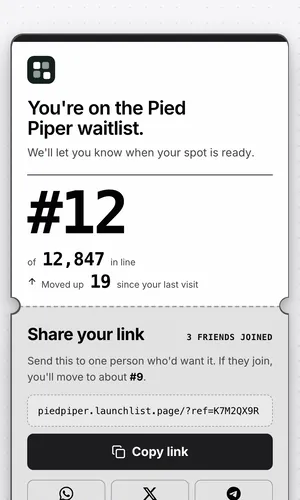
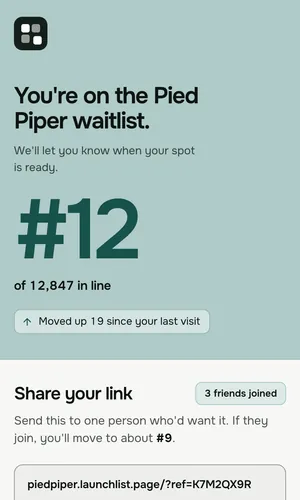
The status page shows their number and how far they have moved since their last visit. When a friend joins through their link and confirms their email, they move up, and the page says roughly where one more friend would put them.
- Clean, Tiles, Split or Ticket design
- Referring yourself never counts
A waitlist landing page builder that starts you on a finished page.
Below is Vesper, the referral starting page, drawn by the same renderer your visitors get. Change its style or the width; the words stay where they are.
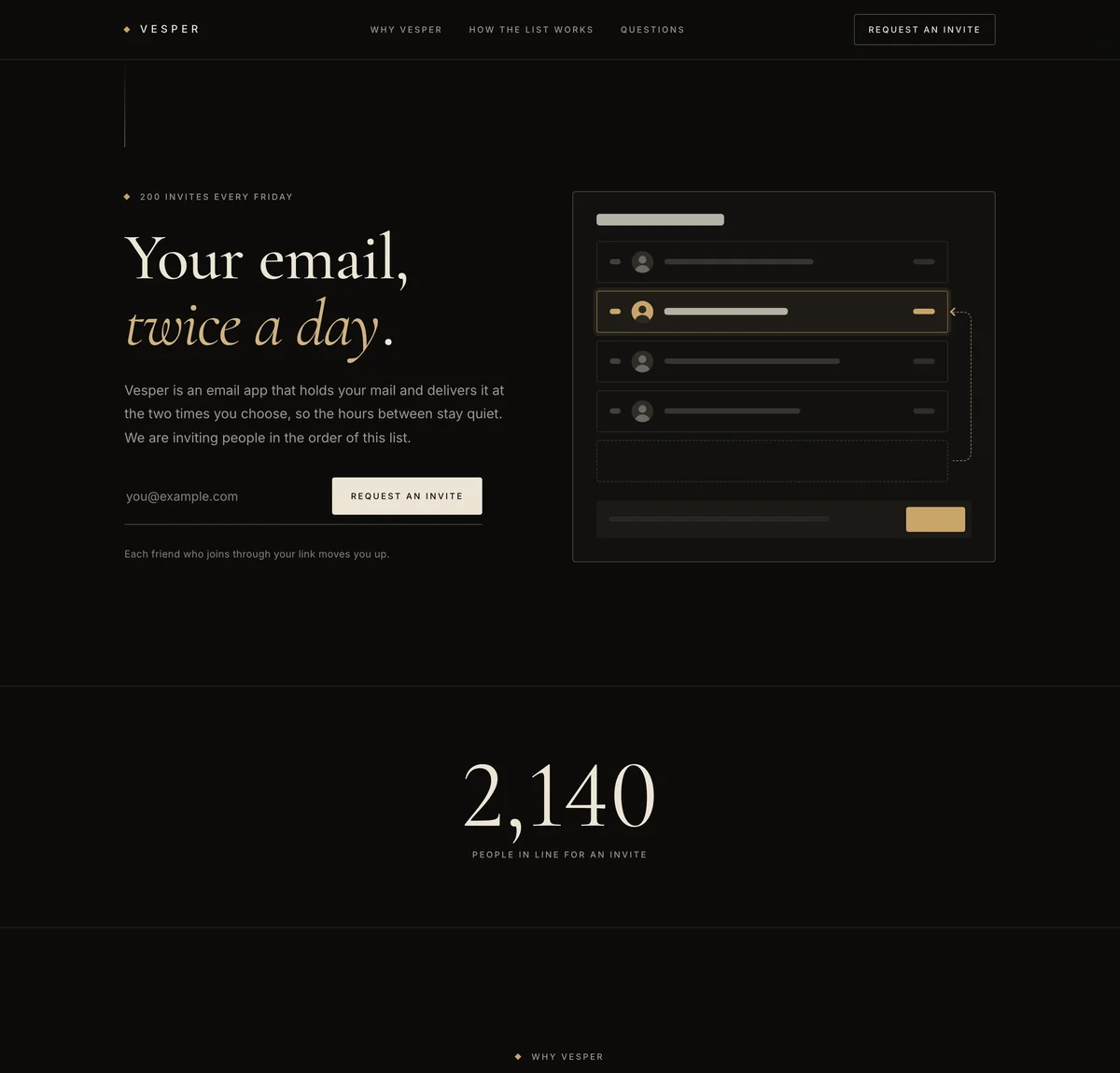
Luxe. Dark, quiet and invite-only: a warm near-black page, large serif headlines, small capitals, thin hairlines and ivory buttons, with the accent color as a small detail. Suits premium, members-only and limited-release products.
Vesper is one of nine starting pages. See all nine waitlist page templates, each live in every style.
Pick a page we host when there is no site to put a form on.
Both feed the same list, so you can start with the page and add the form to a site later.
A good fit when
- There is no website yet, or the one you have is still being built.
- You want one link to post on X, Reddit, LinkedIn or in a newsletter.
- You want a place in line and referrals without wiring anything up.
- You would rather write than design, since the starting page already has the layout.
Not the right fit when
- Your own site already gets the visitors: a signup form on it does the same job there.
- You need payment at signup. LaunchList collects signups, not payments, though a form can send people on to your own checkout after they join.
- You want to test two versions of the page against each other. LaunchList does not split traffic between versions.
Already have a site with visitors? Add a waitlist form to it instead, and its signups join the same list.
A free waitlist landing page, and what each plan adds.
A tag on each row says where it starts. The page itself, its status page and referrals come with every plan.
Spam kept off the list
Each new signup gets a score the moment it comes in. Spam, disposable addresses and fake signups stay off your list, and doubtful ones wait under "Held for review".On every planHow many visits sign up
Analytics shows your signups over time and the share of page visits that signed up, so you can tell whether a new headline did better.On every planYour list, whenever you want it
Download every signup as a CSV at any time, or send each new one to a webhook the moment it arrives.On every planA domain of your own
Put the page on an address such as join.yourproduct.com. LaunchList issues its certificate, and the launchlist.page address stays up.From the Collect planListed by search engines
Turn on "Search engines" for the page and it can be indexed, with the title, description and share image you set for it.From the Collect planOne email to everyone waiting
Write to the whole list from the dashboard when there is news, or on the day the product opens.From the Collect plan
Waiting list landing page questions.
What is a waitlist landing page?
Is a coming soon page the same as a waitlist landing page?
Do I need a website for a waitlist landing page?
Is LaunchList free?
Can I use it on my existing website?
How does the referral leaderboard work?
How do you stop spam signups?
Can I export my signup list?
Can I customize how my waitlist page looks?
Does it work on mobile?
Where should I share my waitlist page?
What happens after someone signs up?
Can I connect it to other tools?
Is a free waitlist landing page indexed by search engines?
Build the page now. The line starts with the first person who joins.
Pick a starting page, add your name and color, and share the link.
Free for your first 100 contactsNo credit card needed