

Your hosted launch page
Build a launch page from finished sections that share one theme, publish it at a public URL, and connect your own domain. No website required.
Every project comes with a hosted launch page. If you have no website, this is your website. If you do, it is still often the better place to send a campaign, because it is built for one job.
The editor#
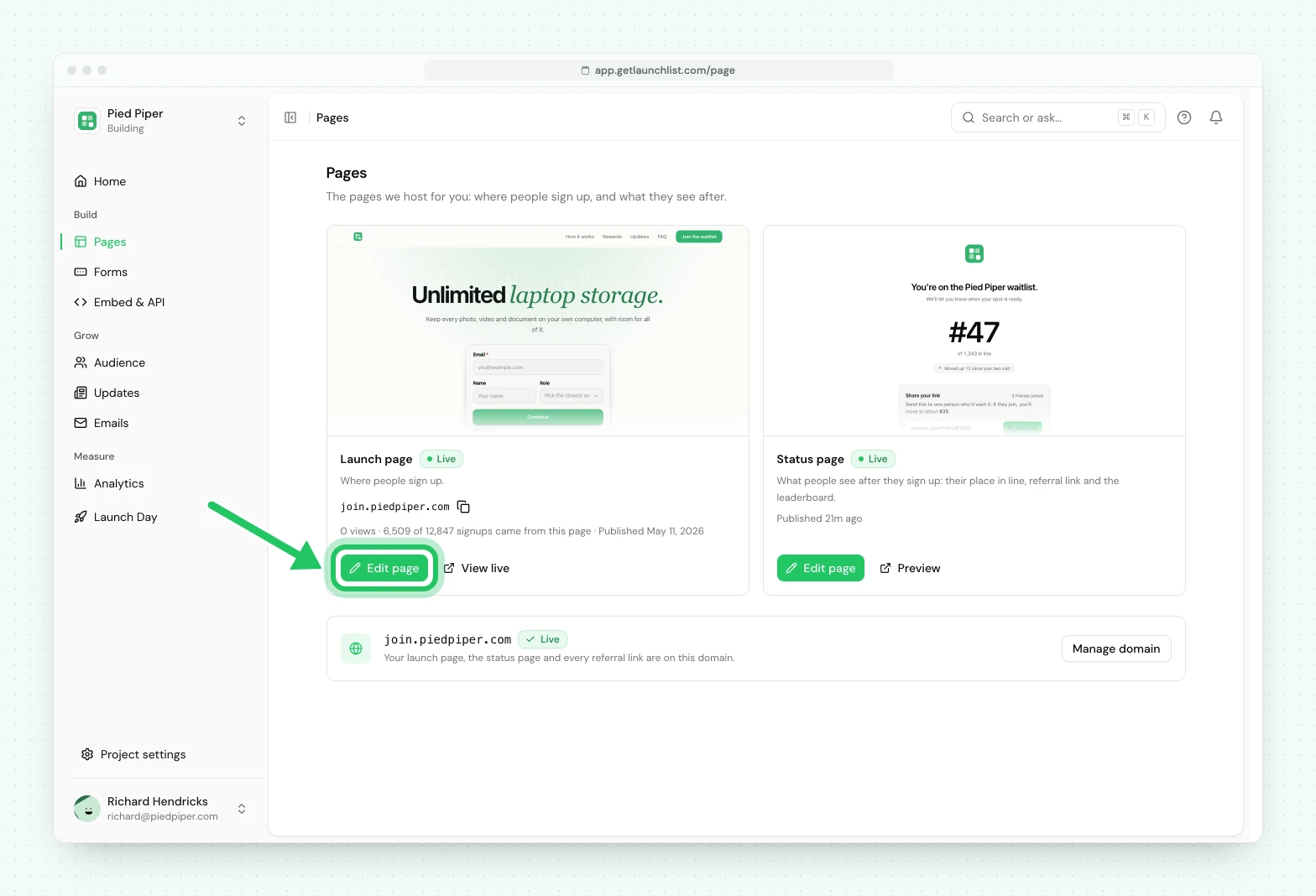
Pages shows two cards: the Launch page (the page people sign up on) and the Status page (what a signup sees after they join). Open Pages, then press Edit page on the Launch page. Your page is already there: every project starts with a one-screen page that holds your logo, your project's name, one line and the signup form.
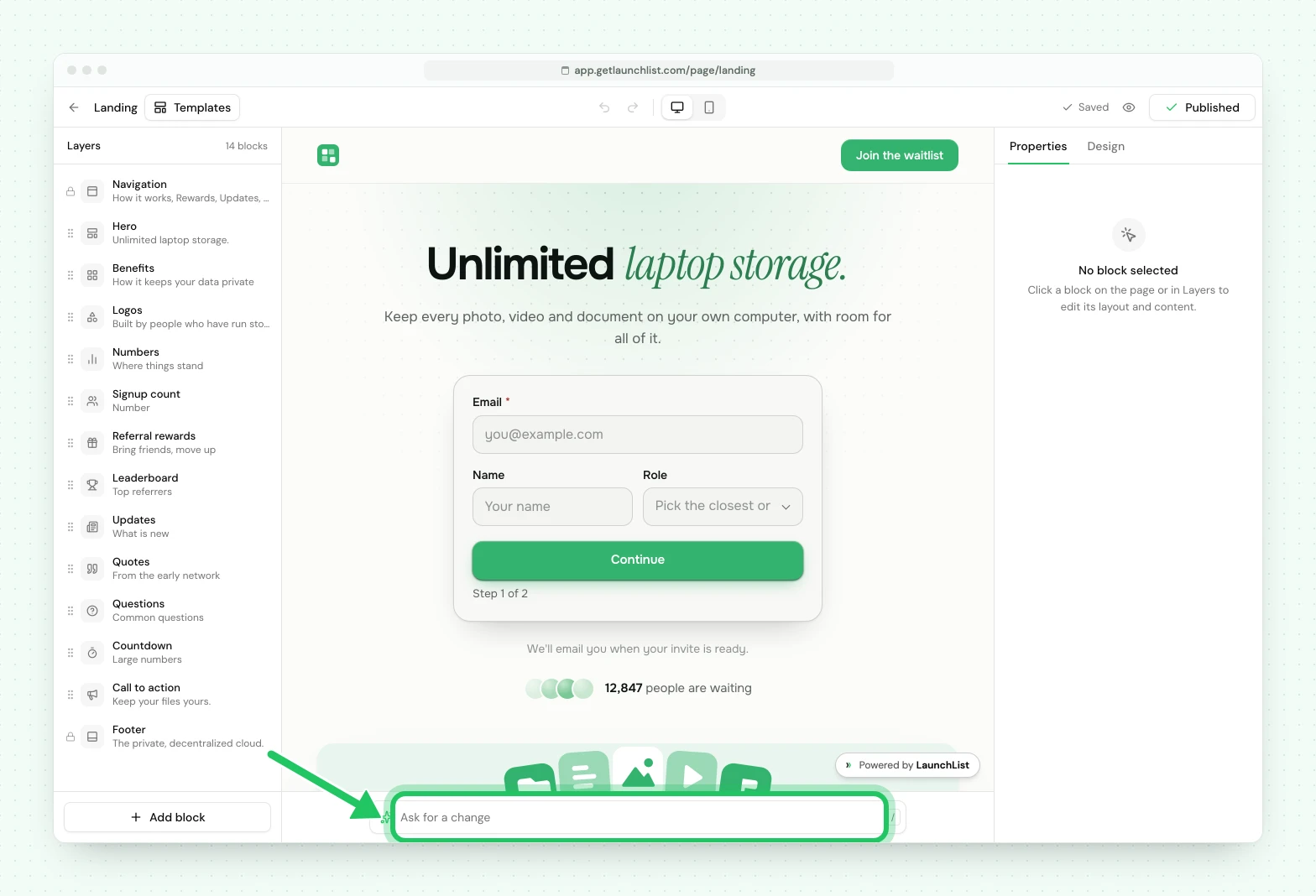
The editor has three parts:
- Layers, on the left, lists the page's sections in order. Drag one to move it, or use Add block to add one.
- The page, in the middle, is the real page, drawn by the same renderer your visitors get. Click a section to select it. Switch between desktop and phone at the top.
- Properties and Design, on the right. Properties holds the selected section's layout and its words. Design holds the look of the whole page.
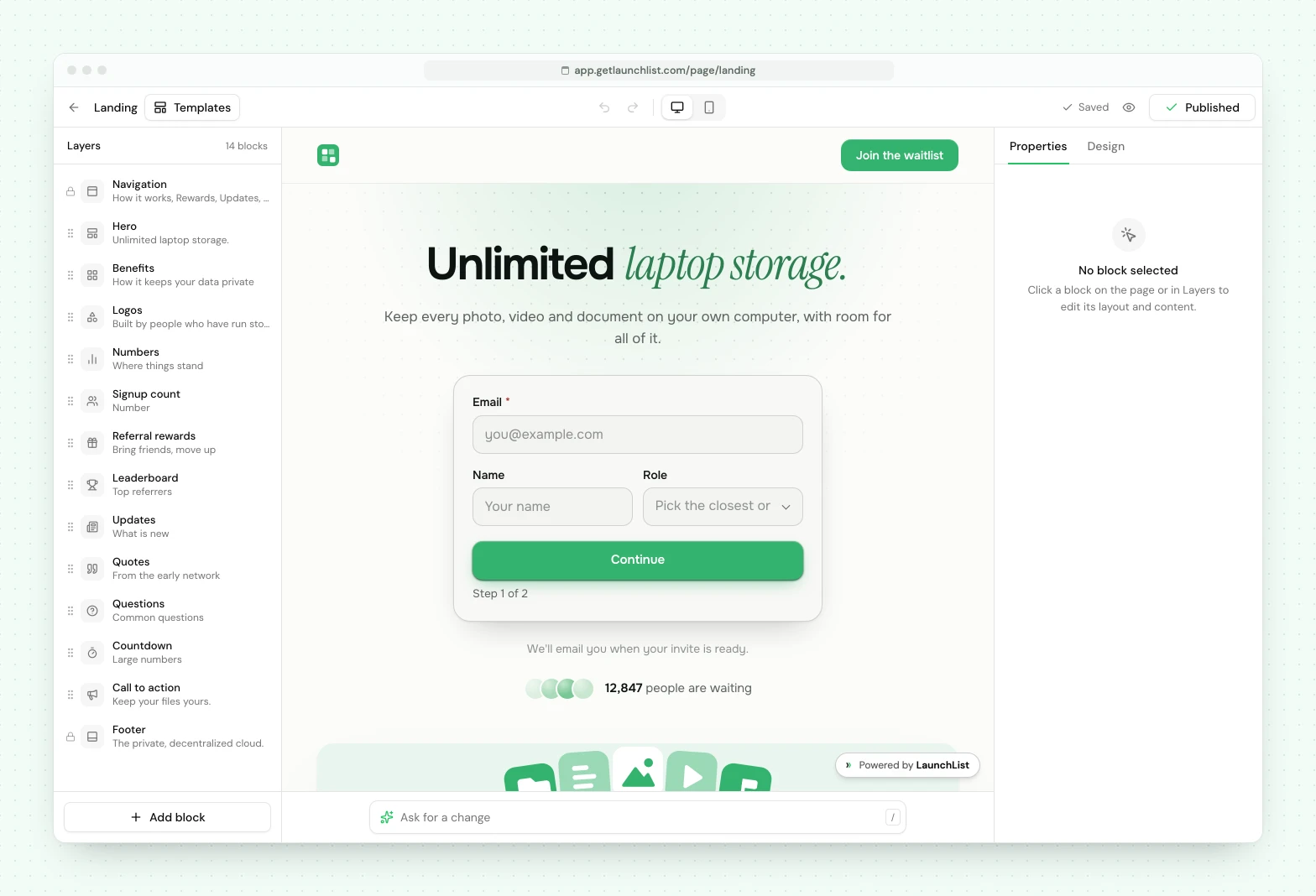
Changes save as you make them. The top bar always says whether the draft is saved.
Sections#
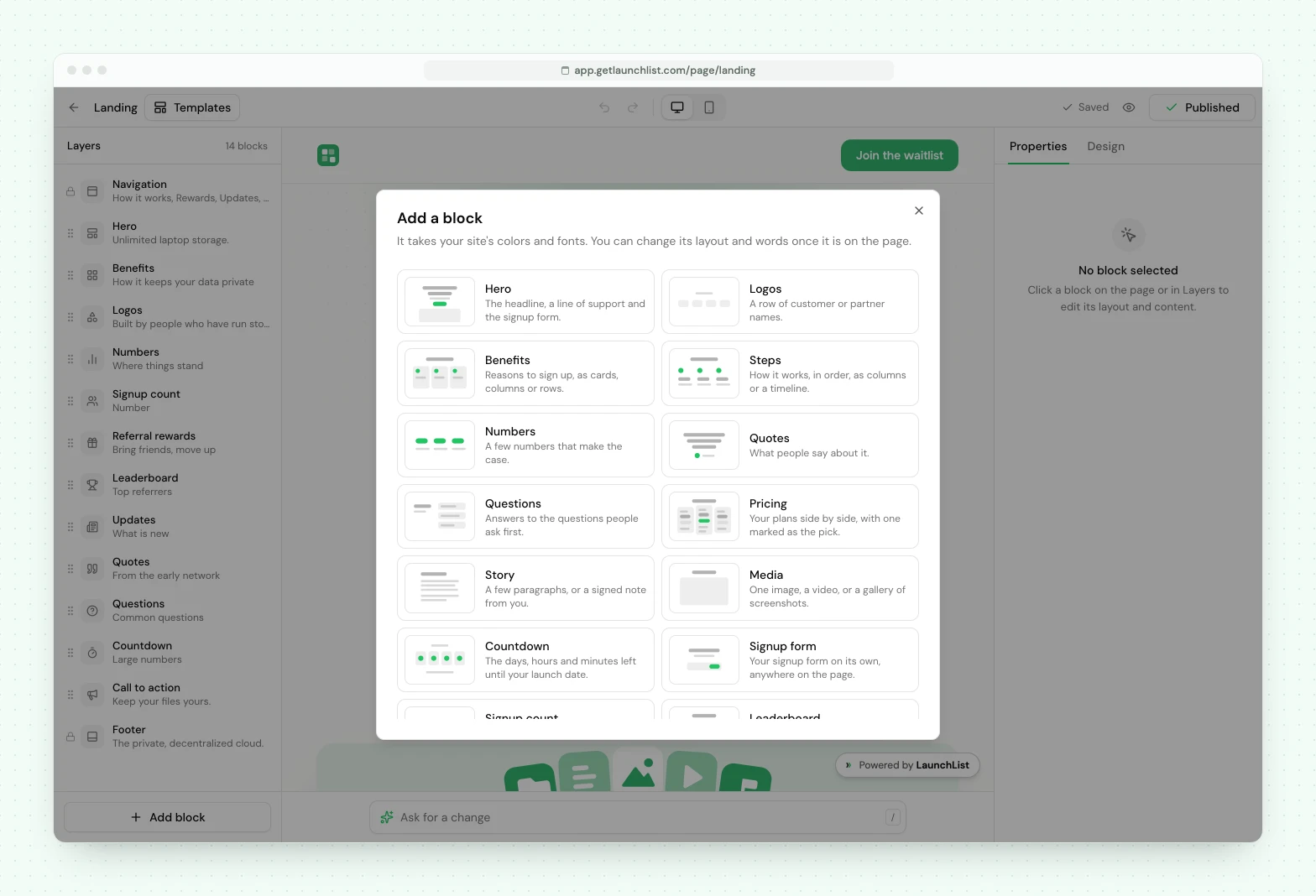
A page is built from finished sections: navigation, hero, logos, benefits, steps, numbers, quotes, pricing, questions, story, media, countdown, call to action and footer. Five more read your project's own data: the signup form, a signup count, the leaderboard, referral rewards and your updates.
Each section has a few layouts, and each layout is a finished composition. You pick one and write the words. A section has no colors, fonts or spacing of its own, which is what keeps the page looking like one page.
One theme for the whole page#
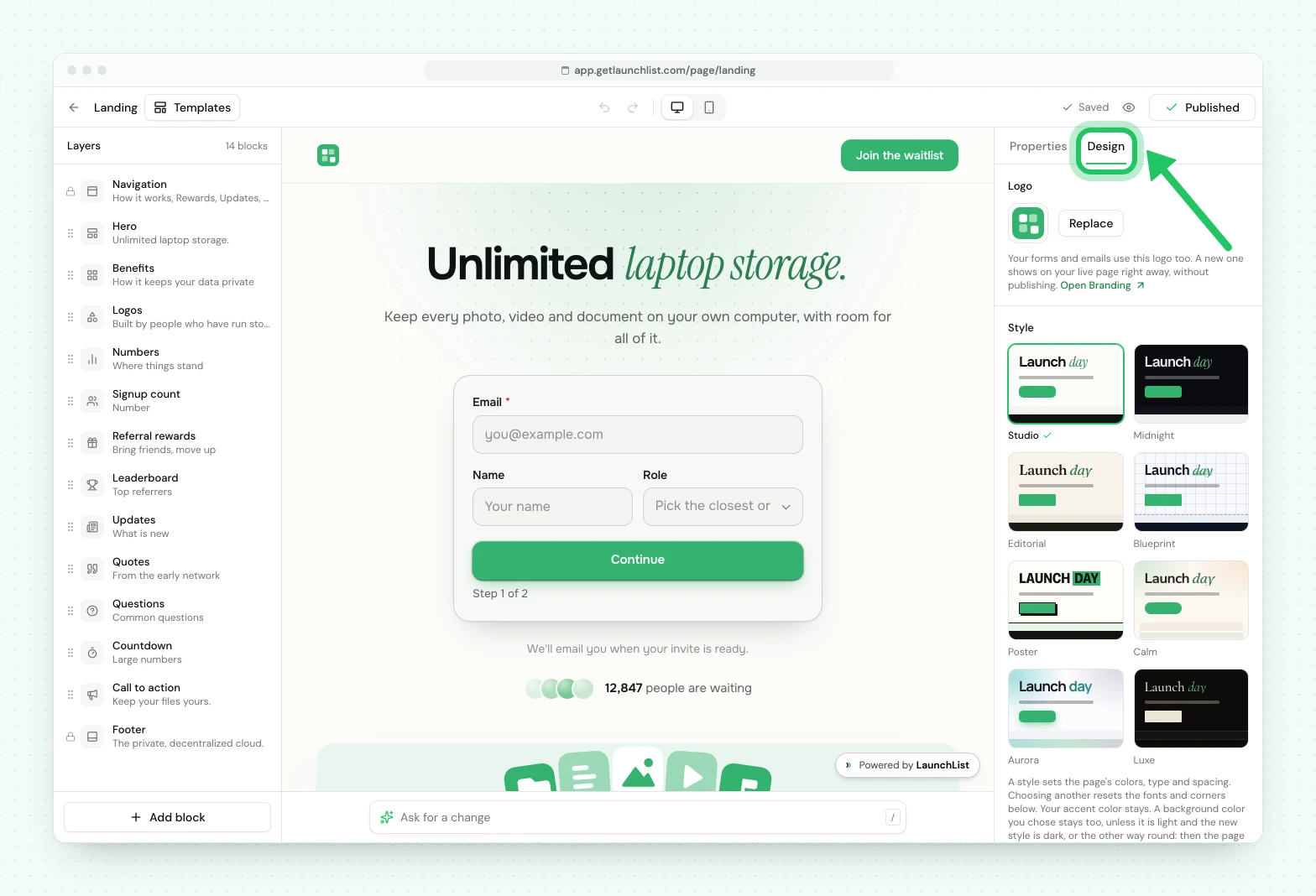
The Design tab sets the look once, for every section:
- Style: one of eight. Studio (bright), Midnight (dark), Editorial (paper and serif), Blueprint (technical), Poster (loud, big capitals), Calm (soft and rounded), Aurora (light, with a glow of your color) or Luxe (dark, serif, quiet).
- Accent color: your color. It starts as your Brand color.
- Fonts: a designed pairing, or your own choice of a heading and a body font.
- Corners: sharp, soft, round or pill.
Your logo comes from your Brand, so it changes everywhere when you change it there.
Ask for a change#
Under the page there is a box to ask for a change in plain words, like "make the headline shorter" or "add a questions section". See Change your page with AI.
Undo#
Full history. Undo and redo cover every change, including moving a section and a change the assistant made, so experimenting costs nothing.
If your page was made before October 2026#
We replaced the page editor, and moved every existing page to the new one. Your sections, words and images were carried over, and the first time you open the editor it lists anything that could not be carried over as it was. Colors, spacing and background effects now come from the page's one theme. Your page kept its address, and we kept a copy of the original.
Sections worth knowing about#
Signup form. Uses any form from the project. Same fields, same validation, same pipeline.
Signup count. Shows your real signup total.
Updates. Pulls your published updates in, so the page keeps saying something new after launch instead of going stale.
Leaderboard and Referral rewards. Show your top referrers and the rewards people unlock by referring.
Countdown. Counts the days, hours and minutes to a date and time you set, as large numbers or on one line. The page shows the time in the time zone you chose, and a visitor in another time zone also sees their own. Once the date has passed it shows a line you write, such as "Doors are open".
Publishing#
Publish takes a snapshot. The live page serves that snapshot, so editing never affects what visitors see until you publish again.
The Publish button at the top of the editor shows where the page stands: Publish before it has ever been live, Publish changes when your draft differs from the live page, and Published when they match. It always opens the publish panel, which shows the page's address, a list of what changed since you last published (for example "Pricing added" or "Hero: headline edited"), links for sharing a live page, and the page's current settings. Nothing goes live until you press the button in that panel. Unpublish, in the same panel, takes a live page offline and keeps your draft, your settings and your signups.
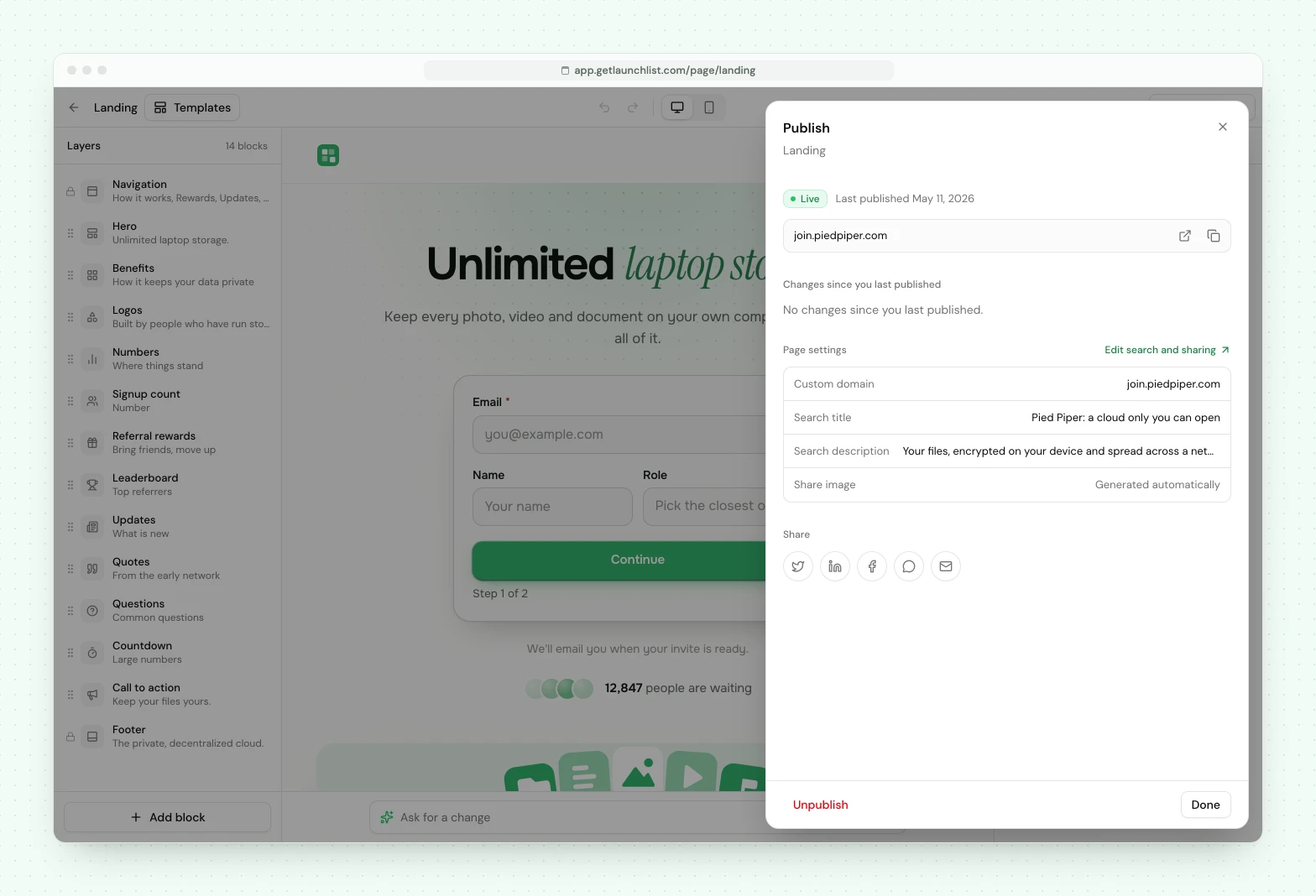
Draft and live are genuinely separate. You can rework the page mid-campaign without anyone seeing a half-finished version.
Share the draft with a signed preview link to get feedback before publishing.
Your page's address#
A published page lives at your-slug.launchlist.page, where the slug is the project's public
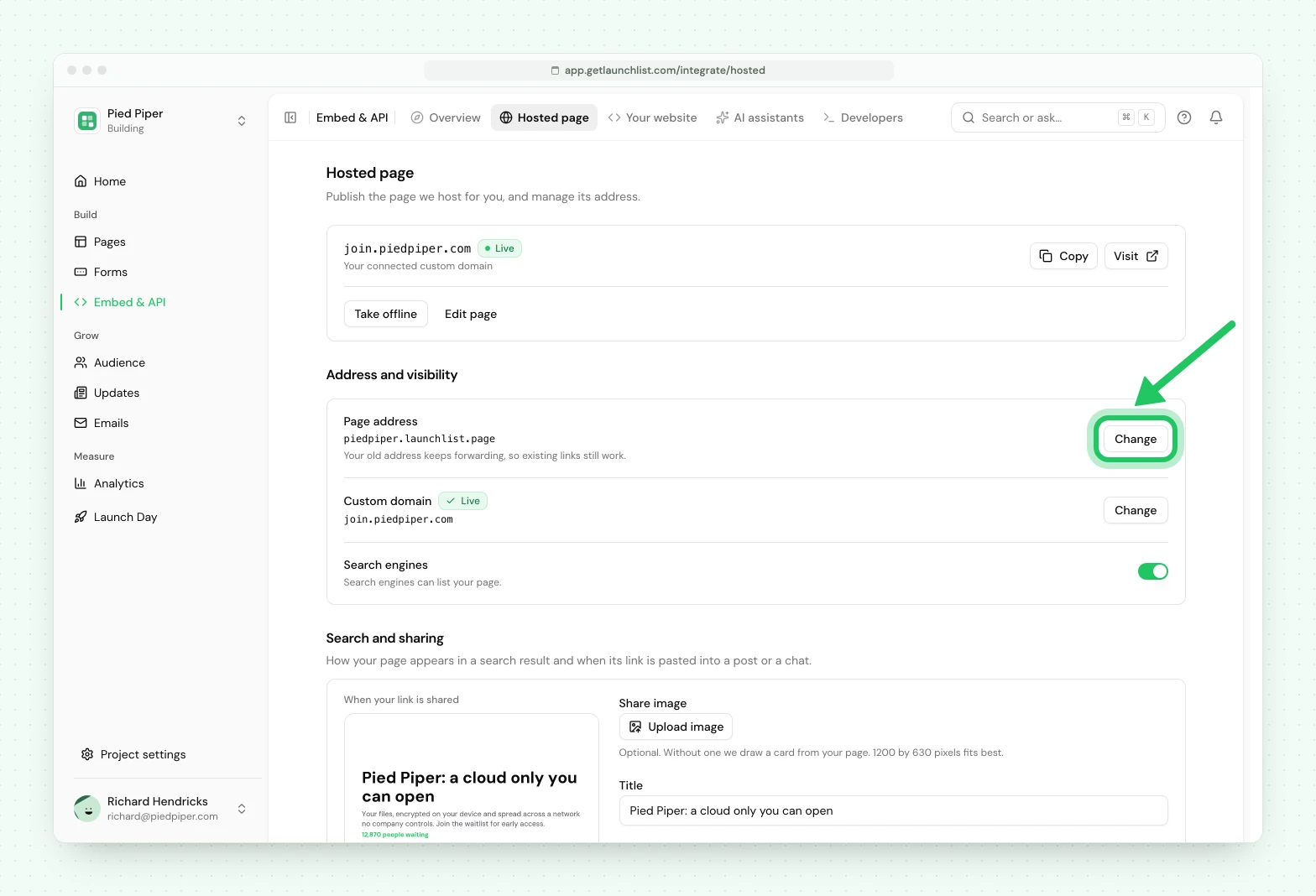
address. You can change the slug at any time under Embed & API, on the Hosted page tab (the Page address row): the old
address keeps forwarding permanently, so a link you already shared never breaks.
Pages are served from launchlist.page rather than from getlaunchlist.com on purpose. It is a
separate domain, which means your page, and the analytics or marketing tags you put on it, are
isolated from the LaunchList dashboard. Connect your own domain and your page answers there too;
the launchlist.page address keeps working, so nothing you have already shared breaks.
SEO#
Pages are server-rendered, so crawlers get real HTML on the first request rather than an empty shell waiting for JavaScript. This is the whole reason the page can rank at all.
You control the title, the description and the social share image under Embed & API, on the Hosted page tab, in Search and sharing. Upload your own share image there (PNG, JPG or WebP; 1200 by 630 pixels fits best), and the card beside the fields shows how your link will look when it is pasted. A share card is generated automatically if you do not upload one, so a link pasted into Slack or X looks deliberate rather than blank. Remove your image to go back to the generated card.
Search engine indexing is on Collect, Launch and Grow. A page on a launchlist.page
address stays out of search until you turn on Search engines on the Hosted page tab. A page
on your own domain is open to search unless you turn that switch off. Free pages stay live and
shareable, and ask search engines not to index them.
LaunchList branding#
Pages on Free and Collect carry a small LaunchList badge, as do status pages and emails. Launch and Grow remove it from all three, along with our logo on the generated share card.
Launch Day tools#
On Launch and Grow, the Launch Day screen gives you a launch countdown and checklist, a Go live button and ready-made share posts for the day itself.
Custom domains#
Serve the page from your own domain rather than ours, on Collect, Launch and Grow. Collect includes one custom domain, Launch three and Grow unlimited.
Connect it under Embed & API, on the Hosted page tab (the Custom domain row), add the DNS record shown, and the certificate is issued automatically once verification passes. See custom domains for the full walkthrough.
Multiple pages#
Today a project has one launch page. The model already allows several: variants for an A/B test, one per campaign, one per connected domain, where the primary serves at your project's URL and the rest at their own slugs. That capability is coming, but it is not switched on yet.
Most launches only ever need the one.
Next#
- Change your page with AI: change the page by asking in plain language
- Building your signup form: what the form on the page asks for
- Every way to integrate: if you also have your own site
Common questions
Can I build a waitlist landing page without a website?
Yes. Every project comes with a hosted launch page at a public URL. Edit it in the visual editor, publish, and share the link. No site, no hosting and no code required.
Is the hosted launch page good for SEO?
Yes. Pages are server-rendered, so search engines and social crawlers receive the real HTML on first request rather than an empty shell. You control the title, description and social image per page. On Collect, Launch and Grow, search engines can index a page on your own domain; a page on a LaunchList address stays live and shareable but asks search engines not to index it.
Can I use my own domain for the launch page?
Yes, on Collect, Launch and Grow. Collect includes one custom domain, Launch three and Grow unlimited; Free pages live on a LaunchList address. Connect a domain, add the DNS record shown, and the certificate is issued automatically once verification passes.