

Your sending domain
Where your emails come from. Send from a shared LaunchList domain with zero setup, or connect your own subdomain to put your brand in the From line.
Every email LaunchList sends for you, the verification mail and your broadcasts and automations, goes out over a sending domain. This is where those messages come from, and it is separate from the custom domain you point at your launch page.
The shared domain (default)#
Out of the box, your mail sends from a shared LaunchList sending domain. There is nothing to set up and no DNS to touch. For many launches this is exactly right, and it is what you fall back to if you ever disconnect a domain of your own.
Send from your own domain#
On the Launch and Grow plans, connect your own domain so your brand sits in the From line instead of ours. Free and Collect projects send from the shared domain. If a workspace moves to a plan without it, mail goes back to the shared domain and your verified domain stays connected, ready for when the plan includes it again.
- Open Project settings → Email, go to the Delivery tab and, under Your own sending domain,
enter a subdomain:
mails.yourcompany.com, not your bareyourcompany.com. Press Connect domain. - Add the three CNAME records shown, at your DNS provider.
- Press Check records. LaunchList resolves each record and switches your sending over once all three answer.
The three records#
All three are CNAME records, generated for your specific domain. The exact hostnames and targets are shown under DNS records, and they stay visible after setup so you can copy them again at any time.
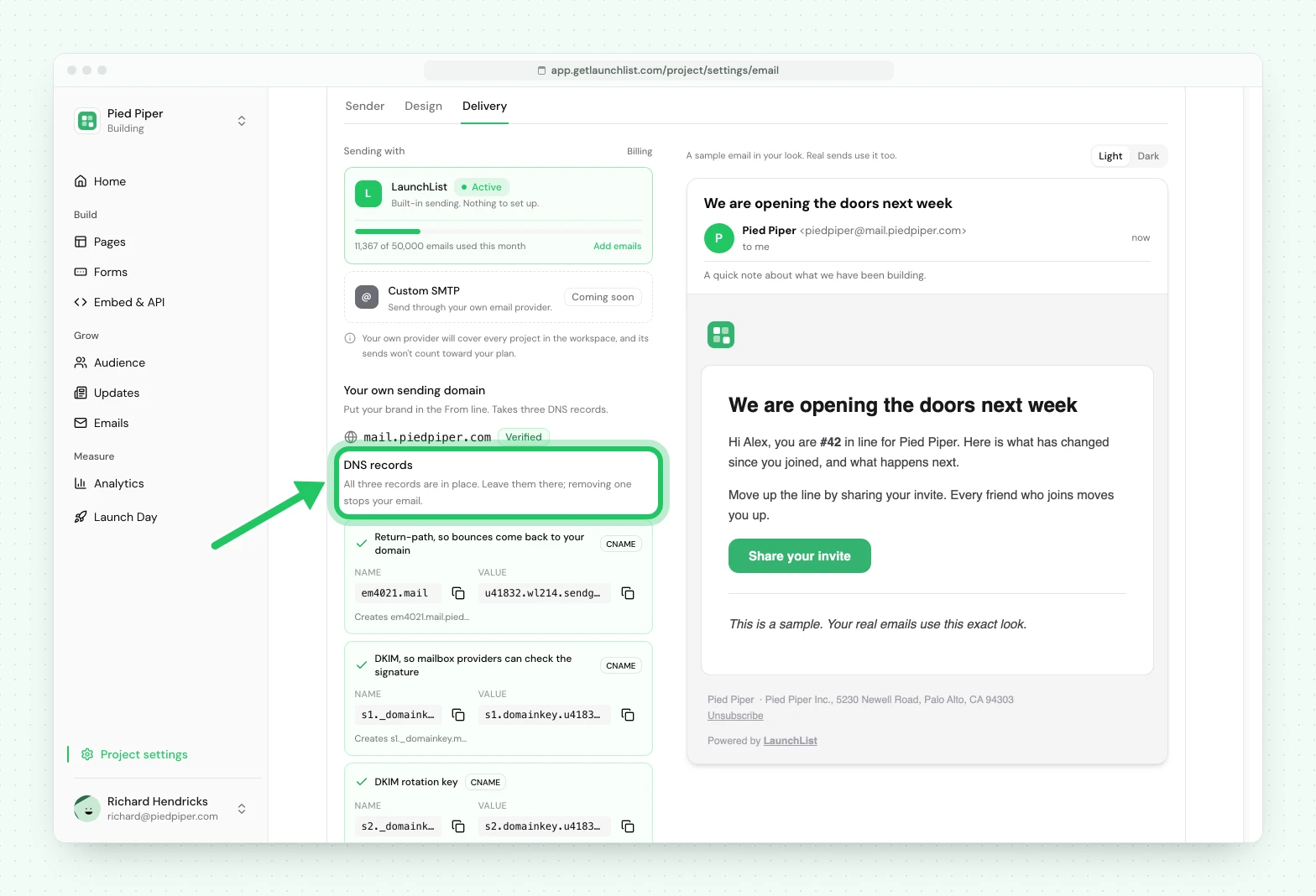
| Record | Type | What it does |
|---|---|---|
| Return path | CNAME | Puts the bounce address on your domain, so bounces come back to a hostname that belongs to you |
| DKIM | CNAME | Publishes a signing key, so receiving mail servers can check the mail really came from you and was not altered |
| DKIM | CNAME | The second signing key, so keys can be rotated without a gap in signing |
There is no TXT record to add or edit, so your existing SPF and DMARC records are left exactly as they are. There is no MX record either, so nothing here can affect the inbox your team already uses.
There is also no certificate to buy or install. Email authentication is pure DNS, so unlike a launch-page custom domain, nothing here waits on HTTPS.
The states you will see#
| Badge | Meaning |
|---|---|
| Waiting for DNS | None of the records are resolving yet. Add them, or give DNS time |
| Almost there | Some records resolve and some do not. Finish the rest |
| Verified | All three answer. Your email now sends from your domain |
| Not working | Nothing resolved within the verification window, or the domain was rejected outright |
Every record carries its own verdict and its own sentence, so you are never left with one failure message covering three records. You can re-check on demand rather than waiting on a background poll. Disconnect falls back to the shared domain, which needs no DNS, so you can never be left unable to send.
Deliverability is shared work#
Whichever domain sends, some of inbox placement is on us and some is on you.
Ours: the sending infrastructure, authentication, suppression, bounce and complaint handling, and one-click unsubscribe.
Yours: only mailing people who opted in, and not going silent for months before a launch blast. A list that has not heard from you in a year will complain, and complaints are what actually damage a sender, on any domain.
Next#
- Email verification is the opt-in mail this domain sends
- Broadcasts covers who a send actually reaches
- Custom domain is the separate domain for your launch page
Common questions
What address do my emails come from by default?
A shared LaunchList sending domain. There is nothing to configure, and your verification emails and campaigns go out over it from day one.
Can I send from my own domain?
Yes, on the Launch and Grow plans. Connect a subdomain in Project settings, add the three CNAME records we generate for it, and your brand sits in the From line. There is no certificate to buy.
Which DNS records do I have to add?
Three, and all three are CNAME records. One is your return path, which is where bounces go, and two are DKIM keys, which are what sign your mail. There is no TXT record to edit, so your existing SPF and DMARC records are left alone.
Why a subdomain and not my main domain?
So your company email keeps its own reputation, separate from your marketing sends. Use something like mails.yourcompany.com rather than yourcompany.com.