

Plans, billing and contact limits
How plans and list sizes work, what happens when your list passes its size, extra campaign emails, and where to find invoices, change plan or cancel.
Billing is per workspace, not per project or per person. Every project in a workspace shares one plan.
Plans and sizes#
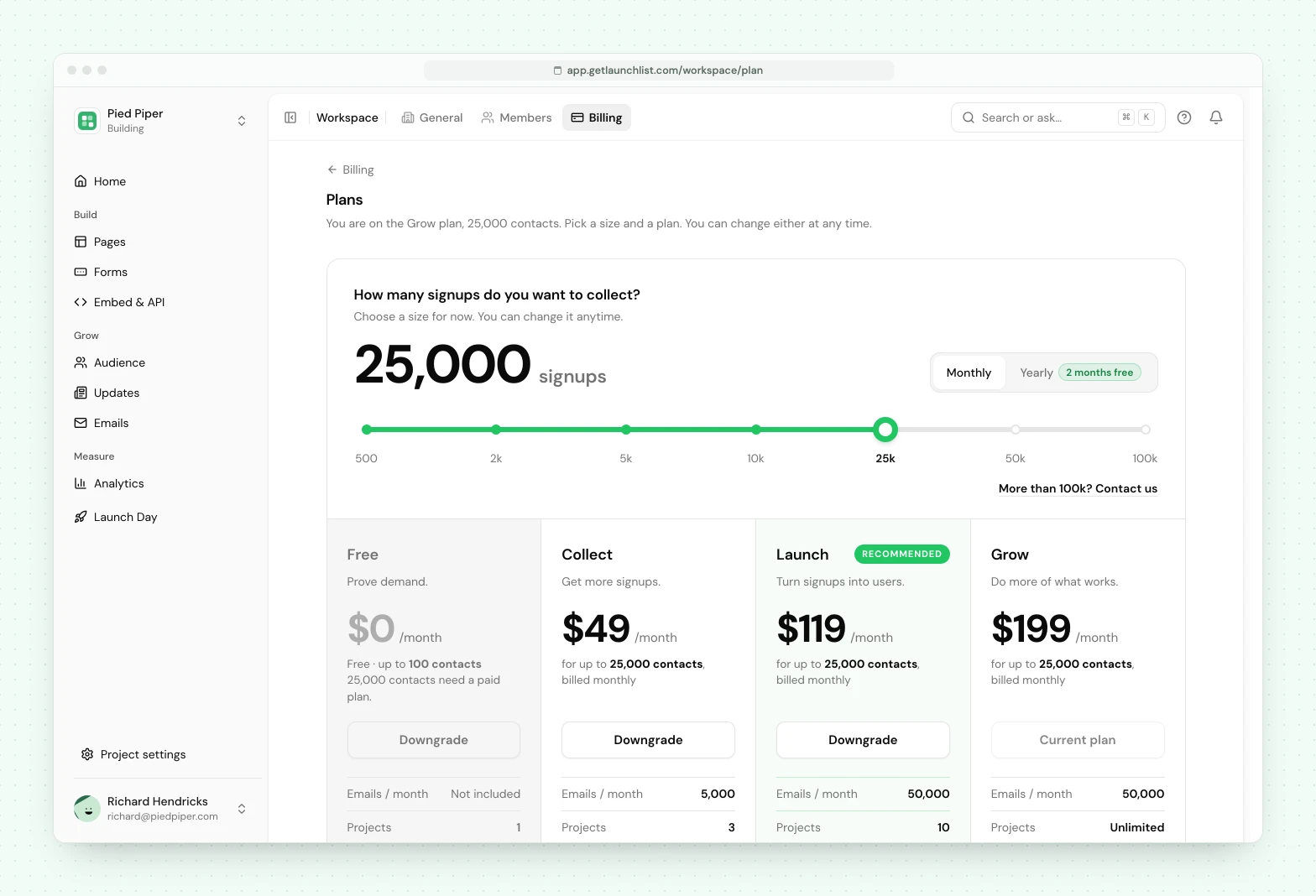
There are four plans: Free, Collect, Launch and Grow. Each paid plan is bought at a size, the number of contacts it holds:
500 · 2,000 · 5,000 · 10,000 · 25,000 · 50,000 · 100,000
Free is fixed at 100 contacts, needs no card and has no time limit. More than 100,000 contacts is Enterprise: talk to us for volume email pricing and invoicing.
Prices for every plan and size are on the pricing page and under Workspace → Billing, behind the button on your plan (Upgrade on the Free plan, Change plan on a paid one), both read from the same plan definition the server enforces, so what you are shown is always what is applied.
What each plan adds#
Each plan includes everything in the one before it.
- Free: a launch page with the AI builder, signup forms and surveys, referral links and a leaderboard, a status page for every signup, invites for your first 100 beta users, and signup analytics. Import and export, spam protection, 17 languages, the API, webhooks, embeds, social-proof widgets and AI agents are on every plan.
- Collect: your own domain, rewards and milestones, points for follows and shares, email campaigns, search engine indexing on your own domain, saved form styles, and roles for your team.
- Launch: automated emails, automatic invites, the official Zapier, Make and Slack apps, saved segments, emails from your own domain, branded invite codes, Launch Day tools, and no LaunchList branding.
- Grow: advanced analytics (what brings you signups and who your signups are), your full analytics history, and priority support.
| Limit | Free | Collect | Launch | Grow |
|---|---|---|---|---|
| Projects | 1 | 3 | 10 | Unlimited |
| Custom domains | LaunchList subdomain | 1 | 3 | Unlimited |
| Team members | Just you | 3 | 10 | Unlimited |
| API requests/min | 60 | 300 | 300 | 1,000 |
| Webhook endpoints | 1 | Unlimited | Unlimited | Unlimited |
| Analytics history | 28 days | 90 days | 12 months | All time |
| Beta invitations | First 100 | Unlimited | Unlimited | Unlimited |
For more projects, domains or team members, move up a plan. None of them is sold as a paid extra.
Monthly or yearly#
Every paid plan and size is billed monthly or yearly. Yearly is 2 months free: the yearly bill is 10 times the monthly price, for 12 months.
What counts as a contact#
One person on your list, however they arrived: your launch page, an embedded form, a CSV import or the API. You pay for how many contacts you hold, not for new signups each month.
- The same person twice is one contact. Duplicates never count.
- Test-mode signups never count.
- Contacts are counted across the whole workspace, all projects together.
- Unsubscribed contacts still count until you delete them or archive their project.
- Removing contacts, deleting a project or archiving a project frees the count immediately, not at the end of a period.
That last point matters when you are cleaning up after a bot flood: delete the fakes and you are back under your size straight away.
Finished a launch? Archive the project#
Archiving a project closes it: its launch pages and forms stop accepting signups, and its audience stays readable and exportable. Its contacts stop counting toward your size, and the project stops counting toward your project limit. You can unarchive it whenever your plan has room.
When your list passes its size#
Signups are never refused. Capture is unconditional, on every plan, whatever your size. A launch going better than expected must never cost you the signups it earned.
Contacts past your size are saved but hidden immediately until you move up a size. They are stored, they are counted, and they come back the moment you move up. Nothing is ever deleted for being over a limit.
- Hidden contacts are not sent to your integrations. Nothing about them goes to Zapier, webhooks or your other integrations, and those events are not sent later: once you move up a size, only new events about those contacts are sent.
- There is no charge for extra contacts. Your subscription never goes up without your approval.
- We let you know as you get close, so moving up is a choice you make ahead of time.
On Free the same rule applies at 100: signups past it are saved and shown when you upgrade.
Emails each month#
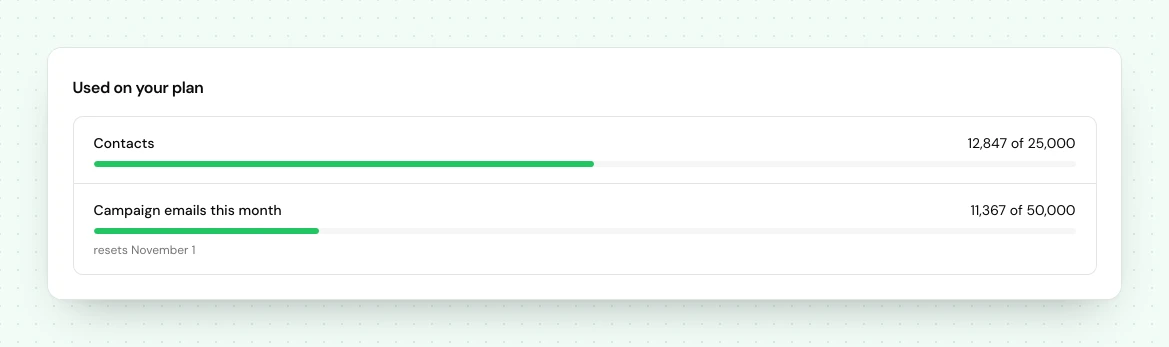
Every paid plan includes a monthly allowance of campaign emails, set by your size:
| Plan | Emails / month |
|---|---|
| Free | No campaign emails |
| Collect | 1 × your contacts, up to 5,000: enough to email your list once a month |
| Launch | 2 × your contacts: enough to email your whole list twice a month |
| Grow | 2 × your contacts |
What counts: broadcasts, automation emails and reward announcements. What never counts: confirmation, verification, welcome and invitation emails. The allowance resets on the 1st of each calendar month.
Extra campaign emails#
Need more in a month? Extra emails are $3 per 1,000, bought in blocks of 1,000 for the current calendar month. You can add them in two places, and both show the cost before you approve it:
- When you send or schedule a broadcast that is larger than what is left, the dialog offers the blocks that cover the difference.
- From Workspace → Billing, on the Campaign emails row, with Add emails. The same button is on the email usage bar in your project's email settings.
Nothing is ever charged automatically. At the allowance, with no extra emails approved:
- A broadcast does not send until you approve the extra or the allowance resets. A scheduled broadcast that is short when its time comes pauses and tells you.
- Automation email steps wait, and continue on the 1st of next month or as soon as you add emails. Steps that do not send email keep running.
- Reward announcements stay pending and go out on the same trigger. The reward itself unlocks on the person's status page straight away.
Changing plan or size#
Workspace → Billing → Change plan (the button reads Upgrade on the Free plan), self-serve, any time. Switching plan or size happens right in LaunchList: pick the plan, the size and monthly or yearly, then confirm. The confirmation tells you when the change applies before you agree to it.
- Moving up (a plan or size that costs more each month) applies at once, prorated, and anything that was hidden reappears immediately.
- Moving down applies at your next renewal, so you keep what you paid for until then.
- Switching between monthly and yearly applies at your next renewal.
If a change leaves you above the new size, nothing is deleted: every contact past it is saved and hidden until you move up a size.
Invoices and receipts#
Every invoice is listed on Workspace → Billing, under Payment and invoices, and is downloadable there. Extra campaign emails and credits appear there too, each as its own one-time charge.
Your card and your invoice details live with the payment provider. Update card and Edit in Stripe on the same page hand you over to their portal, and whatever you set there is what appears on the invoices from then on.
Credits#
Credits are separate from your plan: a prepaid balance for data services that cost us something each time they run. Every workspace starts with 10 free credits, and packs start at $7 for 1,000 credits. They never expire, and AI does not use them. See credits.
Canceling#
Self-serve, same page, no email required.
Canceling ends the subscription at the end of the period you have paid for. Your workspace drops to the Free plan, and your contacts stay: anything past Free's 100 is hidden, and none of it is deleted.
Export your audience before you cancel if you want a copy. Exports are unlimited and never paywalled.
Team#
Free is just you. Collect includes 3 team members, Launch 10 and Grow unlimited. Pending invitations count as used seats, so a workspace does not get extra capacity by leaving invitations outstanding. For more seats, move up a plan.
Changing the plan is owner-only, and that is not configurable. An Admin can see the plan and the invoices; a Member or a Viewer has no billing surface at all. See roles and permissions.
Beta prices#
These are beta prices. They may change for new subscriptions after beta, and we will give notice first. Your subscription never goes up without your approval.
Next#
- Credits: what they pay for
- Inviting your team
- Importing and exporting: your data is never locked in
Common questions
What happens if my list grows past its size?
Every signup is still captured, on every plan. Contacts past your size are saved but hidden until you move up a size, and nothing is ever deleted. There is no charge for extra contacts, and your subscription never goes up without your approval.
What counts as a contact?
One person on your list, however they arrived: your launch page, an embedded form, a CSV import or the API. The same person twice is one contact, and test contacts never count. Contacts are counted across your whole workspace, all projects together. Removing contacts, deleting a project or archiving it frees the count immediately.
Can I send more emails than my plan includes?
Yes. Extra campaign emails are $3 per 1,000. You see the cost and approve it before anything sends, and nothing is ever charged automatically.
Do you offer yearly billing?
Yes. Pay yearly and get 2 months free: 12 months for the price of 10. Every plan and size is sold monthly or yearly.
Where do I find my invoices?
On Workspace → Billing, under Payment and invoices, downloadable there. The same page shows your plan, what it costs, what you have used, your credits and your card. Change plan opens the plans, and Cancel plan is at the foot of the page. Update card opens the payment provider's portal.