

Email verification
What asking people to verify their email does, why referral credit waits for it, and what to do when someone says the email never arrived.
Verification asks a new signup to prove they own the address they gave you. It is the single biggest thing you can do for audience quality.
Joining a waitlist is agreeing to hear from you, so everyone who signs up is on your list and subscribed, whether or not you ask them to verify. Verifying is a separate fact: it proves the address is theirs.
What it does#
When you ask people to verify, a new signup gets an email with a link to verify their address. Until they click it:
- They are on your list. They count as signups and your emails can reach them. In Audience they show in the Waiting for verification view.
- You choose whether to email them. Each broadcast and automation lets you choose who gets it: Verified email, Waiting for verification or Verified or not. See broadcasts.
- Their welcome email waits. It goes out when they verify.
- Their trust verdict cannot reach Verified. It sits at Valid if you have checked their email and it is real, or Unknown if nothing has resolved yet.
- Their referrer gets no credit.
That last one is the point. Referral credit waiting for verification is what makes farming positions with invented addresses stop working. See how referrals work.
Turning it on or off#
The switch is Ask people to verify their email, in the Verification section of the form's settings (open the form in Forms, then Settings). It is per form, and only a form with an email field can use it.
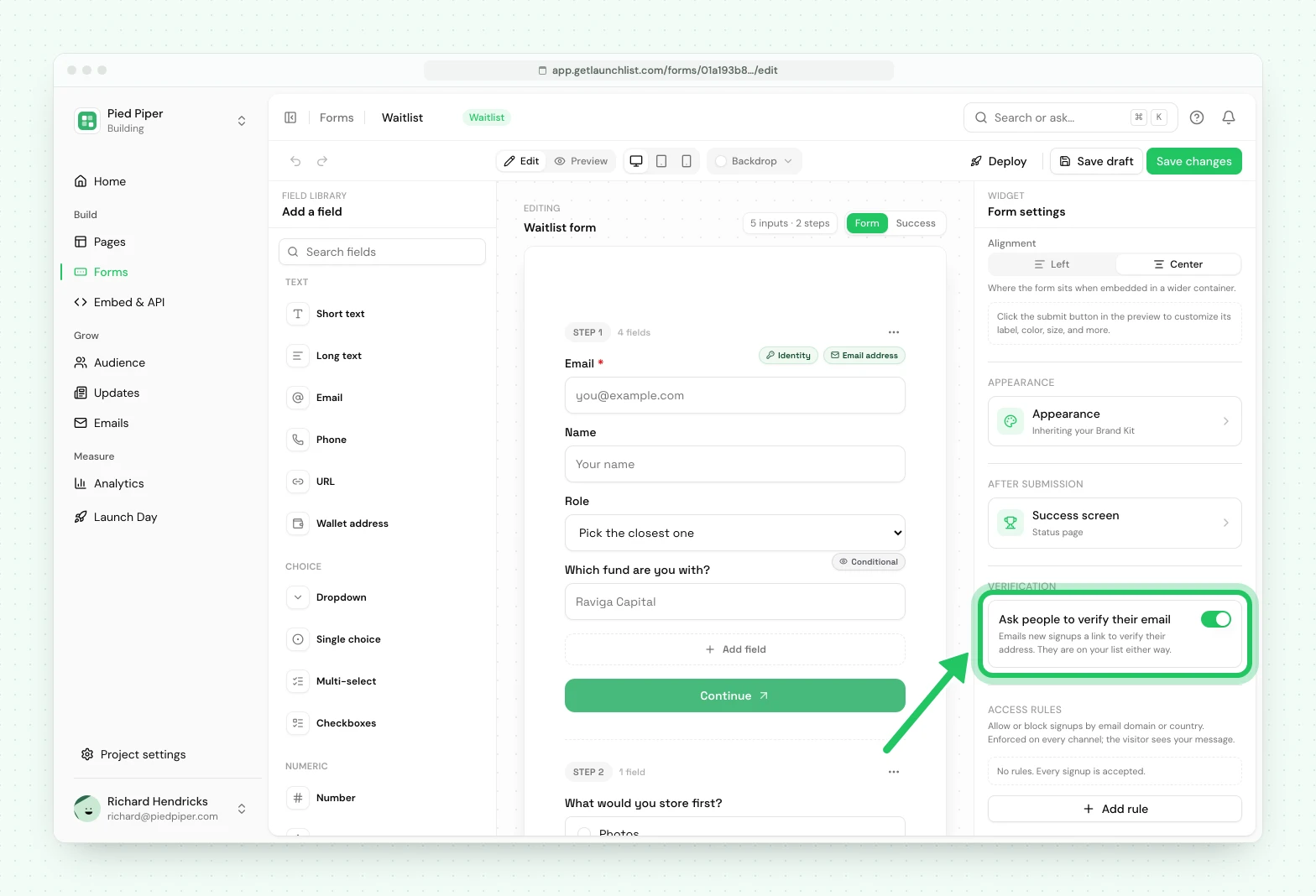
It decides one thing: whether new signups on that form are sent a verification email. It never decides whether they are on your list. Turning it off later changes nothing for people who already signed up. Anyone who has not verified stays on your list, in the Waiting for verification view, and the link they were sent still works.
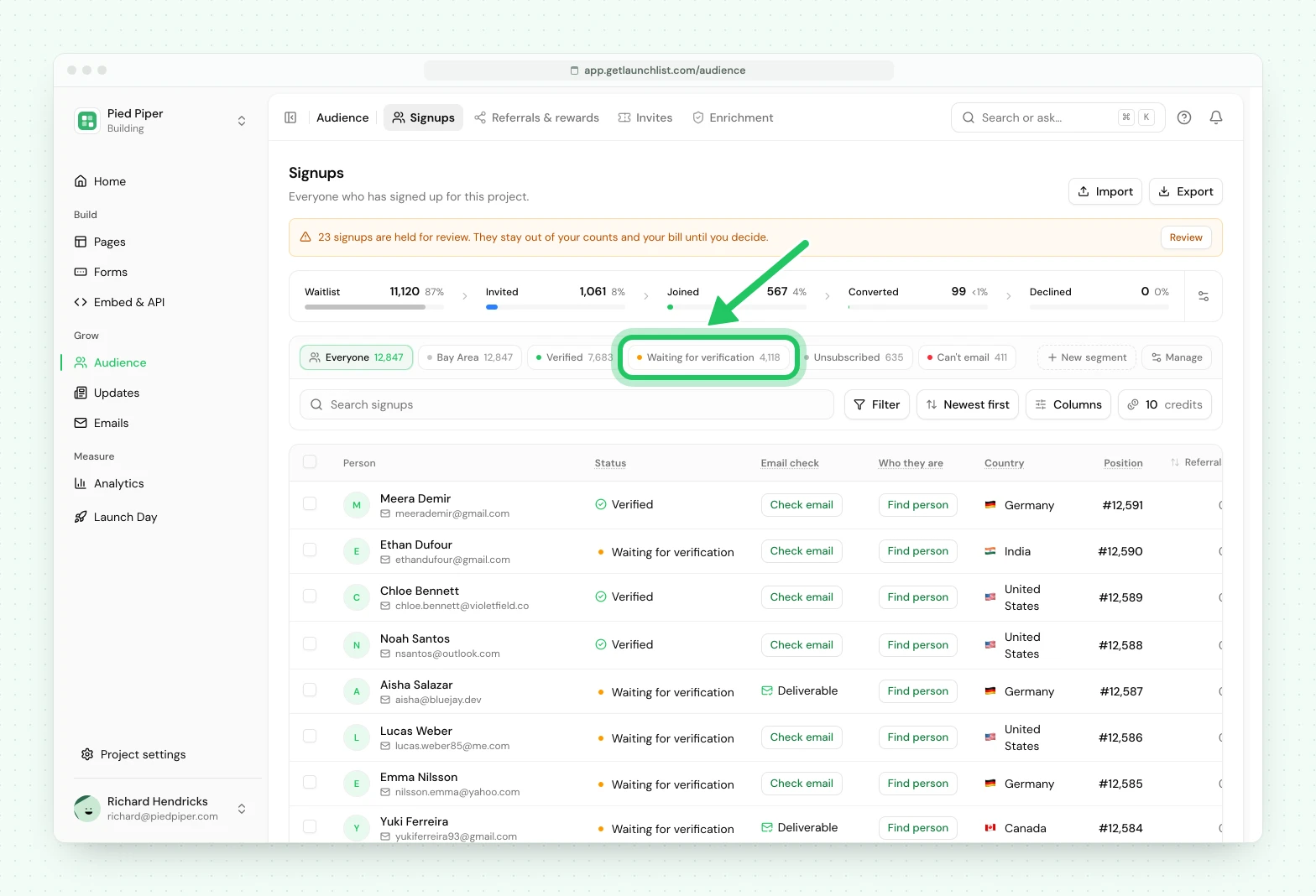
You can email people who have not verified. To resend the link to some of them, select them in Audience and choose Resend verification.
What unsubscribing stops#
When someone unsubscribes, we stop your broadcasts and automations to them. We keep sending emails about their own spot: their verification email, a welcome, and an invitation if you invite them. The unsubscribe page is one button and does not ask them to choose.
A spam complaint, a hard bounce or a blocked address stops every email, including those. Someone who unsubscribed themselves is the only one who can rejoin.
Should you turn it on?#
Yes, if referral positions matter, you want to be able to email only people who proved their address, or you want your signup number to mean something.
Consider not, if you are running a short campaign where every signup counts and you would rather carry a few unverified addresses than ask anyone for an extra click.
It is a genuine trade-off. Some real people never click the link, and that is a cost, not a rounding error. When every form in the project asks people to verify, new broadcasts and automations start on Verified email, so people who have not clicked are left out until you choose otherwise.
The link is safe to open twice#
Opening the link does not verify anything. It shows a short page naming your project with a Verify my email button on it, and only pressing that button verifies. Pressing it twice verifies once.
That sounds like a detail and is not. Corporate mail security tools such as Microsoft Safe Links and Proofpoint fetch every URL in a message before the recipient ever sees it. A link that verified on its own was being verified by a scanner, on behalf of someone who had not read the email and may never read it. It also meant anyone could farm verified contacts, and their referral credit, out of another company's security software.
The link is not consumed either, so opening it again lands on the same place rather than on "this link has expired".
Every state renders a real branded page: needs verifying, already verified, expired, unrecognized. Expired offers a one-click resend. And once someone verifies, they land on their own status page if you have published one, rather than on a dead end.
When someone says it never arrived#
In order of likelihood:
It is in spam. By far the most common. Ask them to check, and to mark it not-spam so the next one lands.
They can resend it themselves. Their status page has a resend button. This is the answer to give people, because it does not need you.
A corporate filter ate it. If several people at one company are affected, it is their mail gateway, not delivery. They will usually need to allowlist the sending domain.
Genuine delay. Verification mail is queued, so it normally arrives within seconds, but it can take longer under load. It also leaves from its own sending identity, separate from the one your broadcasts go out on, so it does not inherit the reputation of whatever else is being sent.
Sending from your own domain#
Verification mail sends from a LaunchList address by default. On the Launch and Grow plans you can connect your own subdomain, which improves deliverability and looks like you rather than like a tool.
That is set up under Project settings → Email → Delivery and takes three CNAME records. Until they resolve, sending falls back to the shared domain so nothing breaks while you configure it. Details in your sending domain.
Imported contacts#
Importing does not send verification email. Bulk-mailing a list you have just uploaded is how you get a domain blocked.
When you import, you say whether these people asked to hear from you. They asked to hear from me adds them as subscribed, so your next broadcast can reach them. I'm not sure adds them as Not subscribed: they get no broadcasts or automations until you mark them as subscribed from Audience. Either way they carry no proof of ownership, because nobody clicked anything, so a broadcast set to Verified email leaves them out. Choose Verified or not to include them. Import people who already agreed to hear from you.
Next#
- Broadcasts covers sending to your audience
- Keeping fake signups out
- Importing a list
Common questions
Should I ask people to verify their email?
For most launches, yes. It makes a fake signup cost a working mailbox and it gates referral credit, which is what stops people farming positions with invented addresses. Everyone is on your list either way, so the cost is only that some real people never click the link.
A signup says the verification email never arrived. What do I do?
Ask them to check spam, then point them at their status page, where they can resend it themselves. If a whole domain is affected it is usually a corporate mail filter rather than a delivery failure.
Why does the verification link say it has already been used?
It should not. Opening the link never verifies anything on its own: it shows a page with a Verify my email button, and only pressing that button verifies. Opening it twice, or a mail scanner fetching it first, cannot lock the real person out.