

Every way to add LaunchList to your site
Eight ways to collect signups: hosted page, inline embed, your own form enhanced, plain HTML with no JavaScript, popup, SPA mount, widgets, and the REST API. Pick by what you already have.
There are eight ways to get a signup into LaunchList. They all run the same pipeline once the signup lands, so deduplication, referral credit, trust scoring, verification email, webhooks and automations happen no matter which one you pick.
Choose by what you already have.
Pick your method#
| You have | Use | Code |
|---|---|---|
| No website yet | Hosted page | None |
| A site builder that allows custom HTML | Inline embed | 2 lines |
| A form you already designed | Enhance your form | 1 attribute |
| A CMS that strips JavaScript | Plain HTML | 1 form tag |
| A button, and you want an overlay | Popup | 1 attribute |
| React, Vue or Svelte | SPA mount | 1 function call |
| Social proof to show, not a form | Widgets | 1 div |
| A backend, and full control | REST API | Your own |
Everything except the hosted page and the API uses the same loader, added once per site:
<script src="https://embed.getlaunchlist.com/v1/embed.js" async></script>
Hosted page#
Every project gets a public launch page at a URL you choose, built in a visual editor. Nothing to install and no site required.
Use it when you have no website yet, when you want a launch page faster than you could build one, or as the destination for an ad campaign.
The page is server-rendered, so search engines receive real HTML from the moment you publish. On Collect, Launch and Grow, a page on your own domain can be indexed; a page on a LaunchList address stays live and shareable but asks search engines not to index it.
Inline embed#
The no-code default. A target element marks where the form goes; the loader fills it in.
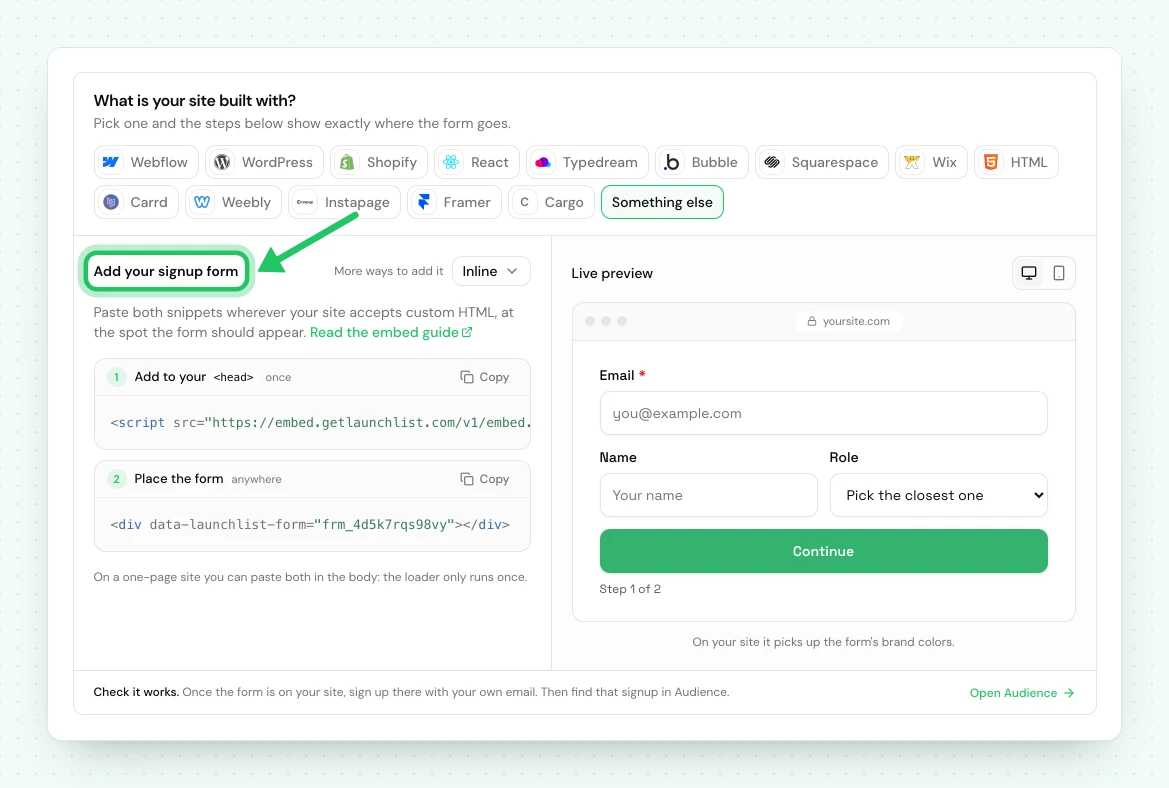
<!-- frm_8Kd2Qm4Rp9 is an example ID; use your own from Embed & API → Your website -->
<div data-launchlist-form="frm_8Kd2Qm4Rp9"></div>
<script src="https://embed.getlaunchlist.com/v1/embed.js" async></script>
The form renders inside a shadow root, so your site's CSS cannot leak in and break it, and its CSS cannot leak out and break your page. Change the fields in LaunchList later and the live form updates itself, with nothing to re-paste.
You can repeat the <div> as many times as you want on a page. Styling comes from your Branding
settings, not from CSS on your side.
Platform guides: Carrd · Framer · Webflow · WordPress · Squarespace · Shopify
Enhance your own form#
Keep your markup, keep your CSS, keep your design system. Add one attribute and we take over the behavior.
<form
    data-launchlist-enhance="frm_8Kd2Qm4Rp9"
    action="https://embed.getlaunchlist.com/f/frm_8Kd2Qm4Rp9/submit"
    method="POST"
>
    <input type="email" name="email" placeholder="you@example.com" required />
    <input type="hidden" name="_channel" value="html" />
    <button type="submit">Join</button>
</form>
You get submission, live format validation, a one-tap fix for email domain typos, inline error
messages, referral attribution and success routing without giving up a pixel of your own design.
If the loader script doesn't load, the form still posts to LaunchList and the signup is saved. With
an inline message as your success behavior, that fallback returns the visitor to your page
without the message.
Match each input's name to your form's field key (the dashboard shows you) so it fills that field
and validates; the identity field's name must match for the signup to attribute. Up to 20 extra
inputs are captured too, as Input data columns in your audience, with values truncated at 2,000
characters. Give each a plain name (letters, digits, spaces, _ and -): dots and brackets are
dropped.
The warning our own rendered form shows when someone leaves the email field with an address that looks wrong is the one thing this path does not carry. Everything the server enforces at submit is identical either way.
This is the right choice when the signup form is part of a designed page and a shadow-root embed would look like a transplant.
Plain HTML, no JavaScript#
A native form posting straight to the capture endpoint. Zero JavaScript, zero dependencies.
<form
    action="https://embed.getlaunchlist.com/f/frm_8Kd2Qm4Rp9/submit"
    method="POST"
>
    <input type="email" name="email" required />
    <input type="hidden" name="_channel" value="html" />
    <button type="submit">Join</button>
</form>
The browser posts it and our server redirects to your Status page or the URL you chose. It works
with JavaScript disabled, inside CMS templates that strip scripts, and anywhere a <script> tag is
not allowed.
Popup#
Any element can open the form in an overlay.
<button type="button" data-launchlist-popup="frm_8Kd2Qm4Rp9">
    Join the waitlist
</button>
It is your own button, so style it however you like. Add data-variant="slideover" with
data-position="right" for a side panel instead of a centered modal.
For programmatic control, for example opening on scroll depth or exit intent:
LaunchList.popup('frm_8Kd2Qm4Rp9').open();
SPA and programmatic mounting#
For React, Vue or Svelte apps that insert the form after page load, mount it yourself once the target element exists.
// 1. Load the runtime once, e.g. in index.html:
//    <script src="https://embed.getlaunchlist.com/v1/embed.js" async></script>

import { useEffect } from 'react';

export function Waitlist() {
    useEffect(() => {
        window.LaunchList?.mount('#waitlist', { form: 'frm_8Kd2Qm4Rp9' });
    }, []);

    return <div id="waitlist" />;
}
Mount again whenever your framework recreates the target. LaunchList.refresh() rescans the page,
but it only finds targets carrying data-launchlist-form, so a bare <div id="waitlist" /> like the
one above needs another mount() call rather than a refresh.
Full guide: React and single-page apps.
Widgets#
Not every embed is a form. Four widgets show live, aggregate numbers from your project, and no widget ever exposes an email address, a phone number or any other contact detail:
- Counter: the live signup total
- Leaderboard: top referrers. Rows show the first name your form collected, or a masked identifier when it collected none.
- Milestone: progress toward a community goal
- Countdown: time until launch
<div
    data-launchlist-widget="counter"
    data-project="acme"
    data-label="founders already in"
></div>
The look travels as data-* attributes, so the same widget can read differently on two sites with
no stored configuration.
There is also a standalone changelog embed, which puts your published updates on your own site. That one matters after launch: it is what keeps the build-in-public feed alive once the hosted launch page has done its job.
<div
    data-launchlist-updates="acme"
    data-heading="What's new"
    data-count="5"
></div>
REST API#
When you want full control, or the signup is happening on your server rather than in a browser, post it directly.
curl https://api.getlaunchlist.com/v1/contacts \
  -H "Authorization: Bearer llk_live_8xKq3Rp9Wm2Nz7Vt6yL1cG5dH0jA4sE8uNqB2fXk" \
  -H "Content-Type: application/json" \
  -d '{ "project": "prj_7Qk2mN4pR8", "email": "ada@lovelace.dev" }'
One call returns the referral code, the live queue position and the trust verdict, so you can show someone their place in line without a second request.
Start with authentication, then create a contact.
Can I use more than one?#
Yes, and most people do. A hosted page for the campaign, an inline embed on the marketing site, a counter widget in the footer, and the API wiring signups into a CRM is a normal setup.
Deduplication is per project, so the same person arriving through three different channels is one contact, not three.
Common questions
What is the easiest way to add a waitlist to my website?
The inline embed. Paste one div where the form should appear and one script tag in your head, and the form renders itself. It works on every site builder that allows custom HTML, including Carrd, Framer, WordPress, Squarespace and Webflow.
Can I add a waitlist without a website?
Yes. Every project gets a hosted launch page at a public URL, so you can collect signups with no site of your own and no code at all.
Does a LaunchList form work without JavaScript?
Yes. The no-JavaScript method is a plain HTML form that posts straight to our endpoint and relies on a server redirect for the result, so it works with JavaScript disabled and inside email clients and CMS templates that strip scripts.
Can I keep my own form design and still use LaunchList?
Yes, with the enhance method. You keep your own markup and CSS, add one attribute, and we take over submission, validation, error display, referral attribution and success routing.