

Authentication
LaunchList API keys are bearer tokens prefixed llk_live_, or llk_test_ for a test key. They are workspace-owned, scoped, and can be pinned to a single project.
Every request to the LaunchList API carries an API key as a bearer token:
curl https://api.getlaunchlist.com/v1/workspace \
  -H "Authorization: Bearer llk_live_8xKq3Rp9Wm2Nz7Vt6yL1cG5dH0jA4sE8uNqB2fXk"
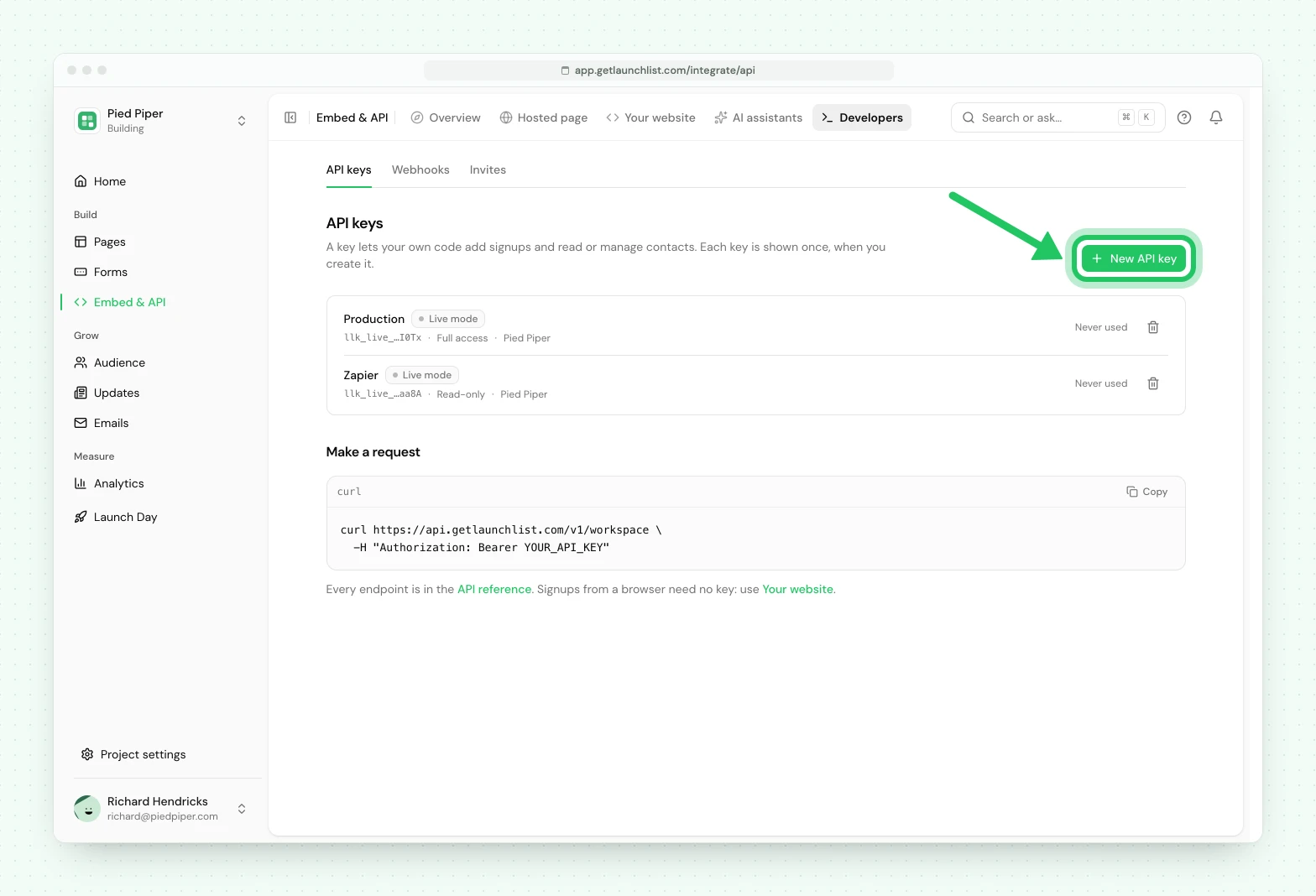
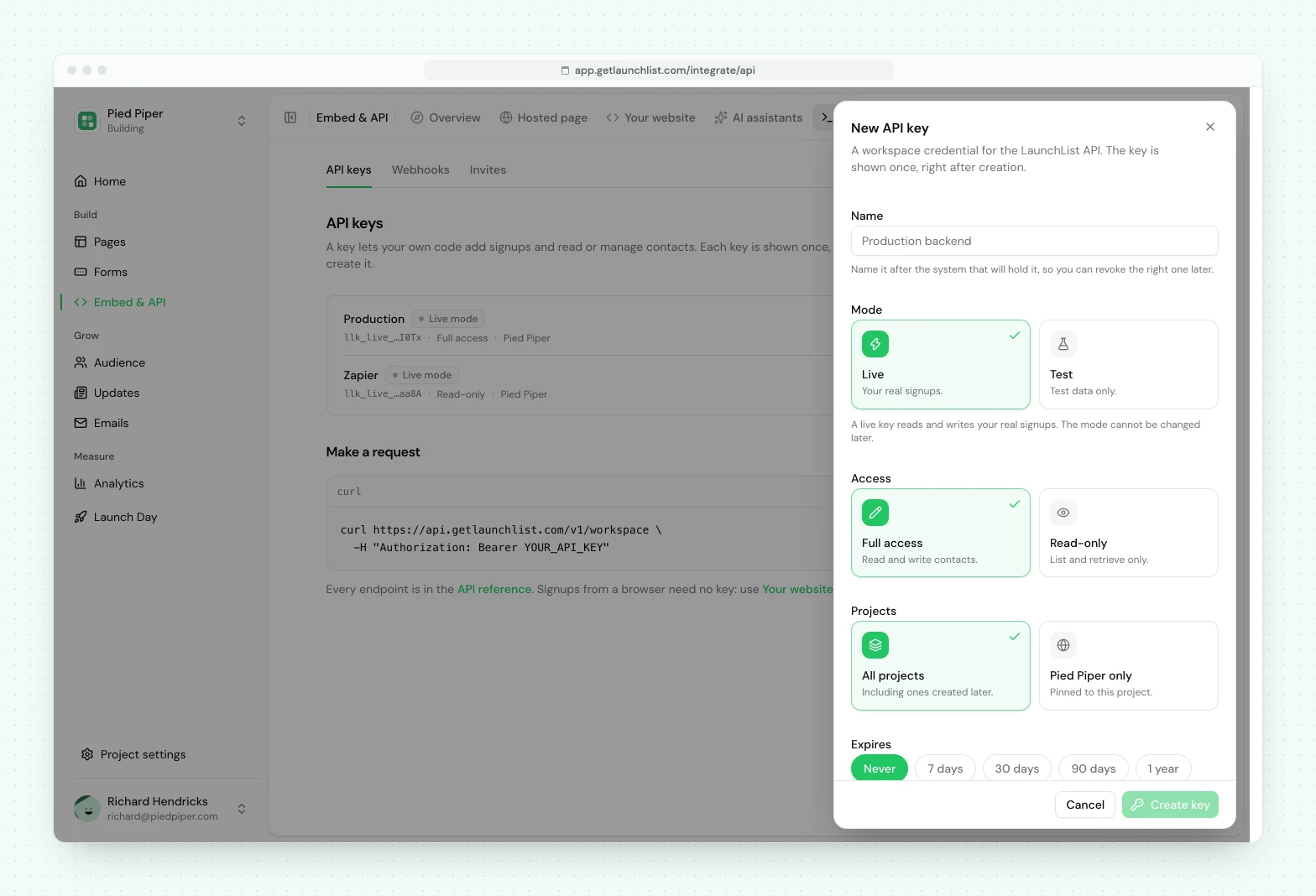
Keys are created in Embed & API → Developers → API keys in the dashboard: press New API key, name it, choose its Mode, its Access and which Projects it covers, and press Create key.
How keys work#
A key is owned by the workspace, not by the person who made it, so removing a team member never breaks a running integration.
The plaintext is shown exactly once, at creation. Only a SHA-256 hash is stored, so a lost key
cannot be recovered: revoke it and create another. A key is the llk_live_ prefix followed by 40
random characters, and the prefix is deliberate, because it makes a leaked key recognizable to
automated secret scanners on GitHub and elsewhere.
Live and test keys#
A live key (llk_live_…) reads and writes your real signups. A test key (llk_test_…) reads
and writes test data only: every contact it creates is a test contact, it never sees or changes a
real contact, and anything that would reach your real project, such as a broadcast or an import,
answers 403 test_mode_unsupported. You pick the mode when you create the key, and it never
changes. A test key is made without the scopes it could never use: the broadcasts:*,
imports:write, segments:write and pages:* scopes. Every response says which kind of key answered in its LaunchList-Mode header. What a test
key can and cannot do is in
testing without touching your audience.
Test keys work with the REST API only, not with the MCP server.
Scopes#
When you create a key you pick one of two access levels:
| Access level | Scopes it carries |
|---|---|
| Read-only | Every :read scope: contacts:read, projects:read, pages:read, broadcasts:read, segments:read, automations:read |
| Full access | Every scope, subject to what you personally may grant (see below) |
Choose Read-only for anything that only reads (analytics, exports, a dashboard) and Full
access for a key that writes: creating or updating contacts, drafting pages, importing a list,
tagging, saving segments, issuing invitations, or sending broadcasts. A request that calls an
endpoint the key's scopes do not cover returns 403 with insufficient_scope.
Each scope grants:
| Scope | Grants |
|---|---|
contacts:read |
List, retrieve, count contacts, read their submissions, referrals, position and email history, read and redeem invitations |
contacts:write |
Create, update and delete contacts, resend verification, resubscribe and unsubscribe |
projects:read |
List and retrieve projects and forms, and read /v1/workspace |
pages:read |
List and retrieve a project's hosted pages |
pages:write |
Over MCP: set up a project, draft a hosted page from a description, edit its draft, and publish it in two confirmed steps. It never edits a live page in place |
invites:write |
Mint invitations, revoke them, and confirm access without a code |
broadcasts:read |
List broadcasts, their results and their recipients |
broadcasts:write |
Create and edit broadcast drafts, and send a test to a teammate. Never sends to the audience |
broadcasts:send |
Send, schedule, pause, resume and cancel a broadcast to the audience |
segments:read |
List segments, and count who an unsaved filter matches |
segments:write |
Save a segment |
imports:write |
Bulk-import contacts without the signup pipeline, exactly like the dashboard's CSV import |
automations:read |
List automations and see where a contact stands in each |
Redeeming a code sits under contacts:read on purpose. It is what your signup flow calls on every
new account, so a Read-only key can redeem invitations, while minting and revoking them needs
invites:write, because they hand out access to your own product.
The exact scope each endpoint needs is machine-readable in the
OpenAPI document, on every operation as x-required-scope.
Pinning a key to one project#
A key can be limited to a single project when you create it. A pinned key cannot read or write any
other project in the workspace, and attempts return 404 rather than 403.
That is deliberate: a 403 would confirm the other project exists. Across a tenant boundary, we
never confirm that an ID is real.
Keeping a staging integration off your real audience#
Give it a test key. Everything it writes is test data, so a misfiring integration cannot write into the audience you actually launch to. For what a test key cannot do, such as sending a broadcast, create a separate project and pin a live key to it: a pinned key reaches nothing outside that project.
Checking a key#
GET /v1/workspace introspects the key: the workspace it belongs to, the plan, the key's own
scopes and mode, the per-minute rate limit, and the current contact count.
curl https://api.getlaunchlist.com/v1/workspace \
  -H "Authorization: Bearer llk_live_8xKq3Rp9Wm2Nz7Vt6yL1cG5dH0jA4sE8uNqB2fXk"
Rate limits#
Limits are per workspace, per minute, and set by plan:
| Plan | Requests per minute |
|---|---|
| Free | 60 |
| Collect | 300 |
| Launch | 300 |
| Grow | 1000 |
Every authenticated response carries RateLimit-Limit and RateLimit-Remaining. A rejected key
is the exception: a 401 is answered before the rate limiter runs, so it carries neither header.
Over the limit you get a 429 carrying Retry-After, which is the number of seconds to wait. Full
detail, including the separate limits on unauthenticated and invitation-redemption traffic, is in
rate limits.
Common questions
How do I authenticate with the LaunchList API?
Send your API key as a bearer token in the Authorization header, written as "Authorization: Bearer" followed by the key. Keys are created in Embed & API → Developers → API keys.
What happens if I lose a LaunchList API key?
You cannot recover it. The plaintext key is shown exactly once at creation and only a hash is stored. Revoke the lost key and create a new one.
Does an API key stop working when the person who created it leaves?
No. Keys are owned by the workspace, not by the user who created them, so removing a team member never breaks a running integration.