

Keeping fake signups out
How LaunchList tells a real signup from a fake one, what the trust tiers mean, and what to do when a bot flood hits your waitlist.
Any public signup form attracts bots. A waitlist attracts them more, because referral positions give people a reason to farm signups.
LaunchList treats this as one question with one answer: is this signup a real person? That judgment is the trust verdict, and it is shown on every contact.
The trust verdict#
Rather than scattering half-signals across your audience, a bounce flag here and a captcha score there, every contact carries one tier:
| Tier | Means |
|---|---|
| Verified | They proved they own the address, and nothing else looks wrong |
| Valid | The passive checks pass and nothing is suspicious, but there is no proof yet |
| Unknown | Not enough has been checked to say. Where a fresh import or a non-email signup starts |
| Risky | Soft signals against it: a role or catch-all address, elevated fraud, held for review |
| Fake | A hard failure: undeliverable, disposable, or behaving like a bot |
Two of those are worth reading twice. Unknown is an honest answer, not a bad one: it is what a contact reads when we have not learned anything about it yet, which is where every imported row and every phone or username signup begins. And a verdict we could not establish is never quietly upgraded to a good one.
The verdict combines proof of ownership, the address itself, device and network clustering, and behavior. Whether the email is real counts too, once you have checked it. It updates as evidence arrives, so an unverified signup that verifies moves up on its own.
You can override any verdict by hand. The engine is a tool, not an authority, and you know your audience.
What runs automatically#
Rate limiting per IP and per fingerprint, so a script cannot hammer the endpoint.
Disposable address detection against a list refreshed weekly, catching the throwaway-mailbox services people use to farm referrals.
Device clustering, which is what actually catches referral farming: fifty signups from one device is a pattern no individual signup reveals.
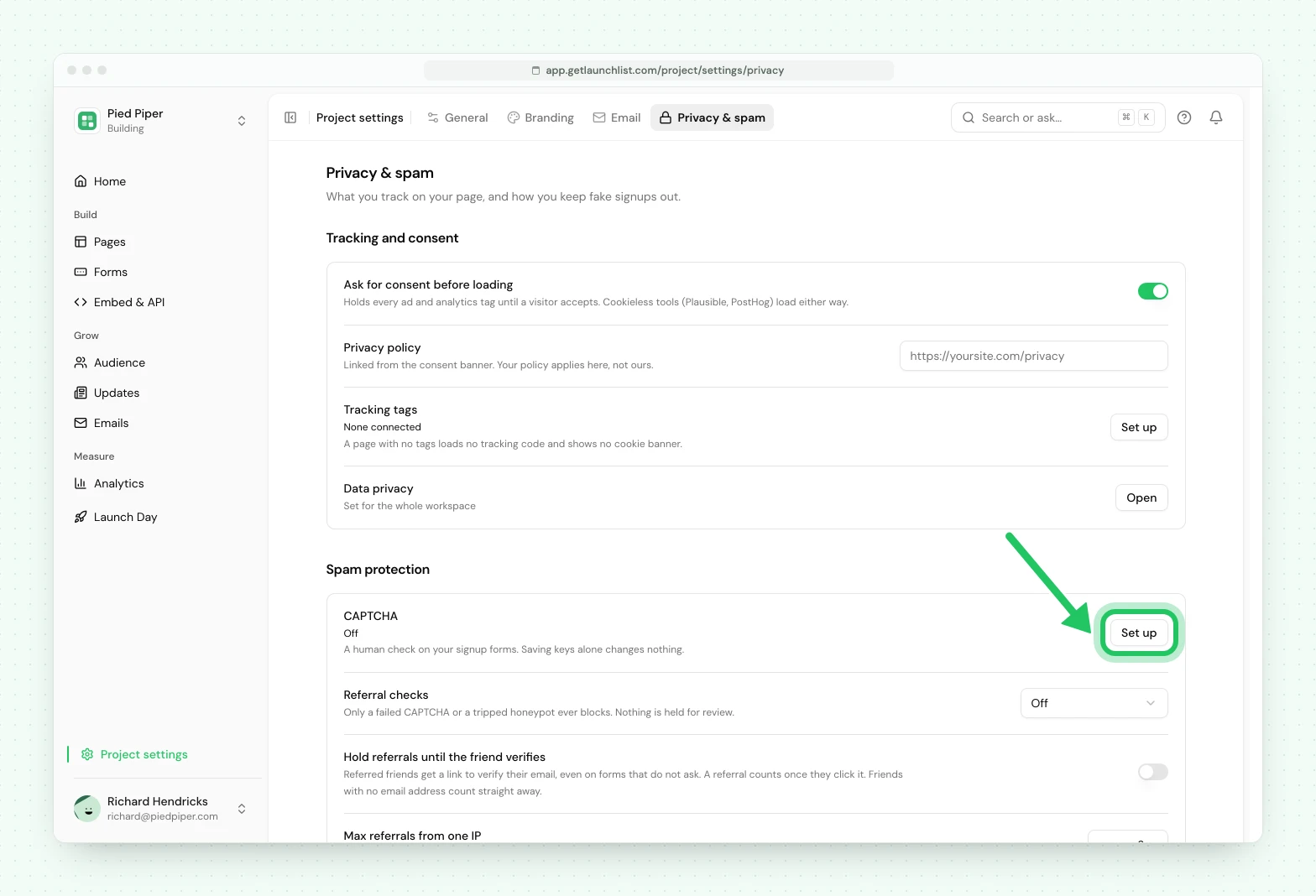
An optional captcha, off by default. It is a real conversion cost and most launches do not need it, so it is there for when you are actually under attack rather than always on. You bring your own Turnstile, reCAPTCHA or hCaptcha keys in the CAPTCHA row of Project settings → Privacy & spam.
Holding and blocking#
Those signals add up to a score, and the score has two lines on it.
Past the first line a signup is held for review: captured and stored, but kept out of your audience, off the leaderboard, and off your bill until you look at it. Past the second, a submission is refused outright, which in practice means a solved-captcha failure, a tripped honeypot, or a score that could only be a bot.
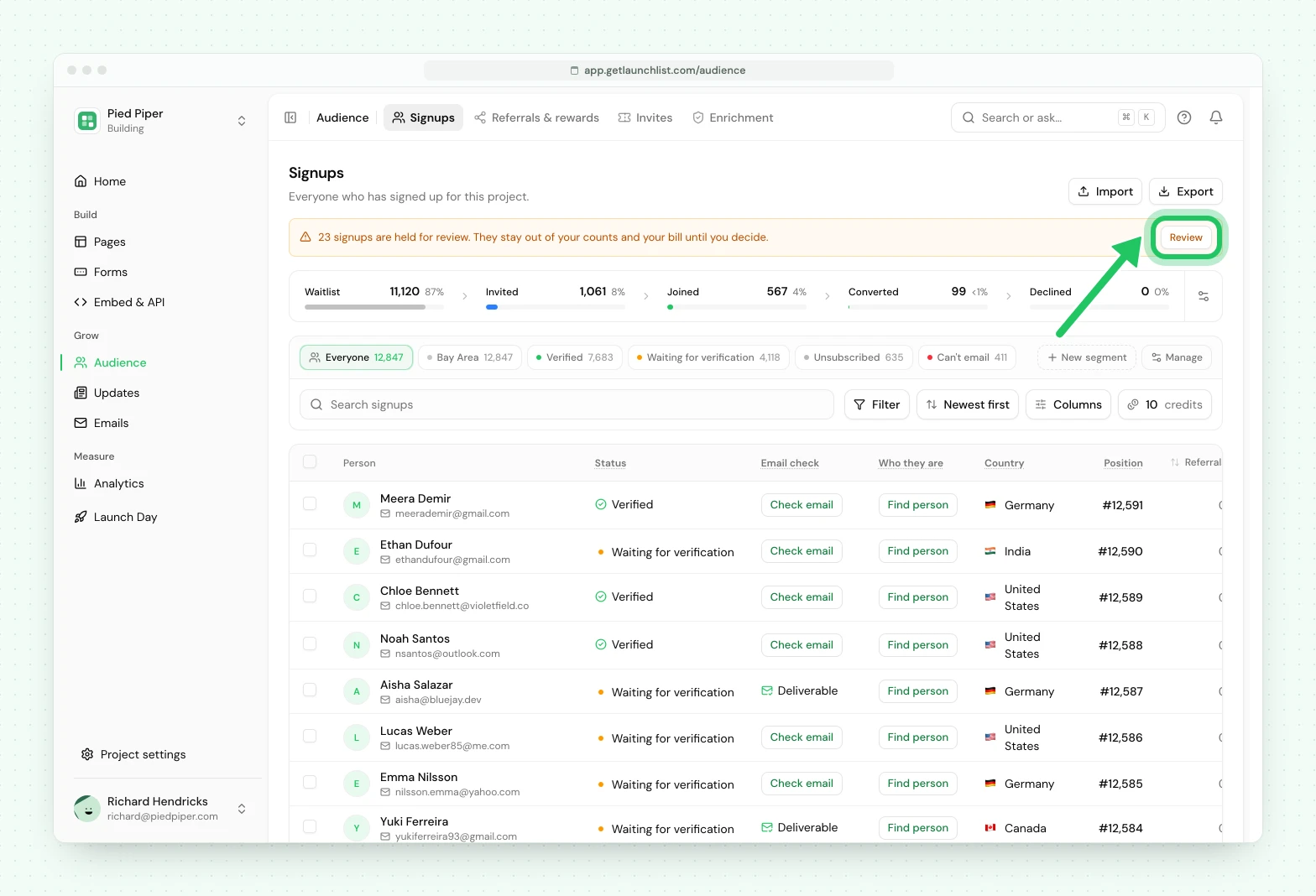
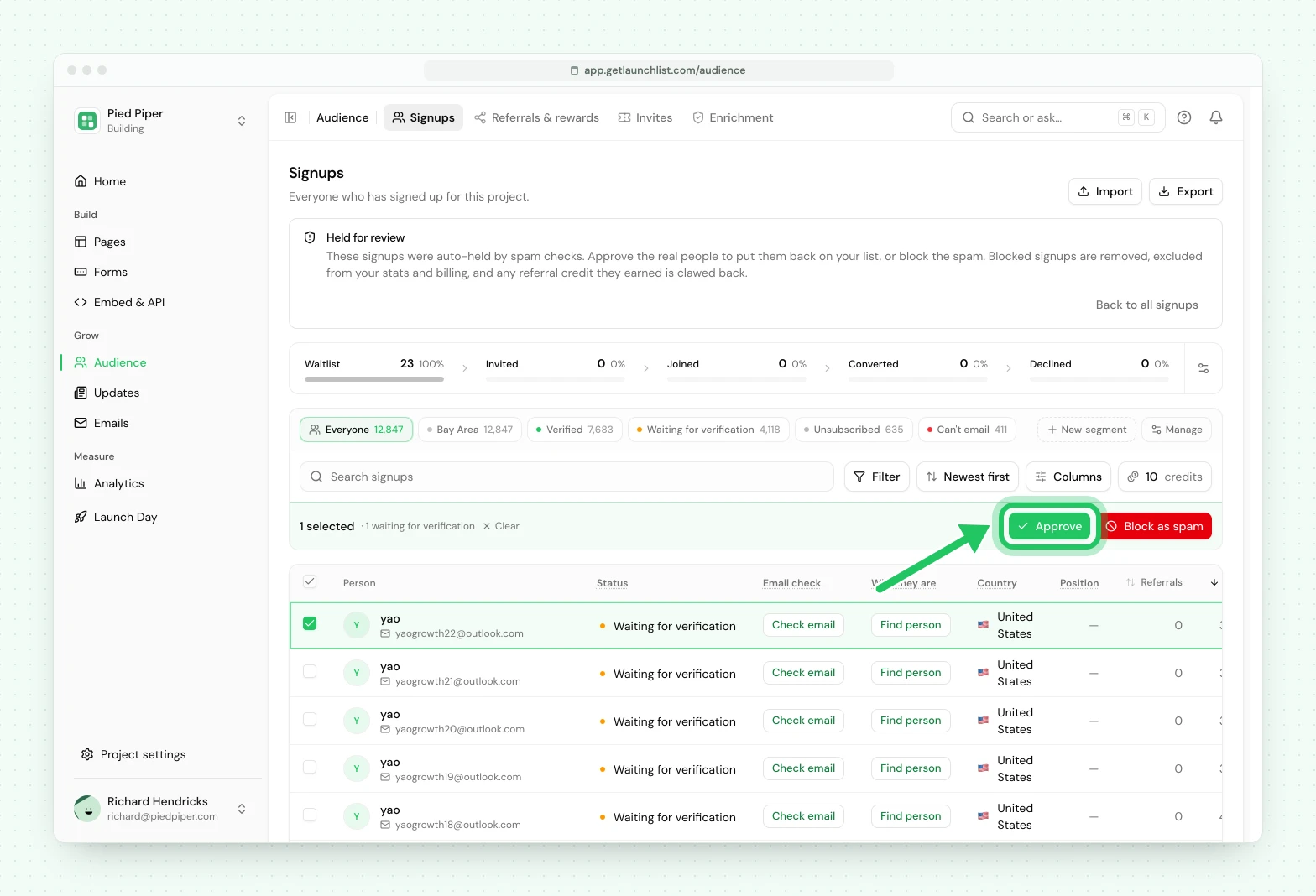
Held is not deleted, and it is not a verdict you are stuck with. While anything is held, Audience → Signups shows a line above the table, "N signups are held for review.", with a Review button. Press it, select the real people and approve them; they join your audience with their original signup time intact. Block the rest.
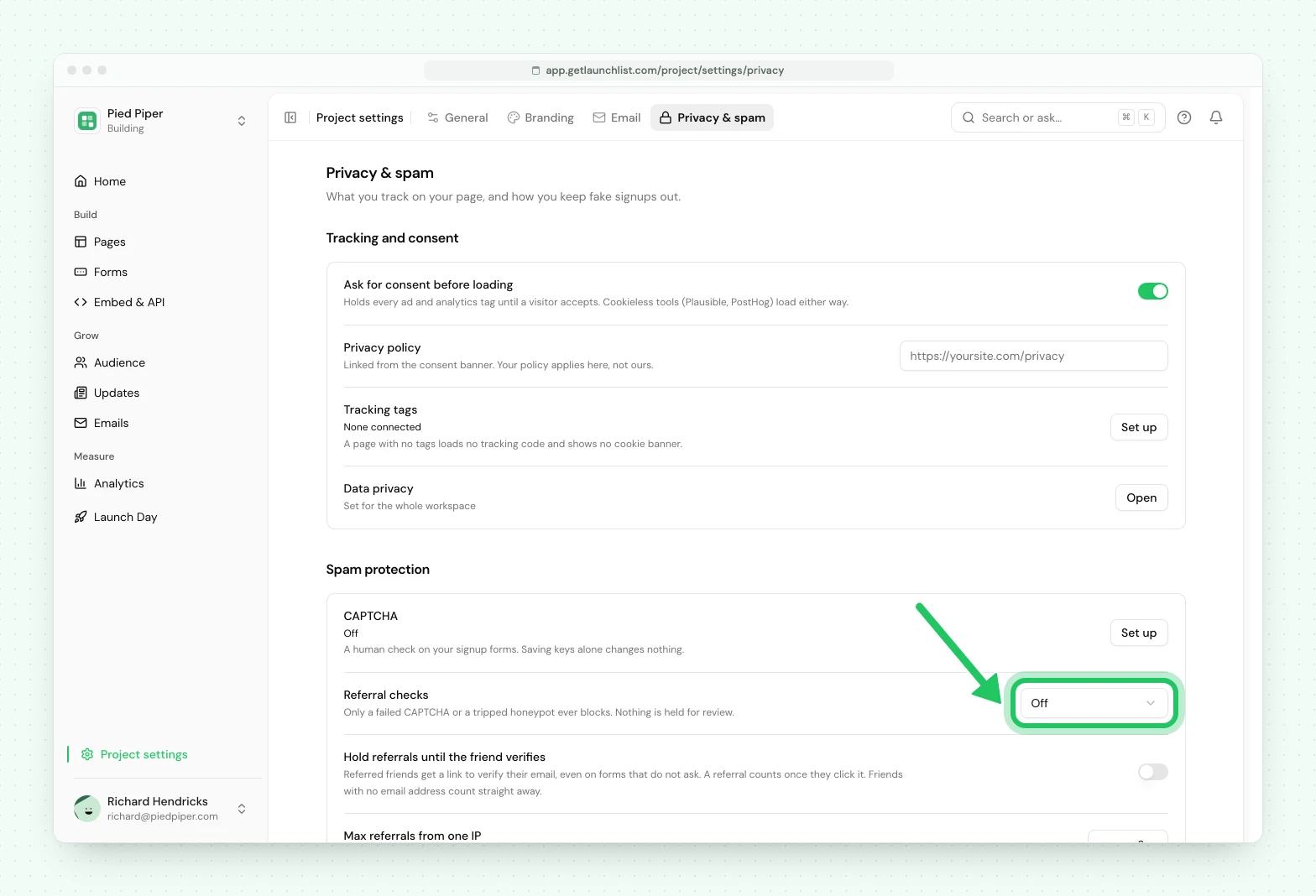
You set how eager this is with the Referral checks row under Spam protection in Project settings → Privacy & spam, from Off through to Strict. Off never holds anything, and even then the hard signals can still refuse an obvious bot.
Verification is the biggest lever#
Asking people to verify their email does more than everything above combined, because it changes the economics: a fake signup now costs a working mailbox. It is on by default for waitlist and marketing forms, and the main reason to touch the setting is to turn it off.
It also gates referral credit. An unverified signup does not move its referrer up the queue, so farming positions with invented addresses stops working. And it lets you email only the people who proved their address, by choosing Verified email on a broadcast.
The cost is an extra click between signing up and being fully counted, and some people never click it. Everyone is on your list either way. That is a real trade-off, and it is the right one for almost every launch.
Cleaning up after a flood#
If you get hit, the process is:
-
Open Audience → Signups and sort by Most trusted, or press Filter and add a rule on trust. The Trust column is off until you switch it on in Columns.
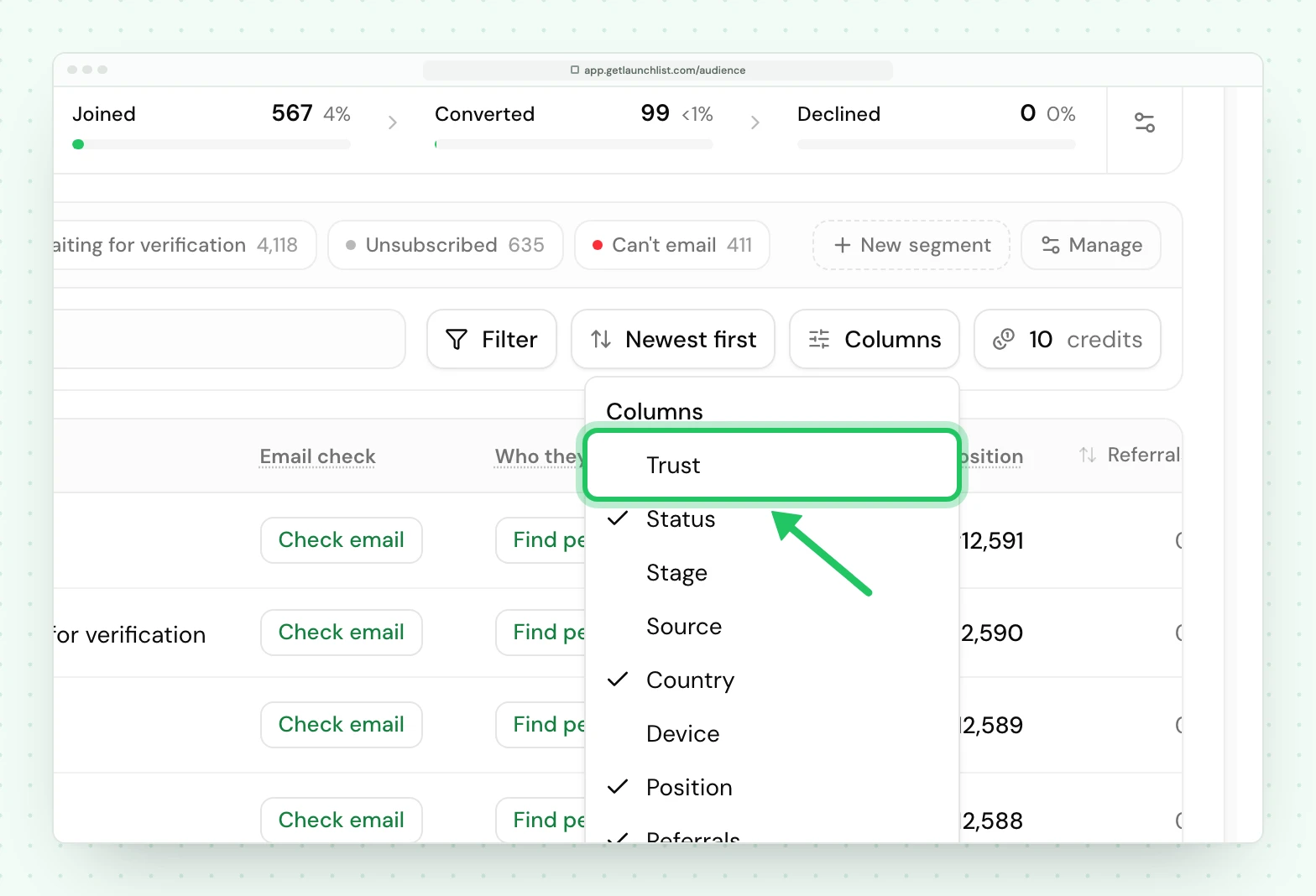
The Trust column is off until you switch it on in Columns -
Start with Fake, then Risky, ordered by signup time. Floods arrive in bursts, so they cluster.
-
Check the held signups too, with Review on the "held for review" line above the table. A real flood usually fills it.
-
Spot-check a handful. Look for near-identical addresses, one device, one referrer.
-
Select and remove them in bulk.
Removing contacts frees your contact count immediately, so real contacts hidden past your size reappear from that moment on. A flood never adds to your bill: there is no charge for extra contacts, only a size you choose to move up to.
What never happens#
Signups are never refused because of your plan. Capture is unconditional. Going past your plan size is a plan question, never a capture one: contacts past your size are saved but hidden until you move up a size, on every plan, and they are never rejected or deleted. A launch going better than expected must never cost you signups.
Nothing is deleted automatically. A bad verdict never removes anybody. The worst that happens to a suspicious signup is that it waits in the held-for-review queue for you, and even a refused submission is refused at the door rather than deleted afterward. The verdict informs you; the decision stays yours.
Next#
- How referrals work: why credit waits for verification
- Importing and exporting: bringing a list in cleanly
- Verification email: turning it on and troubleshooting delivery
Common questions
How do I stop bots from signing up to my waitlist?
Layered defenses run automatically: rate limiting, disposable address detection and device clustering, plus an optional captcha. A high enough score holds a signup for your review instead of letting it into your audience. Email verification, which is on by default, is the single biggest lever, since it makes a fake signup cost a working mailbox.
What does the trust verdict on a contact mean?
It is one derived judgment about whether a signup is a real person, combining deliverability, the address itself, device clustering and behavior into a single tier: Verified, Valid, Unknown, Risky or Fake. Unknown is an honest "not enough checked yet", which is where an imported or non-email contact starts.
Do fake signups count toward my plan size?
Only until you remove them. Removing them frees your contact count straight away, so any real contacts hidden past your size reappear. There is no charge for extra contacts, so a flood never adds to your bill, and signups held for review never count at all.