

Automations
Flows that run themselves. Someone joins, a referral lands, launch day arrives, and the right emails and steps fire without you touching anything.
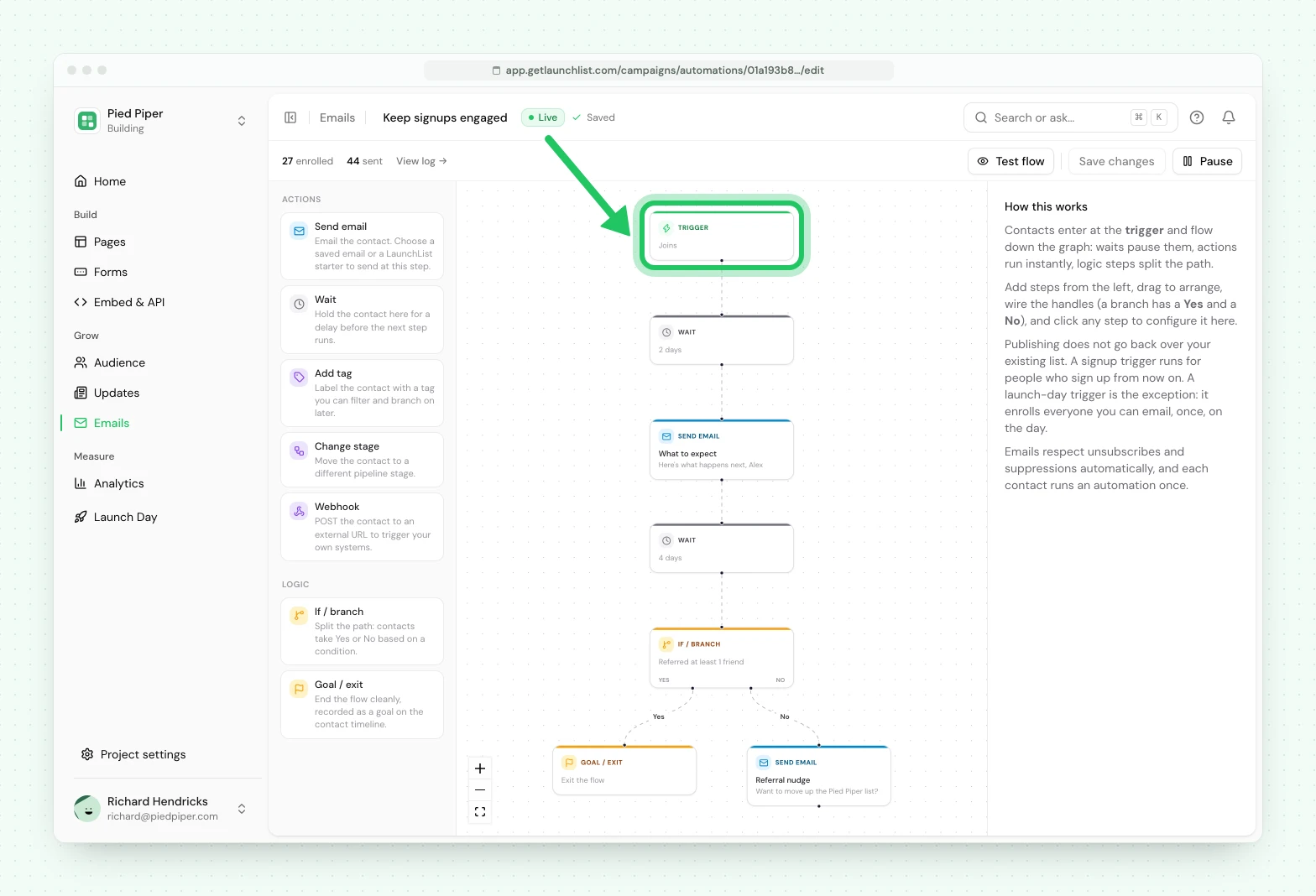
An automation is a flow that runs itself. Where a broadcast is one email you send now, an automation waits for something to happen and then walks each contact through a series of steps, on their clock rather than yours. You build it on a canvas: one trigger at the top, then waits, sends and branches flowing down from it.
Automations are available on the Launch and Grow plans, and that includes automatic invites, such as inviting someone when they reach 3 referrals or on launch day. On Free and Collect you can build and preview an automation, but publishing it needs Launch or higher. If a workspace moves to a plan without automations, every running flow pauses, including steps that do not send email, and picks up again when the plan includes them.
Automation emails count toward your monthly email allowance. When the allowance runs out, email steps wait rather than send, and continue on the 1st of next month or as soon as you add emails. Steps that do not send email keep running, and nothing is ever charged automatically.
What starts a flow#
Every automation begins with exactly one trigger:
| Trigger | Starts the flow when |
|---|---|
| Joins | Someone joins on their own: they sign up through a form, your site or the API, or they come back after unsubscribing |
| New signup | Every signup, the moment it happens, including someone already signed up who signs up again. For steps that do not email |
| Referral credited | A referral is credited to someone. Can be narrowed to fire only at N referrals |
| Stage changed | A contact moves through your funnel |
| Survey answered | A contact completes a survey |
| Launch day | A fixed offset before your launch date, or on the day itself |
Who the emails go to#
Everyone who joins is subscribed, but not everyone has verified their email. The trigger step has a Send its emails to choice, the same three as on a broadcast:
- Verified email: only people who verified. A new signup who has not verified yet is held, not skipped. The step waits until they verify, or until their verification link expires. If they never verify, the email is skipped and the contact's history says why.
- Waiting for verification: only people we sent a link to verify their email who have not clicked it yet. Anyone who has verified is skipped, and so is anyone who was never sent a link (a form that does not ask, the API, an import): their history says "Never asked to verify".
- Verified or not: everyone subscribed, verified or not, including people never asked to verify.
A new automation starts on Verified email when every form in the project asks people to verify, and on Verified or not otherwise. Invitations have no choice: they go to the person you invite.
The steps you can add#
| Step | What it does |
|---|---|
| Wait | Pause for an amount of time before the next step |
| Send email | Send an email, chosen from your Library or a LaunchList starter |
| Add tag | Tag the contact |
| Change stage | Move the contact through your funnel |
| Webhook | Call your own URL with the contact |
| If / branch | Split the flow yes/no on a condition |
| Goal / exit | The exit that marks this contact as done |
Branching#
An If / branch step tests something real about the contact and sends them down the matching path. The conditions are Email is verified (they proved it is theirs, which is not the same as subscribed), Has a tag, Is in a stage, Referred at least N, Is at an invite state (where they stand on early access), Had an email bounce, and Received a broadcast.
A branch on Is at an invite state tests the same standing you see on a contact's profile: waiting on a live code, got in, never arrived (their code was sent but bounced or was marked as spam), expired, revoked, or never invited. A branch on Received a broadcast picks one or more already-sent broadcasts and asks whether the contact is in either the "received" or "did not receive" side of that.
Launch day#
The Launch day trigger fires relative to your project's launch date, which you set under Project settings → General → Launch date. The offsets you can pick are On launch day, 1 day before launch, 3 days before launch, 1 week before launch, 2 weeks before launch or 3 weeks before launch.
There is no after-launch offset. For a last call the day after you go live, use a launch-day trigger followed by a Wait step, which is exactly how the built-in Launch day starter flow is put together.
When it fires, a launch-day flow enrolls your whole subscribed audience at once, and it fires only once.
Status and the send gate#
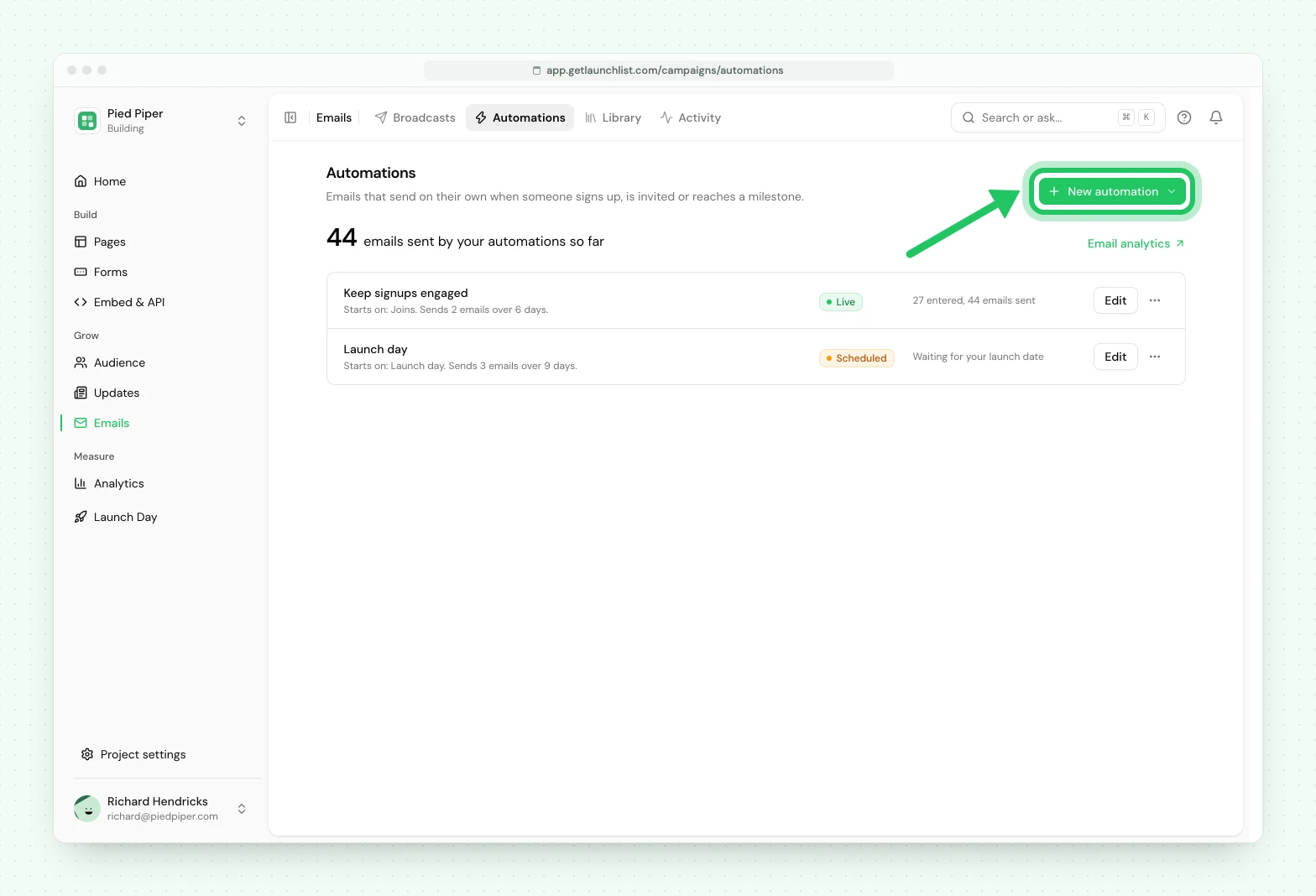
An automation is a Draft until you press Publish, and then it shows as Live. You can Pause a live one and Resume it later, or Delete it. A launch-day flow that is live but still waiting for its moment shows as Scheduled. Only a live automation enrolls anyone.
Whatever a flow does, the send gate is unconditional: an email step skips anyone who is not subscribed, along with anyone unsubscribed, bounced or who marked a previous message as spam, exactly as a broadcast does, and anyone the flow's Send its emails to choice leaves out.
Automation emails share one hourly limit with your broadcasts while your first emails go out gradually. A step that reaches the limit waits for the next hour rather than being skipped. See broadcasts.
Automations live under Emails → Automations. Press New automation to start one, and Test flow to walk a contact through it before you publish.
Next#
- Broadcasts is one send to a segment, right now
- Segments are the cohorts a branch can test against
- Webhooks covers what a webhook step calls
Common questions
What is the difference between a broadcast and an automation?
A broadcast is one email you send to a segment now. An automation is a flow that runs itself whenever an event happens, such as a person joining, a referral landing, or launch day arriving, so each contact moves through it on their own schedule rather than yours.
Do I need a paid plan for automations?
Yes. Automations run on the Launch and Grow plans. On Free and Collect you can build and preview one, but publishing it needs Launch or higher.
Will an automation email someone who has not verified their email?
That is your choice. Everyone who signs up is subscribed, so an automation can email them whether or not they verified. Each automation has a Send its emails to choice on its trigger step, with three options, Verified email, Waiting for verification (people sent a verification link who have not clicked it) or Verified or not, the only one that reaches people never asked to verify. It starts on Verified email when every form asks people to verify their email, and on Verified or not otherwise. A flow set to Verified email holds a new signup until they verify, or until their link expires.
Does a contact go through the same automation twice?
No. A contact enrolls in an automation once. Re-entry, meaning running the same person through again on a later event, is not available yet.