

Early access
Let people off your waitlist and into your product, one at a time, with a shared code, or an open link. The invite side of the funnel.
Early access is how you let people off your waitlist and into your product. A referral grows your audience; an invitation opens the door. It is the moment a signup becomes a customer, so it is worth doing in a way that is controlled, trackable, and hard to game.
The Invites tab#
Audience → Invites is where you run it. Each person you invite gets an email with their own code, and the tab shows where every code stands in one of two words: used or not used yet.
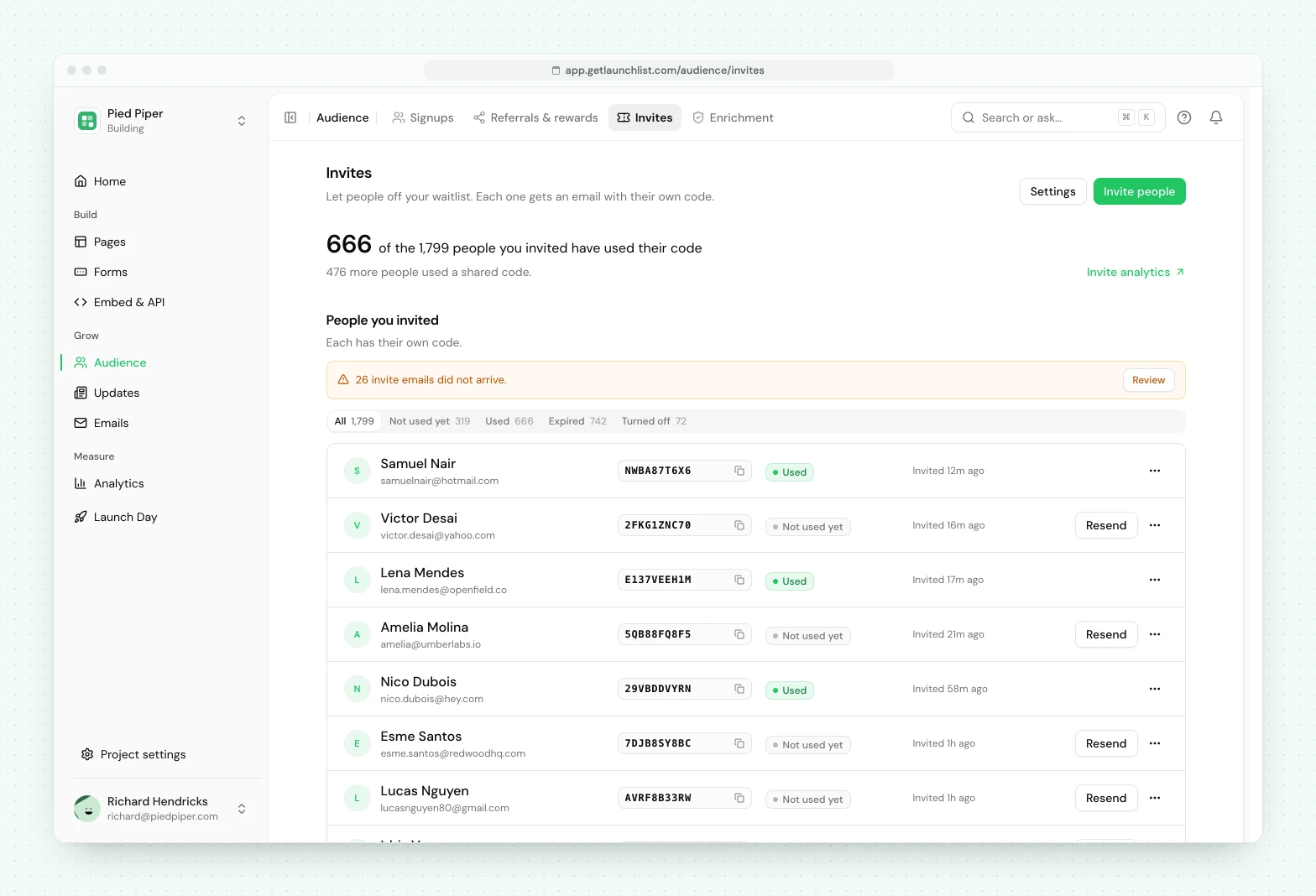
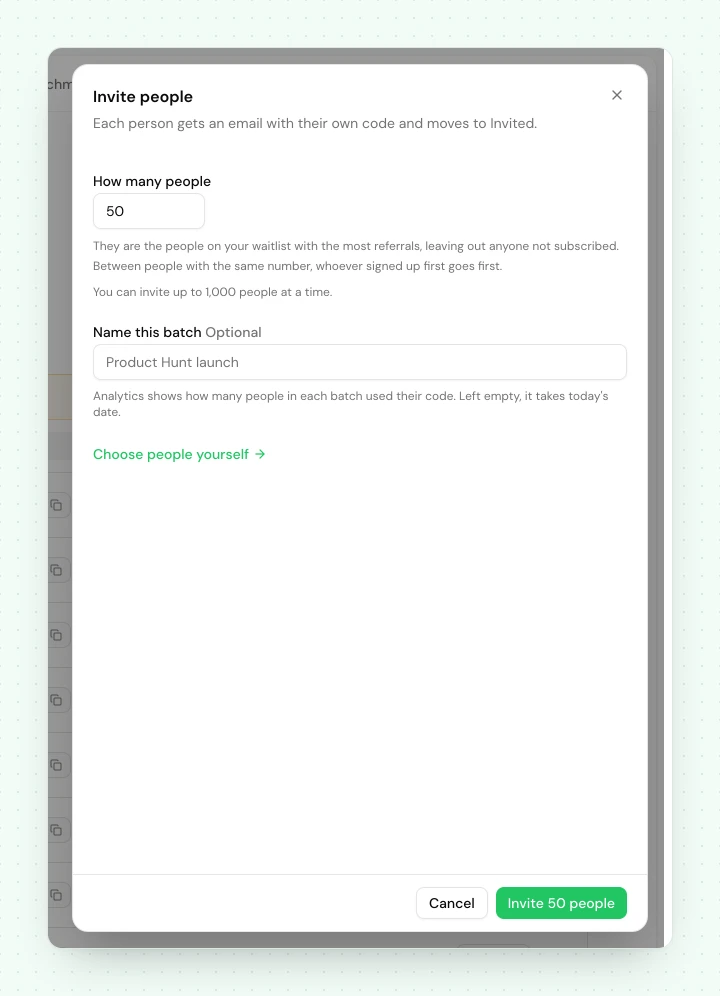
- Before you invite anyone, the tab shows how invites work and one button, Choose who to invite. After that the same dialog opens from Invite people. Enter a number and it invites that many subscribed people from your waitlist, the ones with the most referrals first and, when referrals are equal, whoever signed up first. Choose people yourself opens Signups, where you pick people and choose Invite. One batch holds up to 1,000 people.
- A large batch takes a minute or two. Past 50 people, the invites are sent in the background. The tab shows how far it is ("Inviting: 420 of 1,000"), you can leave the page, and a notification tells you what was sent when it is done. One large batch runs at a time.
- You can stop a large batch. Press Stop beside the progress line. People already invited stay invited, and the rest stay on your waitlist, where Invite people offers them again.
- Once people are invited, the tab opens with how many of them have used their code, then lists them. Each row carries the action that fits it: Resend for someone who has not used their code, Copy code when the email bounced or could not be sent, and Invite again when a code expired or you turned it off.
- Mark as used is in a row's menu, for when you know someone used their code and nothing told us. Turn off this code is there too: the code stops working right away and the person goes back to the waitlist.
- Shared codes sit under the list. Open one to see who used it.
The filters above the list are where a code stands: Not used yet, Used, Expired and Turned off. Everyone you invited is in exactly one. If an invite email bounced, or we could not email someone their code, a line above the list says how many and Review shows them.
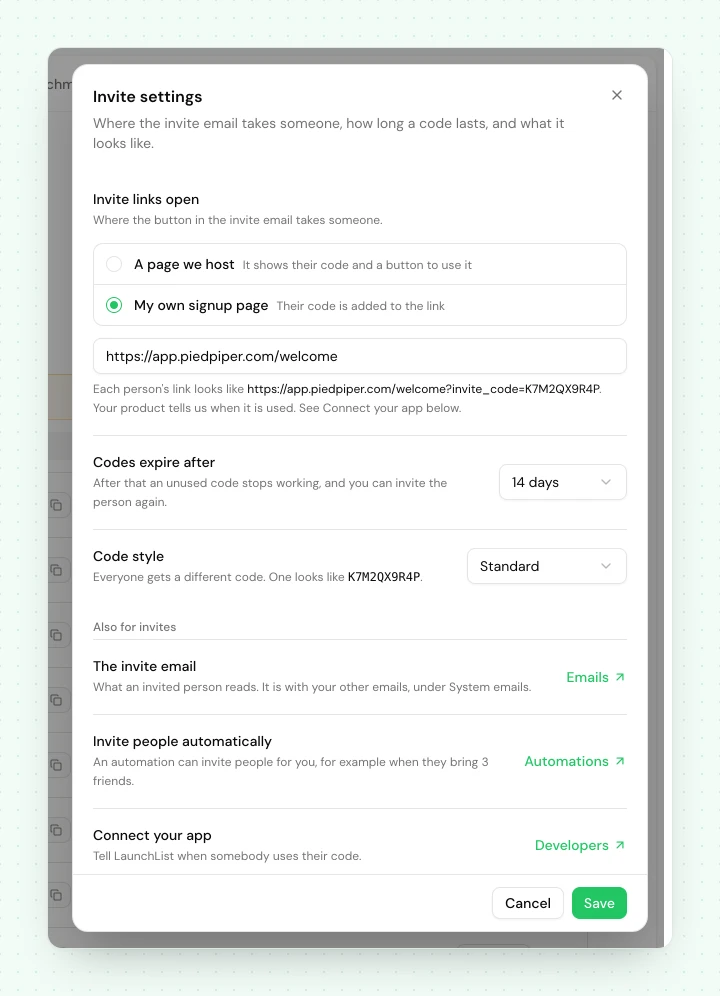
Settings, beside the heading, opens Invite settings, which holds three things: Invite links open (a page we host, or your own signup page), how long a code lasts, and what a code looks like.
Two things live elsewhere, and the tab links to both. Analytics → Invites has the totals and how each batch you invited did. Embed & API → Developers → Invites has the call your product makes when an invited person signs up. It appears there once you send invited people to your own signup page.
A code counts as used when someone presses the button on the page we host, when your product tells us, or when you mark it yourself. If invite links open your own signup page and your product has not been connected yet, everyone shows as not used yet until it is, and the tab says so.
Three kinds of invitation#
| Kind | What it is |
|---|---|
| Personal | One person, one use. Redeeming needs the code and the address it was sent to. |
| Shared | One code with a seat limit, for a launch post, a partner, a community. |
| Open link | A code that skips the waitlist. Anyone who redeems it joins straight away. |
Personal invitations work on every plan, one at a time or in batches. Free includes invites for your first 100 beta users; Collect, Launch and Grow are unlimited. Every code you already sent keeps working whatever your plan.
Branded invite codes, meaning shared codes, open links, your own code strings and domain restriction, need Launch or Grow. So do automatic invites, where an automation invites people for you, for example when they reach 3 referrals or on launch day. If a workspace moves to a plan without them, codes already issued keep redeeming, and new codes use the standard format.
Personal: invite a named contact#
Pick a contact and invite them. This is the same thing as moving them to your invited stage, and it is safe to repeat: inviting the same person twice reuses their live invitation rather than minting a second. Best for a hand-picked rollout, a few people at a time.
Shared: one code, many seats#
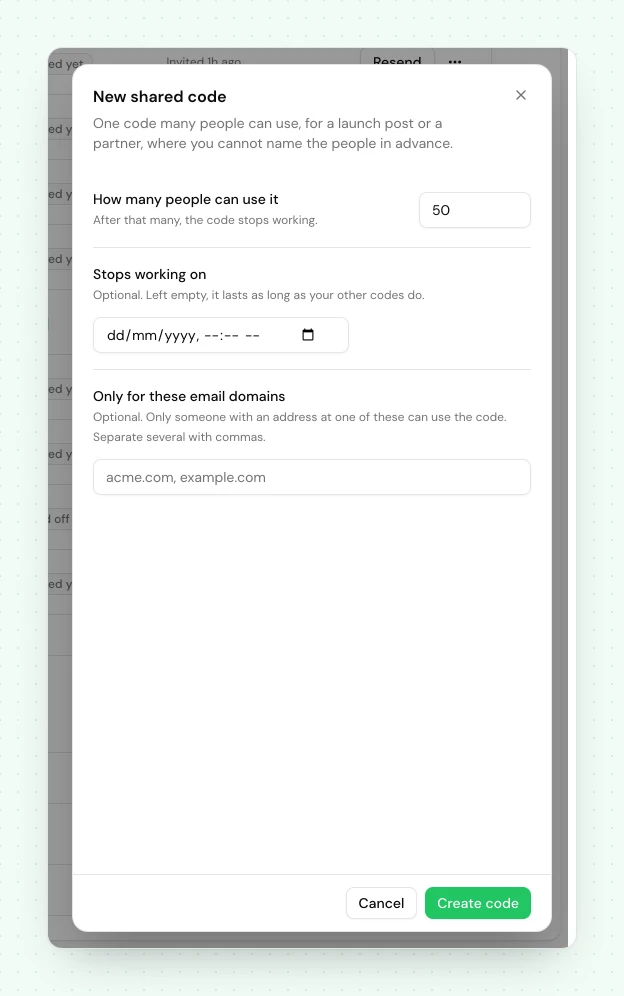
Press New shared code under the list and hand the code out, in a launch tweet, to a partner, in a
community. A shared code must carry a limit, How many people can use it, so it stops working
after that many redemptions. You can also set Stops working on, and restrict it with Only for
these email domains so only, say, @yourpartner.com addresses can use it.
Open link: skip the line entirely#
A code that admits anyone who redeems it. Use it when you are ready to open the doors and no longer need the waitlist as a gate. The dashboard makes personal and shared codes, so you create an open link through the API. It must carry an expiry: it ends up in a Slack channel, a screenshot and a blog post, so a permanent one is an incident waiting to happen. Your product still reports each redemption, as it does for a shared code.
Controls that keep a code from being abused#
- Seats: required on a shared code. It stops working once they are used.
- Expiry: required on an open link, optional everywhere else. The code stops working after the date you set.
- Allowed domains: restrict who can redeem to specific email domains.
- Turn off a code: stop a code at any time ("Turn off this code" in the dashboard,
revokein the API). Turning off a personal invitation steps that contact back to the waitlist, and you can invite them again for a new code. - Invite again: someone whose code expired gets a new code and a new email from their row. To do it for everyone, choose the Expired filter and press the button that reads Invite all N again: it invites up to 1,000 people a run, the most recently invited first. Selecting invited people on Signups and choosing Invite does the same for the ones whose code expired. Someone whose code still works keeps it and is not emailed again, and the message after each invite says how many of each there were. Someone who already joined is never moved back by a batch: they are left out and counted.
How an invite moves someone through your funnel#
Accepting an invitation walks a contact along the stages you already have: waitlist → invited → joined. Because every invitation runs through the same controlled path, your stage counts, history and automations all stay in step. An automation can trigger when someone is invited, or when they redeem and join.
You can also let your systems react in real time with the invite.issued, invite.redeemed,
invite.revoked and invite.expired webhooks.
Where the Claim button sends people#
Every invited person gets a private status page with a Claim access button and their code. When
you have set a signup page, pressing Claim marks the invite used and sends them straight there with
their code attached as ?invite_code=. Your product reads the code from the link and sends it to us
with the address the person signed up with, which needs only a read-only API key. A product that does
not pass the code through can tell us the person signed up with their address alone instead, and that
call needs a key that can issue and revoke invites. With no signup page set, the page shows the code and instructions instead, which is all an
invite-code product needs. Either way the code keeps working if someone types it in by hand, so a
person who copies it from the page and signs up later still gets in.
If you run your own product and want us to hand over the person's verified identity rather than just the code, register a callback and switch on the verified handoff. That path is for teams with a backend to receive it; most founders want the code link above, which needs no setup.
Running it from code#
Everything here is available over the API: mint codes, redeem them from your own signup flow (in one idempotent call), confirm a code was used, and reconcile the list. See the invitations API reference.
Next#
- Pipeline stages: the funnel an invite moves people through
- Invitations API: early access from your own backend
- Webhooks: the four
invite.*events
Common questions
What is the difference between an invitation and a referral?
A referral is someone bringing a friend in. An invitation is you letting someone off the waitlist and into the product. Referrals grow your audience; early access is how you open the door.
Do I need a paid plan to invite people?
No. Personal invitations, one at a time or in batches, work on every plan. Free includes invites for your first 100 beta users, and Collect, Launch and Grow are unlimited. Branded invite codes (shared codes, open links, your own code strings and domain restriction) and automatic invites need Launch or Grow.
What happens to someone after they accept an invite?
They move from the waitlist to the invited stage, and to joined once they redeem. It is the same funnel your stages describe, so your counts and automations stay in step.