Waitlist Marketing Strategy: The 7 Rules Your Waitlist Runs On
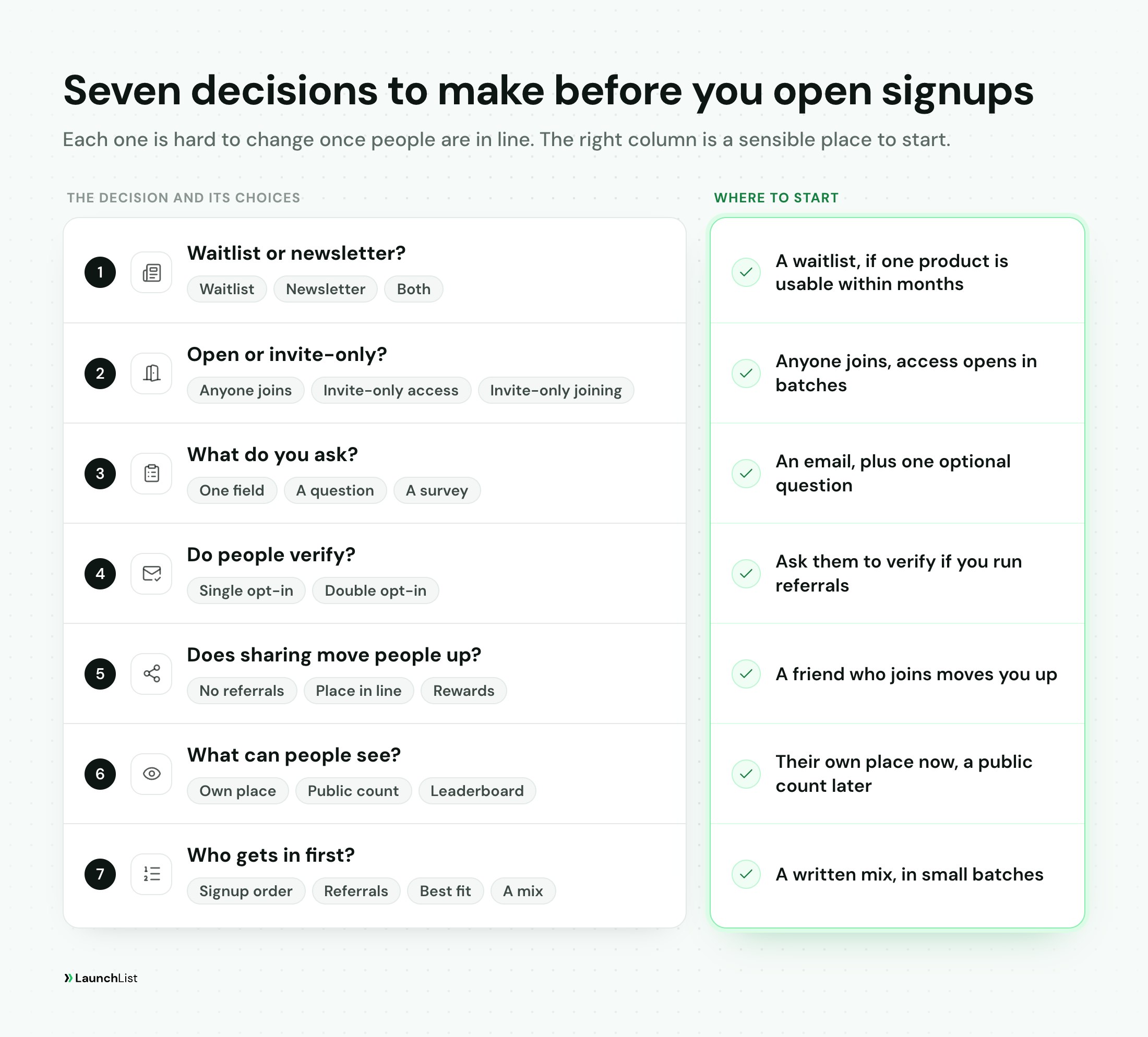
TL;DR: A waitlist marketing strategy is the set of rules your waitlist runs on. Decide them before anyone signs up, because most of them are unfair to change once people are in line. Make these seven calls:
- Waitlist, newsletter or both. A waitlist if one product will be usable soon, a newsletter if you are still building an audience around a topic.
- Open or invite-only. Let anyone join and make access the scarce part, and only as scarce as it really is.
- What to ask. An email address and at most one question. Ask the rest after they join.
- Verify or not. Ask people to verify their email if you run referrals or will email the list often.
- Referrals. A friend who really joins moves people up, and the first reward is easy to reach.
- Show the line. Show each person their own place. Add a public count once it helps you.
- Who gets in first. Write the order down and let people in small batches, starting earlier than feels comfortable.
This guide covers the rules. The calendar around them, meaning your goal, launch date, how long to run and what to send each week, is in our waitlist campaign guide. Where the form should live is in hosted waitlist page vs embedded widget. Sources were checked on November 9, 2026.
What a waitlist marketing strategy is, and why you decide it first
A waitlist looks like a form. The strategy is everything the form implies: who can join, what joining costs them, what they get for sharing, what they see afterward and how the line turns into customers.
Each of those choices changes who signs up and how they behave. That is why they come first. Switch from signup order to referral order after a few hundred people have joined, and the person who joined on day one and shared nothing drops back without being told why. Add a verification step halfway through, and your early and late signups are no longer comparable. The people in line took your rules as a promise.
The seven decisions fall into three groups. One comes first: whether you need a waitlist at all. Three are about the door: who can come in, what you ask and whether people verify. Three are about the line: referrals, what people can see and the order you let them in.
1. Waitlist, newsletter or both?
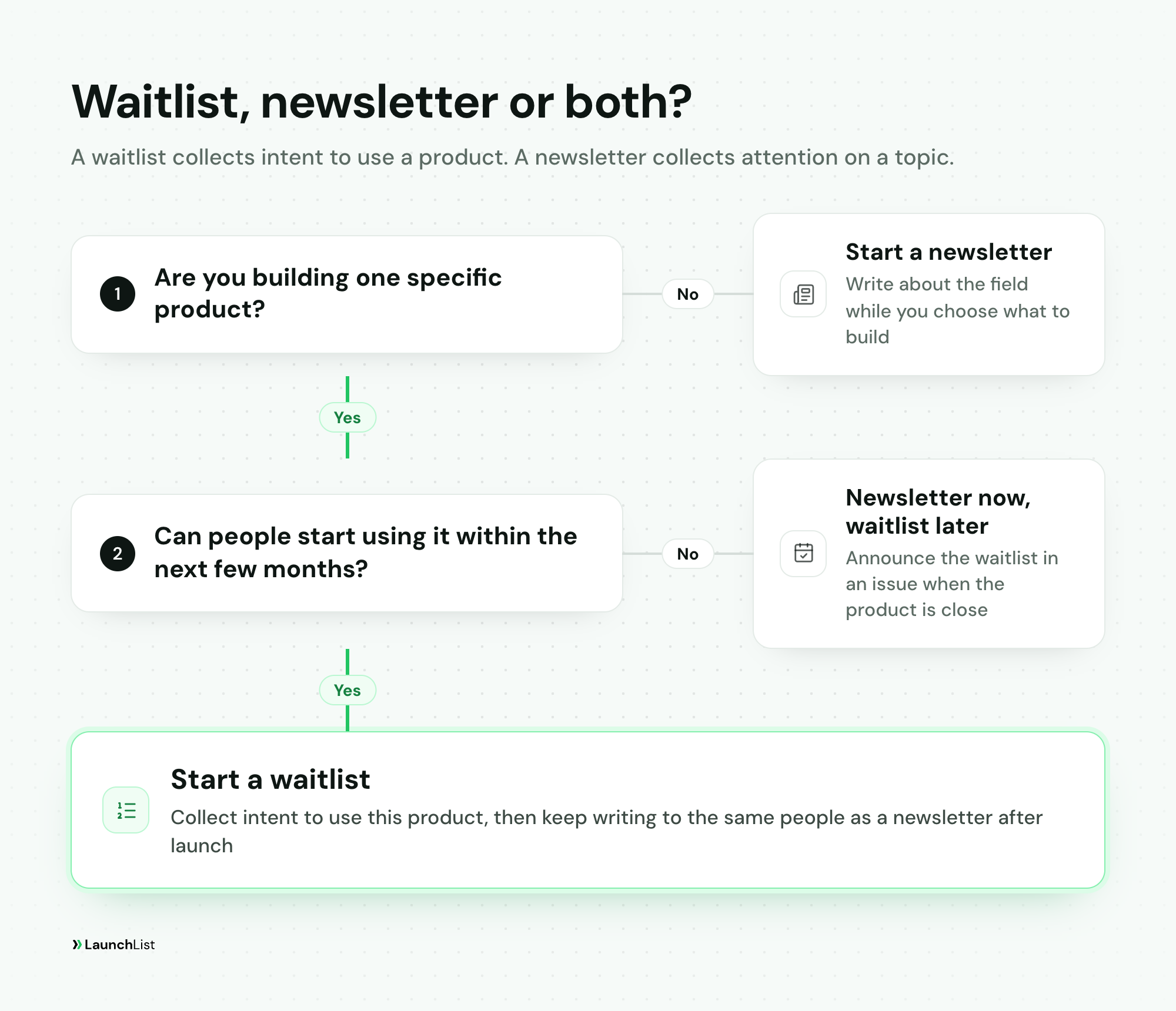
A waitlist collects intent to use a product. A newsletter collects attention on a topic. The difference shows in what you owe the people on it. A waitlist owes them one thing: you will let them in, and you will tell them when. A newsletter owes them something worth reading in every issue, for as long as it runs.
Start a waitlist when:
- you are building one specific product, not exploring a space;
- people will be able to use it within months, not years;
- what you need to learn is whether people want this, and who they are.
Start a newsletter when:
- you are still choosing what to build, and writing about the field is how you find out;
- your advantage is what you know about a field, and the product comes later;
- the product is more than a year away, and a list that waits that long with nothing to read forgets why it joined.
Do both, in order, when you have a product coming and a topic you can write about. The waitlist comes first because it has the sharper question. After launch, the same people can keep hearing from you as customers and readers. A newsletter can also host a waitlist later: one issue announces the product, and the readers who want it join the waitlist.
If you are not yet sure people want the product, the waitlist itself can be the test. Our guide to what to do once you have an app idea shows how to run one for two weeks with a signup number set in advance.
2. Open to everyone, or invite-only?
"Invite-only" can mean two different things, and most waitlists only need one of them.
- Invite-only access. Anyone can join the list, but the product opens a batch at a time. This is the normal waitlist, and it is the default to start from.
- Invite-only joining. You need an invite even to get on the list. This makes sense only when the product's value depends on who else is in it, such as a small community or a two-sided marketplace that must stay balanced.
Scarcity is the reason invite-only works, and it only works when it is true. Daniel Priestley built a whole launch method on real limits, which we apply to a waitlist in the Daniel Priestley waitlist strategy. When Google announced Gmail on April 1, 2004, it said that "a handful of users will begin testing the preview version". The limit was real: it was a preview, and it came with far more storage than other free webmail of the time. Real limits you can name include seats you can onboard by hand, support hours, server capacity or a batch size you need to learn from.
What breaks trust is a limit that is not real: "only 100 spots left" on a page that has said it for three months, or a countdown that resets. People notice, and the ones who notice first are the ones most likely to share.
What to say on the page: the limit and the reason, in one line. "We're letting people in 25 at a time so we can set each team up by hand" gives people something to believe and something to wait for. "Coming soon" gives them neither.
3. What to ask at signup
Every field you add costs signups, so the form should ask for what you need to reach people and nothing else. For most waitlists that is one field: an email address. If you will reach your audience another way, by phone or a username, ask for that instead.
Then decide whether one more question earns its place. A question earns it when the answer changes what you do: who you invite first, which feature you build next or which group you write to. Good examples:
- "What do you use for this today?" tells you who you are replacing and how they talk about the problem.
- "What's your role?" lets you invite the people you are building for before the curious.
- "How many people on your team would use it?" separates a solo user from a team you could sell to.
Make the question optional, and ask the rest after people have joined. The thank-you page and the first email are better places for a short survey, because the person is already in and has a reason to answer. In LaunchList, a survey can sit on each signup's status page, where they answer as themselves.
Leave out anything you would not act on. A long form also makes it more tempting to buy or scrape a list later "to fill in the gaps", which is the opposite of what a waitlist is for.
4. Should people verify their email?
There are two ways to run the door:
- Single opt-in. People are on the list the moment they submit the form.
- Double opt-in. People also click a link in an email to verify their address.
In both cases joining is the decision to be on your list. Verifying proves something different: that the address is real and belongs to the person who typed it.
What verification gets you. Referral counts cannot be inflated with made-up addresses, because a referral can wait until the friend verifies. Fewer of your emails bounce, which matters because mailbox providers judge you on what happens to what you send. Google's email sender guidelines require every sender to Gmail to authenticate its mail and to keep spam rates reported in Postmaster Tools below 0.3%. A list full of typos and throwaway addresses works against both.
What it costs. Some people never click the link, so fewer of your signups will be verified than joined. Those people are still on your list. You decide whether your broadcasts go to everyone or only to verified addresses.
A simple rule: ask people to verify if you run referrals, or if you will email the list more than a couple of times before launch. You can skip it for a short list of people you already know, such as a beta for your existing customers.
Whether the law where you sell asks for more than this, for example a record of consent, is a question for a lawyer, not a blog post. Verification gives you a dated record that the address belongs to the person who signed up, and that is a sensible place to start.
5. Referrals: should sharing move people up?
A referral program gives every signup a personal link. When a friend joins through it, the person who shared moves up the line, earns a reward or both. It can turn one signup into several, and it can also turn a waitlist into a game of farming fake accounts if it is set up loosely.
Run referrals when a better place in line or a reward actually matters to people, which usually means access is scarce or the reward is something they want. Skip them when you sell to a few dozen companies and every buyer will get a call anyway.
If you run them, make three choices:
- What counts as a referral. A friend who joins and is real. With verification on, a referral counts when the friend verifies, not when they submit the form. Self-referrals and bursts of signups from one place should not count at all.
- What moves people up. A friend who joins should be worth more than a small action like following you on social media. If both earn points, keep the gap large, or the line fills with people who followed you and told nobody.
- What people earn. A better place in line costs you nothing. A reward costs you something, so make it one you can hand out: early access, a founding-member price, merch or a call with you.
Harry's, the shaving brand, ran one of the best-documented prelaunch referral campaigns. Its team wrote up how it gathered nearly 100,000 email addresses in one week with a page whose one clear message was "Invite Friends and Earn Product." Two of its lessons still apply: make rewards tangible, and make the first tier easy to reach. Its first prize was a free shave cream. Seven more programs, from PayPal to Monzo, are in our referral program examples. How to build the full program is in our waitlist referral program guide, and how to measure whether it spreads is in our viral coefficient guide.
6. Do you show the line?
There are three things you can show, and each is its own decision.
- Each person's own place. "You're number 412." This is what makes a referral program feel worth it, because people can see the number move when a friend joins. If you run referrals, show it. If you do not, a fixed place can still tell people roughly when they will get in.
- A public signup count. "3,240 people are waiting." A large number is a reason to join. A small one does the opposite, so add the count once the number helps you and leave it off before that.
- A public leaderboard of top referrers. It gives your most active sharers a reason to keep going. Show only what people agreed to have shown, and decide in advance what happens to someone who games it.
A countdown to the date the first batch opens works the same way as scarcity: it helps when the date is real and hurts when it slips. Use one when you are confident in the date, and change it in the open if you have to.
7. Who gets in first, and when?
This is the decision people care about most, because it decides when they get what they signed up for. Pick one rule, write it on the page before anyone joins and stick to it.
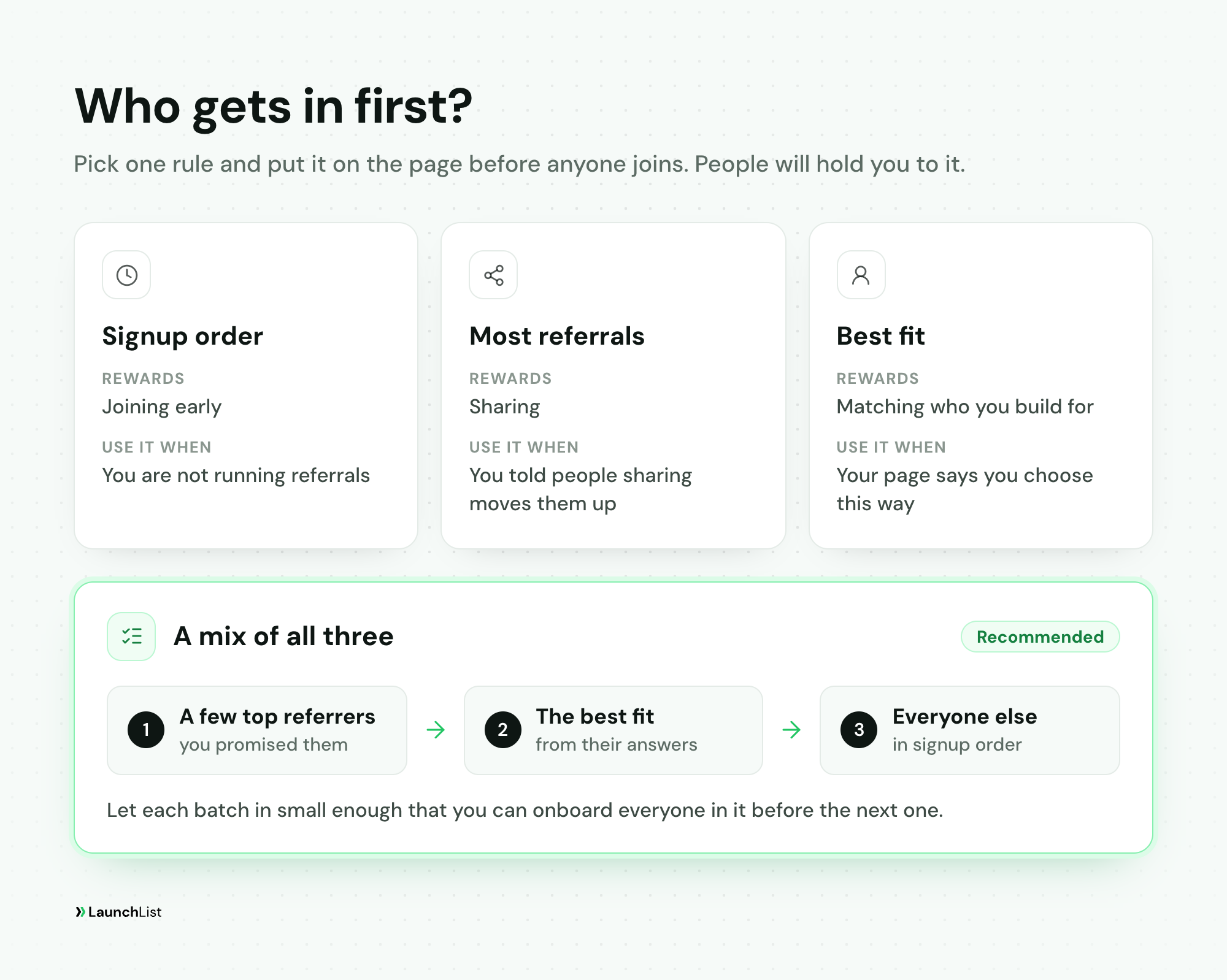
- Signup order. Simple and fair, and it rewards joining early. Use it when you are not running referrals.
- Most referrals. Required if you told people sharing moves them up. Robinhood's waitlist ran on this rule. Break ties by signup order, so that sharing nothing still leaves someone ahead of everyone who joined after them.
- Best fit. The people whose answers match who you are building for. It gets you the most useful feedback, but you must say on the page that you choose this way, or it looks like favoritism.
- A mix. A few top referrers first, because you promised them, then the best fit, then everyone else in signup order. This is the one we recommend, and it works when the page explains it.
Let people in small batches. A batch should be small enough that you can onboard everyone in it and fix what breaks before the next one. Each batch also gives you a moment to email the rest of the list with a real update.
Start before the list feels big enough. You are ready for a first batch when the product does its main job, you can support the people in it, and there is something you need to learn from real users. Waiting for a bigger number mostly makes the oldest signups colder. A first batch of 20 people who use the product teaches you more than another month of signups. How to run access as a program, from the invite email to feedback calls, is in our guide to running an early access program, and turning those people into paying customers is in how to convert a waitlist into paying customers.
Write the strategy down on one page
Seven sentences are enough, and the page your signups see should say most of them. Here is an example for a fictional product, a bookkeeping app for freelance designers:
| Decision | Our call | What the waitlist page says |
|---|---|---|
| Waitlist or newsletter | Waitlist: the app is in private testing | "Join the waitlist for early access." |
| Open or invite-only | Anyone joins, access opens in batches of 25 | "We're letting designers in 25 at a time so we can set up each account by hand." |
| What to ask | Email, plus an optional "What do you use for invoices today?" | One field and one optional question |
| Verify | Yes, because we run referrals | "Check your inbox to verify your email." |
| Referrals | A friend who joins moves you up; three friends get you in the next batch | "Share your link. Three friends who join get you in the next batch." |
| Show the line | Own place yes, public count once it passes 1,000 | "You're number 412." |
| Who first | Three-friend referrers, then best fit, then signup order | "Top referrers first, then everyone in the order they joined." |
If a sentence is hard to write, the decision is not made yet. If a sentence is easy to write but you would not put it on the page, ask why.
Mistakes that break a waitlist strategy
- Changing the order after people joined. If you must change it, tell the list what changed and why before it takes effect, and protect the people who acted on the old rule.
- Promising a reward you cannot hand out. Fifty people earning a free year is a cost. Decide the rewards with the budget in front of you.
- Scarcity that is not real. One screenshot of a "last 100 spots" banner a month apart is enough to undo it.
- A long form. Five questions on the signup form ask strangers for effort before they have any reason to give it.
- Counting unverified referrals. It rewards whoever is most willing to type fake addresses, and it pushes honest sharers down.
- A public count of 12. Wait until the number helps.
- Waiting for a bigger list before the first batch. The list does not get warmer while it waits.
How to set this up in LaunchList
Disclosure: LaunchList is our product. It is pre-launch waitlist software for founders, and each decision above is a setting you can change before you share the page.
- The form. One field by default. Add an optional question, or put a survey on each signup's status page so people answer after they join.
- Verification. Ask people to verify their email is a switch on the form, on by default for a new signup form. Everyone who signs up is on your list either way. When you send a broadcast, you choose verified addresses only, people still waiting to verify, or both.
- Referrals. Every signup gets a referral link and a live place in line on their status page. A friend who joins gives 10 points on a new project, and actions you add, such as following you on X, give as many points as you set. With verification on, a referral counts when the friend verifies.
- The line. A signup counter, a referral leaderboard, a milestone bar and a countdown are blocks you can add to your launch page or embed on your own site. Leave them off until they help.
- Who gets in first. Under Audience → Invites, enter a number and LaunchList invites that many people, most referrals first and signup order for ties. Or choose the people yourself, for example the ones whose answers match who you are building for.
The form, verification, referral links, the widgets and personal invites are on the Free plan, which holds 100 contacts. Referral rewards and broadcasts start on the Collect plan. To try the whole setup on a real page, create a waitlist and work through the seven decisions before you share the link.
Waitlist strategy FAQ
What is a waitlist marketing strategy?
It is the set of rules a waitlist runs on, decided before anyone signs up: whether you need a waitlist or a newsletter, who can join, what you ask on the form, whether people verify their email, whether sharing moves them up, what they can see about the line, and who gets in first. The calendar around it (goal, launch date, emails) is the campaign; the strategy is what the campaign promotes.
Should a waitlist be invite-only?
Usually only the access should be. Let anyone join the list, then let people into the product in batches you can handle. Make joining itself invite-only only when the product depends on who else is in it, such as a small community. Either way, the limit has to be real: a cap that never closes is noticed, and it costs you trust.
Should I use double opt-in for a waitlist?
Yes if you run referrals or plan to email the list regularly. Asking people to verify their email stops referral counts being inflated with made-up addresses and keeps bounces down, which protects how mailbox providers treat your emails. The cost is that some people never click the link. On a short, private list of people you already know, you can skip it.
Do I need a referral program on my waitlist?
Not always. Referrals work when a better place in line or a reward actually matters to people, and when you will let people in by that order. They add little for a B2B product with a few dozen possible buyers. If you run one, credit a referral only when the friend's signup is real, and make the first reward easy to reach.
In what order should I let people off a waitlist?
Pick one rule and say it on the page before anyone joins. The common rules are signup order, most referrals, best fit from their answers, or a mix. A mix often works best: a few top referrers first, then the people who match who you are building for, then everyone else in signup order, in batches small enough to onboard.
Should I start a waitlist or a newsletter first?
Start a waitlist if you are building one specific product that people will be able to use within months. Start a newsletter if you are still choosing what to build, or the product is more than a year away and you need an audience in the meantime. Many founders do both in order: a waitlist before launch, then a newsletter to the same people after it.
When should I start letting people in?
When the product does its main job, you can onboard and support a small batch, and there is something you need to learn from real users. Do not wait for the list to feel big enough. A first batch of 20 people who use the product teaches you more than another month of signups.