How to Price a SaaS Product Before Launch
TL;DR: How to price a SaaS product before launch: work out three inputs (the value you create for one customer, what they pay today for the alternative, and your cost per customer at the margin you want), which gives you a floor and a ceiling. Choose the unit you charge by, launch with one or two plans, then ask the people who want the product. Run 5 to 10 willingness-to-pay interviews that ask about current spend instead of "how much would you pay", then send the four Van Westendorp questions to 30 to 50 people on your waitlist. You get a range, not a price: pick a starting point inside it, above your cost floor, and confirm it with real payments before you announce. Below are the steps with a worked example, the tables, a pricing survey you can copy and the email that invites your list to answer it.
SaaS pricing before launch: why price before you ship
Most founders look up how to price a SaaS product once the product is built, and treat price as the last field on a pricing page. SaaS pricing before launch is closer to the first decision. Jason Cohen, who founded Smart Bear and WP Engine, made the case in Pricing determines your business model (2014): at $10 a month you need over 8,000 customers to reach $1 million a year, and those customers still expect support, while at $100 a month 200 to 300 customers can make a very profitable small company. The price decides who you sell to, how you reach them and whether you can afford to.
Pricing is also far cheaper to get right before anyone pays. Madhavan Ramanujam of Simon-Kucher told First Round Review that about 80% of companies in a 2014 Simon-Kucher study left the price discussion to the last minute, and he argues for asking whether people would pay before you build, while they are not yet in a negotiating mood. Before launch, changing your price means editing a page. After launch it means emails, exceptions and churn.
And before launch you have something most pricing guides assume you lack: a list of people who asked for the product. If you have started a pre-launch waitlist, every person on it is a potential respondent who matches your market better than any panel you could buy. The rest of this guide uses that list.
How to price a SaaS product in 7 steps
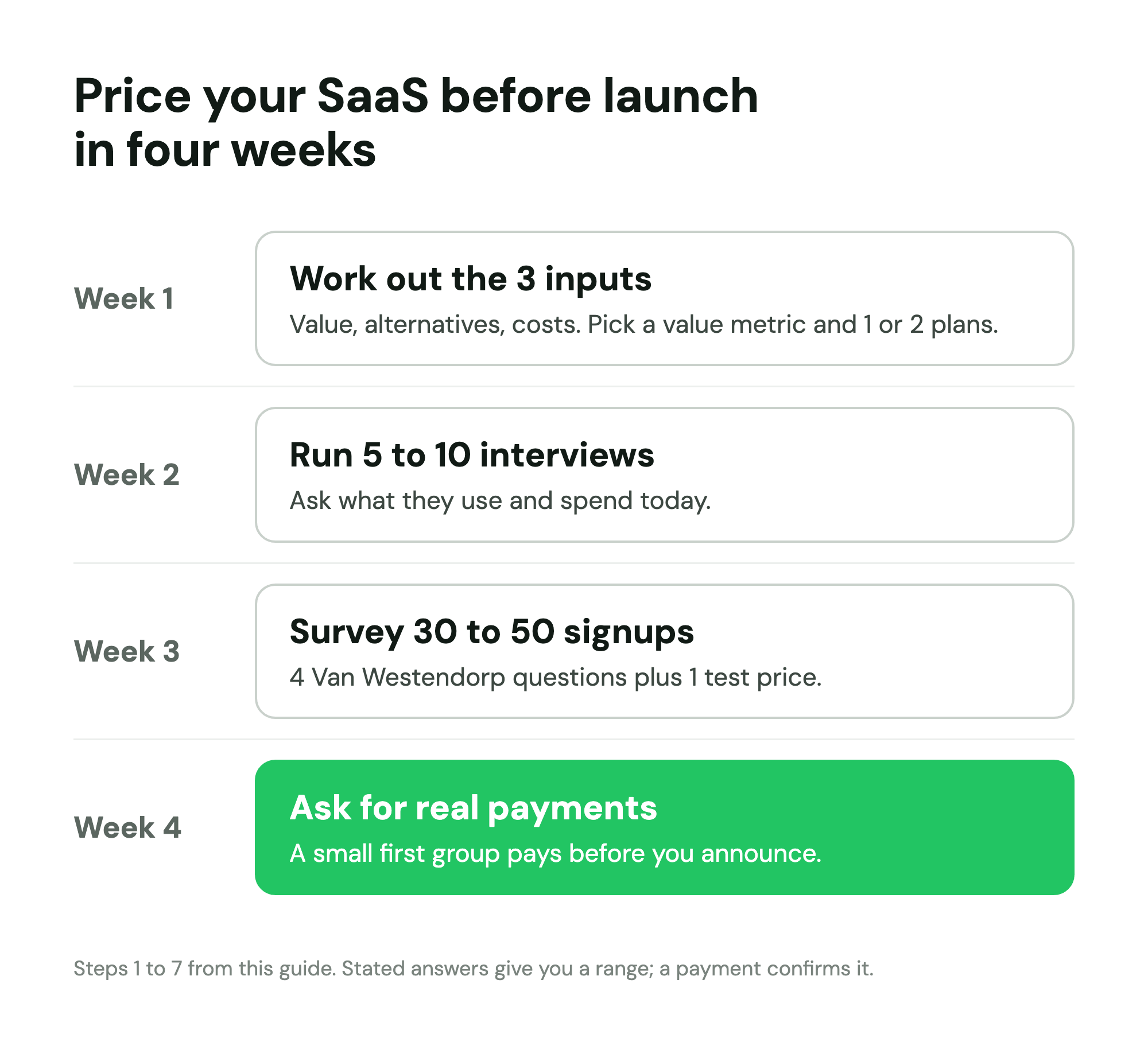
The short version of how to price a SaaS product with real input, in roughly the order you would do it over four weeks:
- Work out the three inputs: value to the customer, the alternatives they pay for now, and your costs at a target margin.
- Choose a value metric: the unit your price scales with.
- Decide how many tiers to launch with: usually one or two.
- Run 5 to 10 willingness-to-pay interviews that anchor on what people spend today.
- Run the Van Westendorp price sensitivity meter on 30 to 50 people from your list.
- Check one or two candidate prices with the Gabor-Granger method.
- Set the billing terms: monthly or annual, free plan, free trial or neither.
Then test the price with real money before you announce it.
Step 1: Work out the three inputs
Every pricing method you will read about is a way of estimating one of three numbers. "How much should I charge for my SaaS?" has no single answer, but these three numbers bound it. Get rough versions of all three before you ask anyone anything.
Value to the customer. What changes for the customer, in money or time, when the product works? Count only what they would agree with: hours saved at what that person costs, revenue they recover, a tool or contractor they stop paying for. This is the ceiling. Nobody pays more than the value they believe they get, and most will want to keep the larger share of it.
The alternatives they pay for now. Very few products replace nothing. Your customers solve the problem today with a competitor, a spreadsheet, a part-time assistant, an agency or their own evenings. What they pay for that is the anchor your price will be judged against, whether or not you mention it. Jason Lemkin's advice in SaaStr's take on early pricing is to price close to comparable products before product-market fit, because buyers already know roughly what software like yours costs.
Your costs and target margin. Add up what one more customer costs you each month: hosting, third-party APIs, email sending, payment fees, and the support time they will need. Then divide by one minus your target gross margin. Software has traditionally run at high gross margins: Martin Casado and Matt Bornstein of a16z put the benchmark for comparable SaaS at 60% to 80% or more, and found AI companies often at 50% to 60%, because model calls cost money every time someone uses the product. If you are building with AI, measure your cost per customer from real usage before you set a floor. This number is the floor: below it, every new customer makes the business worse.
A worked example
Take a made-up product: a tool that chases unpaid invoices for agencies of 5 to 20 people. All numbers below are illustrative.
| Input | How you estimate it | Example result |
|---|---|---|
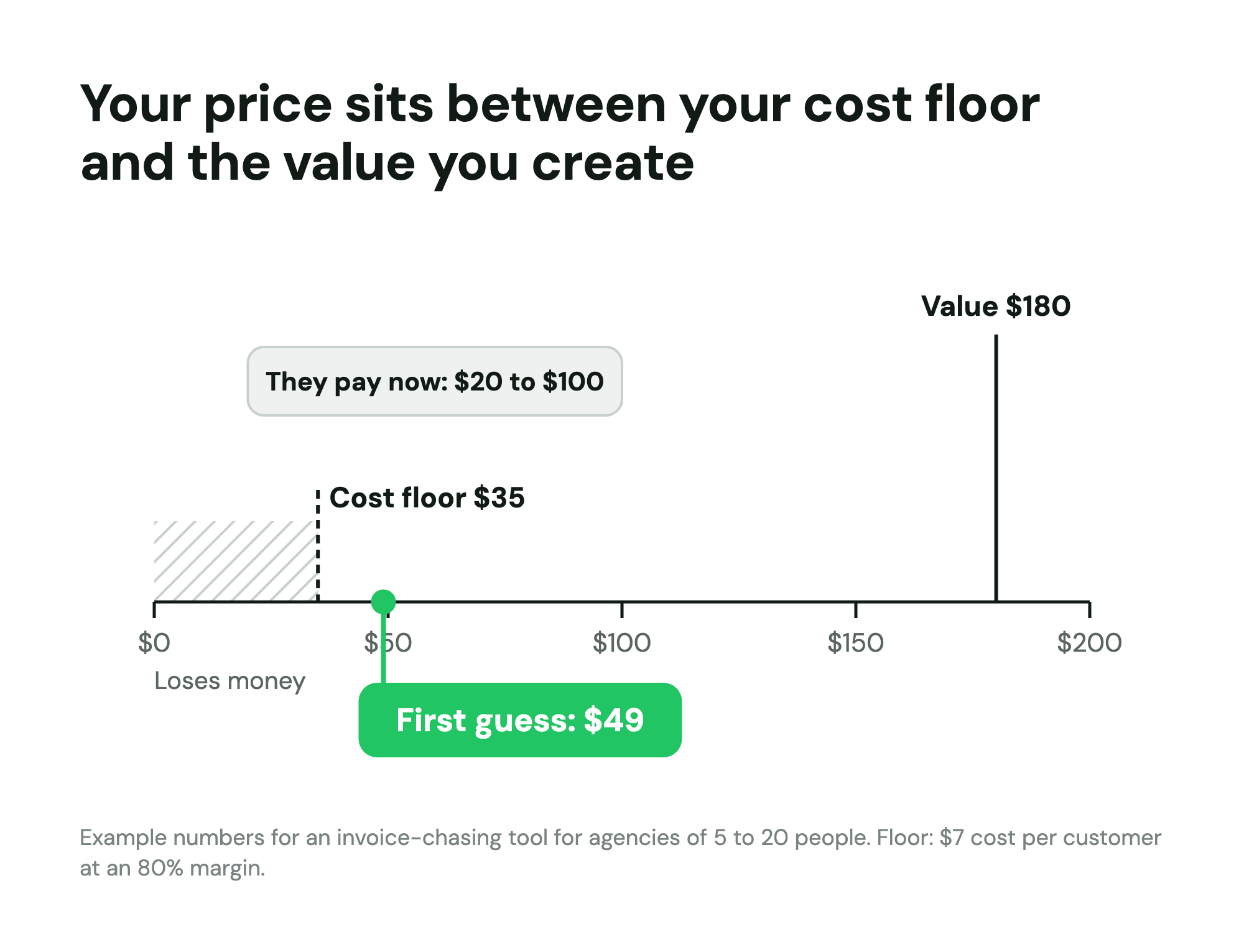
| Value | An account manager spends about 4 hours a month chasing invoices, at about $45 an hour | About $180 a month |
| Alternatives | A virtual assistant for 4 hours at $25 an hour, or a reminder add-on for their accounting software | $20 to $100 a month |
| Costs | Hosting, email and support time of about $7 per customer a month, at an 80% target gross margin ($7 ÷ 0.2) | Floor of $35 a month |
So the price lives somewhere between $35 and $180, and the alternatives say most buyers will judge it against $20 to $100. A first hypothesis of $49 a month sits above the floor, inside the range of what they pay now, and at about a quarter of the value. It is a hypothesis, not an answer. The next steps test it.
A tip for the cost line: if you do not know your monthly costs yet, a startup runway calculator forces you to list them, and the same list gives you the cost per customer.
Step 2: Choose a value metric
A value metric is the unit your price scales with. It matters as much as the number, because it decides who pays more, when bills go up and how predictable they are. Patrick Campbell, the founder of ProfitWell, wrote in a guest post for Lenny's Newsletter that companies pricing on a value metric grew at double the rate with half the churn of those charging a flat fee or by feature tier. That is ProfitWell's own research, so read it as a vendor claim, but the logic holds: when price grows with the value a customer gets, small customers can start cheaply and big ones pay more without a renegotiation.
| Value metric | Example | Good when | Watch out for |
|---|---|---|---|
| Flat price | Basecamp's plans, with no per-user fees | Value does not grow much with team size; you want the simplest possible sale | Big customers pay the same as small ones |
| Per seat | One price per user | Every user gets similar value; buyers budget by headcount | Teams share logins to avoid adding seats |
| Per active user | Slack bills only members who use it | Adoption across a team is uneven | Bills vary month to month |
| Usage | Zapier prices by tasks a month | Value tracks volume closely | Customers fear a surprise bill and ration use |
| Outcome or transaction | A share of each payment processed | You can measure the result and it is clearly yours | Hard to define, and customers dislike paying a share of their own success |
| Size bands | Plans by contacts, projects or records stored | Customers know their size; the bill is predictable | Bands that are too wide push people to the edge of each one |
DHH, co-founder of 37signals, explained why Basecamp avoided per-seat pricing in Why we never sold Basecamp by the seat (2017): per-seat pricing "by definition makes your biggest customers your best customers", and with that money comes influence over the roadmap. Basecamp's pricing page still lists flat plans with no per-user fees (checked 31 October 2026). Slack went the other way and charges per member, but its Fair Billing Policy treats anyone who has not used Slack in over 28 days as inactive and credits the unused part of the bill, which removes the main objection to per-seat pricing: paying for people who never log in. Zapier charges by tasks, counting only work it successfully completes.
Three tests for your value metric:
- Does it grow with value? A customer using more of it should be getting more out of the product.
- Can the customer predict it? If they cannot guess next month's bill, they will hesitate to start.
- Can you measure it cleanly? If you argue with customers about what counted, it is the wrong unit.
Campbell's suggestion in the same post: write down 5 to 10 candidate metrics, then ask customers and prospects which one or two feel fair. You can put that question in your interviews and your survey (it is question 4 in the survey below).
Step 3: Decide how many tiers to launch with
Tiers exist to serve different segments: groups that need different things and will pay different amounts. Before launch you usually know one segment well, the one you have been talking to. Inventing three tiers for segments you have not met means guessing at the fences between them, and every guess is a pricing page decision a customer can be confused by.
| Stage | Tiers | Why |
|---|---|---|
| Before launch, first paying customers | 1 | You are testing whether anyone pays at all, and one price gives the cleanest signal |
| Launch, with a clear second segment in your research | 2 | For example, solo users and teams, when your survey shows they answer price questions differently |
| After a few months of usage data | 3 | Real usage shows where natural breakpoints are, and the top plan gives buyers an anchor |
| Selling to larger companies | 3 plus a "talk to us" plan | Big buyers need procurement terms, security reviews and custom limits |
Two plans is fine at launch when the evidence supports it, and the Superhuman story below shows what that evidence looks like: different buyer types giving clearly different answers to the same price questions. Without that evidence, launch with one plan and a clear way to contact you for anything bigger. Adding a plan later is easy. Removing one means moving customers.
Step 4: Run 5 to 10 willingness-to-pay interviews
Before you send a survey, talk to 5 to 10 people from your list who match the customer you are building for. The interviews do two jobs: they tell you how people describe the value in their own words, which you need to write the survey, and they surface the alternatives and budgets you guessed at in step 1.
Do not ask "how much would you pay for this?", because hypothetical answers run high: a meta-analysis of 28 studies by Murphy, Allen, Stevens and Weatherhead (2005) found stated values a median 1.35 times what people actually paid. Ask about the past and the present instead, and save price ranges for last.
Willingness to pay questions that work
Anchor on what they do and spend today:
- "How do you handle [the problem] today? Walk me through the last time."
- "What do you pay for that now, in money? Roughly how many hours a month does it take?"
- "Who decided to pay for it, and how long did that take?"
- "What else did you try before this, and why did you stop?"
- "If [the problem] disappeared tomorrow, what would you do with the time or money?"
- "What would a tool need to do for you to switch from what you use now?"
Then, near the end, Ramanujam's three range questions from the First Round interview: "What would be an acceptable price for this? What would be expensive? What would be prohibitively expensive?" Ranges are easier to answer honestly than a single number, and the gaps between them show you where demand drops off.
Two follow-ups make every answer more useful. When someone says a price is fine, ask "why would it be worth that to you?", and listen for the value they repeat back. When someone says it is too much, ask "compared to what?", and you learn the anchor they are using. Write down the exact words people use for the value, because they become the wording of your survey and later your pricing page.
Step 5: Run the Van Westendorp price sensitivity meter on your list
The Van Westendorp price sensitivity meter is a four-question survey introduced by the Dutch economist Peter van Westendorp at the 1976 ESOMAR Congress (Wikipedia summary). Instead of asking for one price, it asks for four, each a different threshold, and the overlap of everyone's answers shows the range of prices your market finds reasonable. It works well before launch because it needs nothing but a description of the product and a list of people who understand the problem.
The four questions, and what each tells you
| Question | What it measures | What the answers show |
|---|---|---|
| At what price would [product] be so cheap that you would doubt its quality? | Too cheap | Where a low price starts to cost you trust |
| At what price would [product] be a bargain, a great buy for the money? | Cheap | The price that feels like good value |
| At what price would [product] start to feel expensive, so that you would have to think before buying? | Expensive | Where people start to hesitate |
| At what price would [product] be so expensive that you would not consider it? | Too expensive | The ceiling for each person |
Ask all four as open number fields, in a fixed order, and do not suggest a range: Penn State's course notes on the method warn that offering ranges imposes your view on the answers. Describe the product in two or three sentences before the questions, using the words your interviewees used, and state the billing period ("per month, for your whole team") so everyone prices the same thing.
How many answers you need
Be honest with yourself about what a pre-launch survey can tell you. Thirty or more answers from your list give you a rough, directional range, not a reliable reading. For that, researchers recommend much larger samples, often in the hundreds: Mike Pritchard of 5 Circles Research, in the comments on his guide to the method, treats 10 to 20 answers as directional, 50 as a minimum and 100 as better, and uses at least 200 answers for business studies and 400 for consumer studies, which he puts at a margin of error of about 7 and 5 points. For a pre-launch list, aim for 50 answers from people who match your customer, accept 30 as the floor, and treat the result as a range to test with real payments. If you want to compare segments (founders against employees, small teams against large), you need that number in each one.
That also tells you when to run it. If you have 300 people on your list and a typical survey response rate, you will get your 30 to 50. If you have 40, run the interviews and wait; getting your first 100 waitlist signups comes first.
How to read the Van Westendorp chart
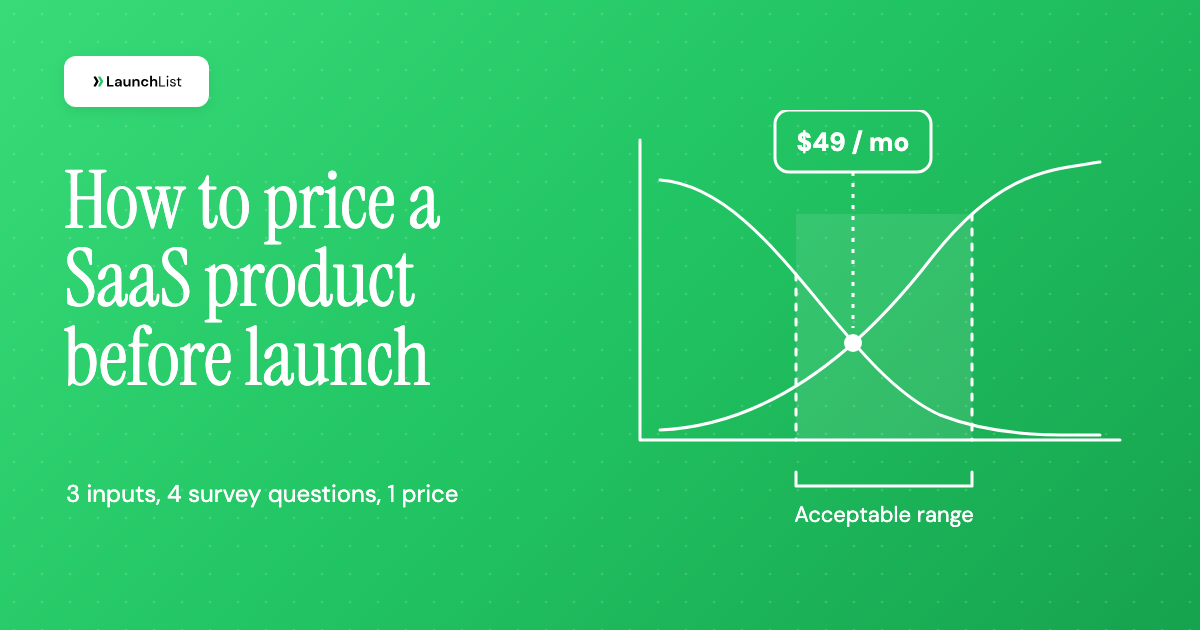
For each price, work out four shares of your respondents: the share who said that price or more would be too cheap, the share who said that price or more would be a bargain, the share who said that price or less would be getting expensive, and the share who said that price or less would be too expensive. The first two lines fall as the price rises and the last two climb. Where they cross gives four points:
- Lower edge of the acceptable range: where "too cheap" crosses "expensive". Below this, more people distrust the price than hesitate at it.
- Optimal price point: where "too cheap" crosses "too expensive". The fewest people reject the price for either reason.
- Indifference price point: where "cheap" crosses "expensive". As many people call it a bargain as call it expensive.
- Upper edge of the acceptable range: where "cheap" crosses "too expensive". Above this, more people rule it out than see value.
Different tools invert different curves, so their exact points can shift a little. Do not let that worry you: the output is a range, and the decision is yours.
A worked example with illustrative numbers
Back to the invoice tool. Suppose 40 people from the waitlist who run or work at agencies answer the four questions. These numbers are illustrative, made up to show how the chart reads:
- Acceptable range: $30 to $60 a month.
- Optimal price point: $35. Indifference price point: about $48.
- At $50, 7 of the 40 called the price too expensive. At $60, 10 did.
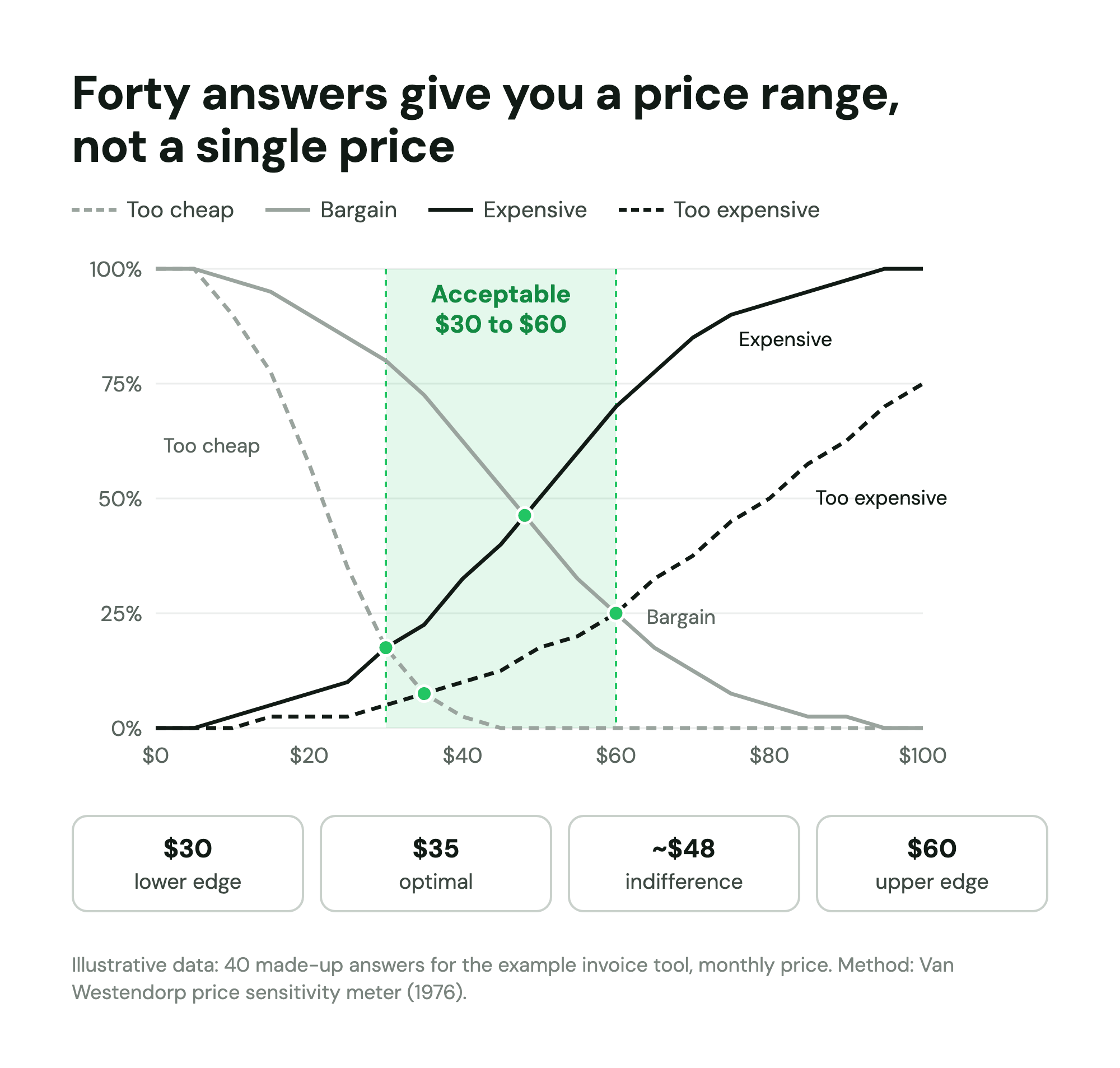
How to read it against step 1: the lower part of the range ($30 to $35) falls below the $35 cost floor, so it is out regardless of what people would accept. The $49 hypothesis sits at the indifference point and well inside the acceptable range. Going to $59 would put the price near the upper edge, where a quarter of respondents rule it out. A reasonable decision: launch at $49, and watch whether the people who do not buy are the ones who answered low.
Two limits to keep in mind. The method shows which prices people find acceptable, not how many will buy; Sawtooth Software, which makes pricing research tools, prefers choice-based conjoint for measuring price sensitivity in depth. And a new category is hard to price for people who have never paid for anything like it, so lean harder on the alternatives from step 1 when your product is truly new.
Split the answers by segment
The most useful thing a Van Westendorp survey can do before launch is show you that different people answer differently. Gaurav Vohra, part of Superhuman's founding team, told Schematic that Superhuman's 2017 Van Westendorp data split clearly by buyer: individual contributors around $15 to $20 a month, founders and CEOs around $30, and investors around $45 and up. The team anchored on founders and CEOs, set the price at $29, and an intern rounded it to $30. Accepting that some individual contributors would not buy at that price was part of the decision.
That is why the survey below asks about role and company size before any price question. A single blended range would have hidden Superhuman's answer.
Step 6: Check a price with the Gabor-Granger method
Van Westendorp gives you a range. The Gabor-Granger method, named after the economists André Gabor and Clive Granger, tests specific prices: respondents see one price and say whether they would buy at it, then see a higher price if they said yes or a lower one if they said no. Sawtooth's explainer describes the output: a demand curve (the share willing to buy at each price) and a revenue curve (that share times the price), whose peak suggests the price to pick.
You can run a light version as one question in your survey: show one of three or four prices, chosen at random per respondent, and ask how likely they are to buy at it. With the invoice example (illustrative numbers again):
| Price | Would buy | Revenue per 100 respondents |
|---|---|---|
| $29 | 72% | $2,088 |
| $39 | 61% | $2,379 |
| $49 | 50% | $2,450 |
| $59 | 33% | $1,947 |
| $69 | 20% | $1,380 |
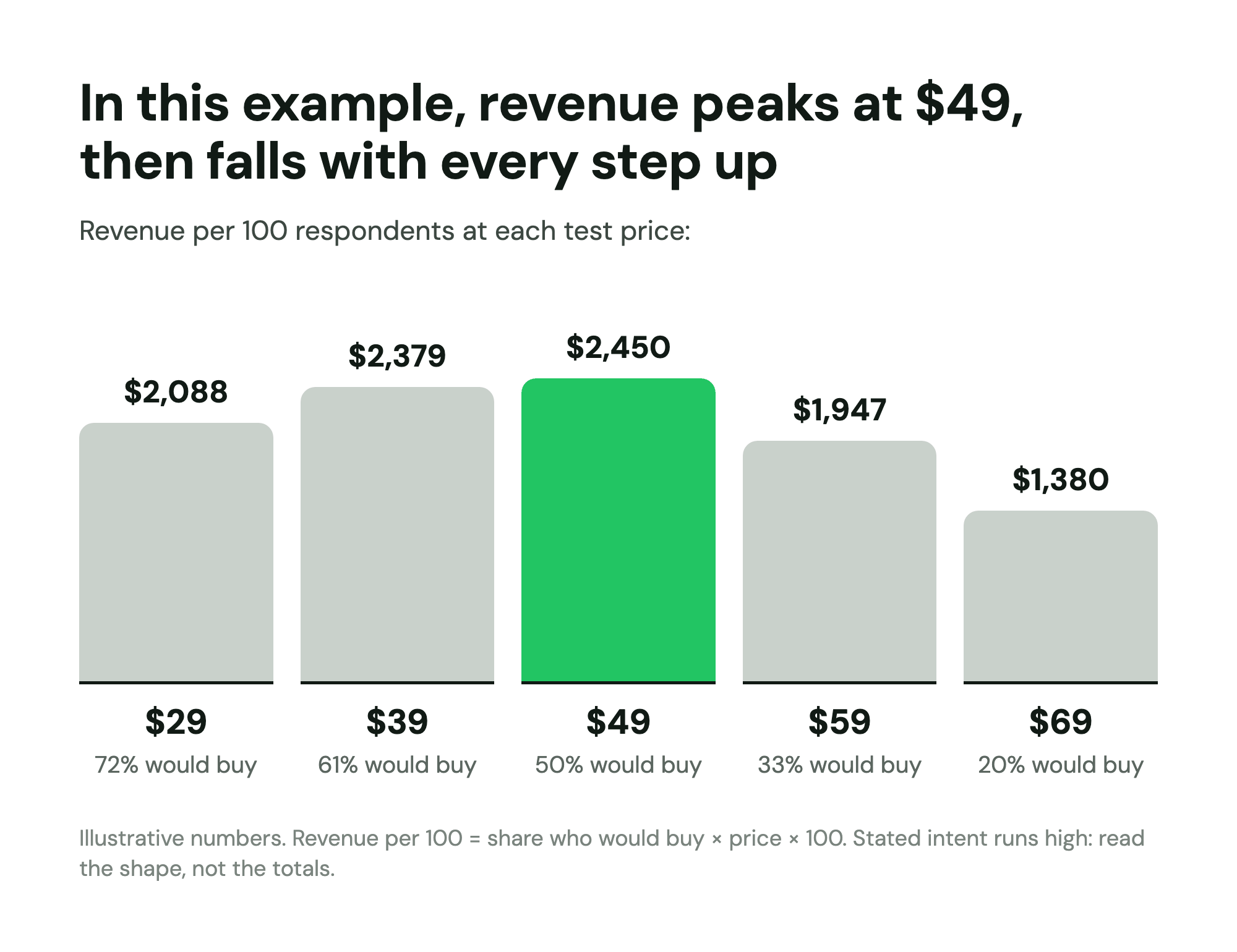
Revenue peaks at $49 and falls with every step above it, which agrees with the Van Westendorp read. Sawtooth lists the method's limits plainly: it tests price alone, and it does not show respondents the alternatives they would compare you against. Stated purchase intent also runs high, so use the shape of the curve, not the percentages, and never forecast revenue from "would buy" answers. For a revenue forecast, plug a cautious paying share into a pre-launch MRR calculator and try two or three prices side by side.
Step 7: Set the billing terms
Price is more than the monthly number. Three decisions shape what people actually pay.
Monthly vs annual billing
Offer both once you have a monthly price you trust. Annual billing gives you cash up front and fewer cancellation decisions each year, and the discount is the price of that. The common choice is two months free: in Recurly's study of plan structures, covering more than 1,000 SaaS businesses billing through Recurly from January 2017 to July 2018, the most popular annual discount was 16.7%, which is exactly two months free, and the median across all price segments was the same. Recurly is a billing vendor and the data is from its own customers, so read it as a vendor benchmark. Campbell's post adds two findings from ProfitWell's data: whole-dollar offers such as "2 months free" work better than percentages, and the size of a discount correlates almost perfectly with churn, so he advises against discounts above about 20%.
Before launch, keep it simple: one monthly price, one annual price at 10 times the monthly, and no other discounts.
Free plan, free trial or neither
| Option | Suits | Watch out for |
|---|---|---|
| Free plan | Products that spread through use (shared docs, invites, public pages) and cost little per free user | Free users who never convert, and support costs for people who do not pay |
| Free trial | Most B2B products: a clear decision date and a clean paying signal | A trial too short to reach the moment the product proves itself |
| Neither, paid from day one | Products with a clear, immediate result; testing price is the point | Fewer people try it, so you need a strong demo or onboarding |
For a sense of scale, the benchmark Kyle Poyar and Lenny Rachitsky published in What is a good free-to-paid conversion rate (2023), from a survey of 1,000+ mostly B2B products, put good conversion at 3% to 5% for freemium self-serve and 8% to 12% for free trials. A free plan needs many more users to produce the same number of customers, which is a cost before launch, when your list is small. If price is what you need to learn, paid from day one, or a trial that ends in a payment, gives you the answer fastest. For B2B buyers in particular, many founders skip both and charge from the first customer, with a demo or a hands-on setup instead of a trial.
How to show the price on your pricing page
Once you have a price, how you present it shapes how it reads. Three things matter most at launch:
- An anchor price. Buyers judge a price against whatever number sits next to it. If you have a second, larger plan or a "talk to us" option, show it beside the main plan, and put the comparison from step 1 in a line of copy ("less than 4 hours of an account manager's time a month"), so $49 is read against $180 of value rather than against zero.
- A recommended plan. With two plans, mark the one most customers should pick, with a label such as "Most teams choose this" and a filled button. It answers "which one is for me?" before the buyer has to ask.
- An annual toggle. Show monthly and annual prices with one switch, and state the annual saving in whole months ("2 months free") rather than a percentage, which Campbell's data favored. Keep the monthly price visible so the annual one has something to be compared with.
Then test the price with real money
Everything above is people telling you what they would do; the test that matters is a payment. Before you announce, ask a small group from your list to pay, for example a first cohort that prepays or a paid pilot, and if people who called $49 reasonable will not pay it when the link is in front of them, believe the payment over the survey. To reward those early buyers, the early access program guide covers founding member pricing, and the guide on how to convert a waitlist into paying customers covers the launch offer.
Raising prices later, and who to grandfather
Your first price will be wrong in one direction or the other, usually too low. Raising it later is normal. Three choices shape how it goes:
- Who gets the new price, and when. New customers can see the new price immediately. For existing customers, Patrick Campbell recommends what he calls a legacy discount: they keep their current price for a set period, then move (Verblio's summary of his podcast interview, 2021). Keeping old prices forever is the other option, and it gets harder to manage with every change.
- How much notice. Superhuman, raising its price from $30 to $40 in 2024, gave three months' notice by email (an August email for a November change), with options: move to $40, move to a separate $30 plan, or switch to annual at a limited-time rate. Gaurav Vohra told Schematic that churn ran 1 to 2 points above normal for 60 to 90 days, and that the change was the largest year-over-year revenue impact that year.
- What you say. Campbell's advice for the email: remind customers of the value they got, point to features they asked for that now exist, explain that the price funds more of that work, and end with an offer to talk if the change genuinely hurts their business.
Whatever you decide, write it down before your first customer pays, so "early customers keep their price for 12 months" is a policy and not a promise you have to reconstruct later.
Common SaaS pricing mistakes before launch
- Pricing too low. The most common one. A low price needs more customers, more support per dollar and more acquisition spend to reach the same revenue, as Cohen's price zones show, and it tells buyers something about quality (that is what the "too cheap" question measures). Multiply your price by the customers you can realistically reach, with a TAM SAM SOM calculator if it helps, and check the business still works.
- Pricing by cost alone. Cost is the floor, not the price. A product that costs $7 a month to serve and saves someone $180 is not worth $9.
- Copying competitors without checking. Comparable prices are a fair anchor, as Lemkin says. But a competitor's price reflects its costs, segment and mistakes. Check that your buyers compare you with that competitor before you match it.
- Too many tiers. Three or four plans for segments you have not met means guessing at the fences, and buyers stall when they cannot tell which plan is theirs.
- Asking friends "how much would you pay?" Friends are polite and rarely the buyer, and the question produces a number nobody had to commit to. Ask people on your list about current spend.
- Treating a survey as the answer. Survey results are a range to test. The payment is the answer.
- Discounting to close the first deals. Deep early discounts set the wrong anchor, and Campbell links larger discounts to higher churn. Offer a first-cohort price with written terms instead.
If people join your list and then do not pay, the problem may be earlier than price; the guide to why your waitlist is not converting walks through the other causes.
A pricing survey you can copy
Use this as one short survey sent to your list, after the interviews. Replace everything in square brackets. It takes about four minutes to answer. Questions 1 and 2 let you split results by segment; questions 6 to 9 are the Van Westendorp questions; question 10 is the light Gabor-Granger check (show each person one of the prices at random).
Help us set a fair price for [product]

[Product] [one sentence on what it does, in your interviewees' words].
For example: [one concrete outcome, e.g. "it chases unpaid invoices
so your team does not have to"]. All prices below are per month,
for [your whole team / one person].

1. Which best describes you?
   [Founder or owner] [Manager] [Individual contributor] [Other]

2. How many people work at your company?
   [Just me] [2 to 10] [11 to 50] [51 to 200] [More than 200]

3. How do you handle [the problem] today?
   [Tool or competitor] [Spreadsheet] [Someone does it by hand]
   [We do not handle it] [Other]

4. Roughly what do you pay for that each month, including people's time?
   [Number]

5. Which way of paying would feel fairest to you?
   [A flat monthly price] [Per person on the team]
   [By how much I use it, e.g. per [unit]] [Not sure]

6. At what monthly price would [product] be so cheap that you would
   doubt its quality?   [Number]

7. At what monthly price would [product] be a bargain, a great buy
   for the money?   [Number]

8. At what monthly price would [product] start to feel expensive,
   so that you would have to think before buying?   [Number]

9. At what monthly price would [product] be so expensive that you
   would not consider it?   [Number]

10. If [product] cost [$X] a month, how likely would you be to buy it
    when it launches?
    [Definitely] [Probably] [Not sure] [Probably not] [Definitely not]

11. Anything that would make you more or less likely to pay for it?
    [Long text]

12. Can we contact you about a short call or early access?
    [Yes] [No]
When you read the answers, drop anyone whose four Van Westendorp answers are out of order (a "too cheap" price higher than their "too expensive" one) before you build the chart; the Penn State notes recommend cleaning invalid answers first. Then build the chart once for everyone and once for each segment from questions 1 and 2.
The email that invites your list to answer
Keep it short, from a person, and honest about why you are asking. Send it to people who match the customer first, and expect most answers in the first 48 hours. For more on what gets opened, see these waitlist email templates.
Subject: Can you help me price [product]? (4 minutes)

Hi [first name],

You joined the waitlist for [product] [time ago, e.g. "in September"].
Thank you. We are getting close to launch, and before we set a price
I would rather ask the people who will use it than guess.

Would you answer 12 quick questions? It takes about 4 minutes:
[survey link]

There are no right answers. Honest numbers help most, including
"I would not pay for this," which tells us something important.

As a thank you, everyone who answers by [date] will be in the
first group we invite. [Only promise this if you will keep it.]

Thanks,
[Your name]
[Your role] at [product]

P.S. If you would rather talk for 15 minutes, just reply to this
email and I will send a time.
Collecting pricing answers with LaunchList
LaunchList is pre-launch waitlist software for founders. It will not set your price, analyze survey results or draw a Van Westendorp chart, and it does not take payments, so the pre-sale step happens in your own billing tool. What it does is help you collect pricing answers from the right people and reach them again.
- Ask at signup. The waitlist form builder adds questions to your signup form on every plan: dropdowns, single or multiple choice, number fields and long text. One question such as "What do you pay for [tool] today?" or "How many people are on your team?" at signup means every new person arrives with the context you need to segment later. Keep it to one or two questions, because every extra field costs signups.
- Run the survey as a second form. A project can have several forms, including a survey form, and they all feed the same audience: someone who signs up and later answers your pricing survey is one contact with two submissions. You read a survey's answers under Forms, and you can export your audience as a CSV to build the chart in a spreadsheet.
- Split the answers. Tags work on every plan, so you can tag interviewees or anyone who answered a certain role. On the Launch and Grow plans you can build your own segments, for example agencies of 11 to 50 people, and see them in waitlist management.
- Send the survey to your list. From the Collect plan you can email your waitlist with the invitation above, to everyone or to a tag or segment. Pricing has what each plan includes.
- Model revenue. The free pre-launch MRR calculator linked in step 6 turns a list size, a paying share and a price into launch-day and first-year revenue, which is the quickest way to compare $39 against $49.
If you are still deciding whether the idea is worth pricing at all, start with an idea validation landing page and the idea validation tools guide, and come back to pricing once people are signing up. If you are building a subscription product, SaaS waitlist software explains how founders use LaunchList before a SaaS launch. For the rest of launch preparation, the SaaS launch checklist and the SaaS pre-launch marketing playbook cover what comes next.
SaaS pricing FAQ
How do I price a SaaS product before launch?
Start with three inputs: the value the product creates for a customer, what they pay today for the alternative, and your cost per customer at the margin you want. That gives you a floor and a ceiling. Pick the unit you charge by (your value metric), launch with one or two plans, then test a starting price with 5 to 10 willingness-to-pay interviews and a Van Westendorp survey of 30 or more people from your waitlist. Treat the result as a range and confirm it with real payments.
How much to charge for my SaaS?
If you are asking how much to charge for my SaaS, the answer is more than your costs need and less than the value you create, anchored on what customers already spend on the problem. A useful starting point is the price of the alternative they pay for now, adjusted for how much better your product is. If your cost per customer is $7 a month and you want an 80% gross margin, your floor is $35. If the product saves a customer $180 a month in time, a price between those two numbers is defensible, and a survey of your list tells you where in that range to start.
What is the Van Westendorp price sensitivity meter?
A four-question pricing survey introduced by Dutch economist Peter van Westendorp in 1976. Each respondent names the price at which the product would be too cheap to trust, a bargain, getting expensive, and too expensive to consider. Plotting the four answers as cumulative curves shows an acceptable price range and a narrower range in which most people find the price reasonable. It gives you a range, not a single price, and it does not predict how many people will buy.
How many people do I need for a pricing survey?
For a pre-launch Van Westendorp survey, aim for 50 answers and treat 30 as the minimum for a directional read. Mike Pritchard of 5 Circles Research calls 10 to 20 answers directional, 50 the minimum and 100 better, and uses at least 200 for business studies and 400 for consumer studies when precision matters. If you plan to compare segments, you need that number in each segment.
What is a value metric in SaaS pricing?
The unit your price scales with: seats, active users, contacts, tasks, messages, projects or a share of each transaction. A good value metric grows as the customer gets more value, is easy for them to predict, and is easy for you to measure. Slack charges per active member, Zapier by tasks a month, and Basecamp charges a flat price with no per-user fees.
How many pricing tiers should a new SaaS have?
Usually one or two at launch. Tiers exist to serve segments with different needs and budgets, and before launch you rarely know your segments well enough to fence them. Start with one plan for the customer you understand best, add a second only if your interviews or survey show a clearly different group, and add a third when real usage data tells you where the lines are.
Should a new SaaS offer a free plan or a free trial?
A free trial suits most new B2B products, because it gives a decision date and a clear signal of who pays. A free plan suits products that spread through use, with a cheap way to serve free users. In the benchmark Kyle Poyar and Lenny Rachitsky published in 2023 from 1,000+ products, good free-to-paid conversion was 3% to 5% for freemium self-serve and 8% to 12% for free trials. Neither is required: charging from day one is the clearest test of price.
How big should the annual discount be?
Two months free, a 16.7% discount, is the common choice. It was the most popular annual discount in Recurly's study of more than 1,000 SaaS businesses billing through its platform between January 2017 and July 2018. Patrick Campbell of ProfitWell also found that whole-dollar offers such as months free work better than percentages, and that discounts above about 20% go with higher churn.
What willingness to pay questions should I ask?
Ask about what people do and spend today rather than what they would pay in theory. Good questions: what do you use for this now, what does it cost you in money and time, who approved that spend, and what would make you switch. When you do ask about price directly, use ranges: what would feel like a bargain, what would feel expensive, and what would rule it out.
Should I grandfather early customers when I raise prices?
Usually for a set period, not forever. Patrick Campbell recommends letting existing customers keep their price for a fixed time, a legacy discount, then moving them to the new price with notice and a reminder of what has improved. Superhuman gave three months' notice when it moved from $30 to $40 and offered a cheaper plan or an annual option to anyone who did not want the new price.