How to Find Beta Testers With No Audience (2026)
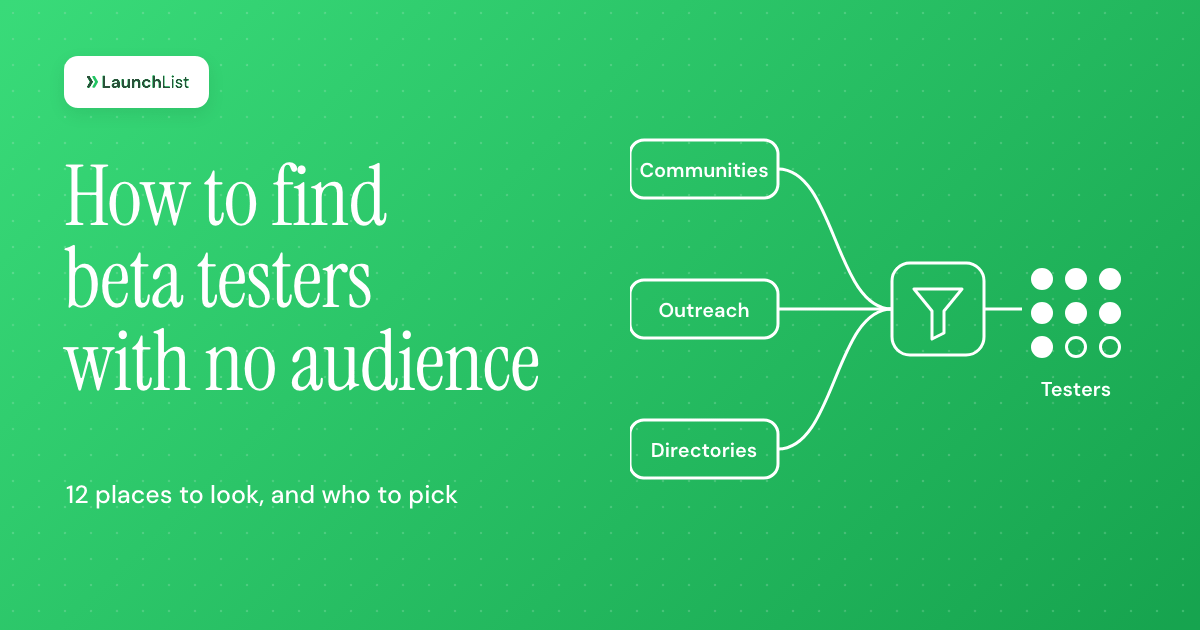
TL;DR: How to find beta testers when nobody knows you yet: go where people who have the problem already talk about it, not where people who know you hang out. Write one sentence about who the product is for, put up a signup form with two to four screening questions, then spend two weeks on three channels at once: answering questions in the communities your users already use, messaging about 30 hand-picked people one by one, and posting in beta-tester communities for bug and device coverage. Recruit about three times the active testers you need, because only around 30% of beta testers typically take part. For mobile apps, TestFlight takes up to 10,000 external testers and Google Play requires 12 testers for 14 days on new personal accounts. Below: 12 channels compared, the funnel math, a screening scorecard, incentives that do not bias feedback and five messages you can copy.
What beta testing is, and how long it lasts
Beta testing means people outside your team using an unfinished product in their own setting, on their own data, and telling you what breaks and what is missing. It usually comes after an alpha:
- Alpha: the first working version, tested by your team and perhaps a handful of trusted people. Expect crashes and missing pieces.
- Closed beta: a chosen group from outside, invited on purpose. This is what most founders mean by "beta", and it is what this guide is about.
- Open beta: anyone can join, often through a public link or a store listing. You trade control for volume.
For how a beta fits into the wider launch, see what a beta launch is and how it differs from a soft launch.
As for length: long enough for testers to use the product the way they would in real life, which for most apps means at least two weeks and often four to six. Google Play's minimum for new personal developer accounts is 14 days with the same testers, a sensible floor for any product. Run the beta in short rounds with fixes in between, rather than one long test where feedback piles up unread.
What makes a good beta tester
Before you look for anyone, decide who you are looking for. A good beta tester has four things:
- The problem, now. They ran into it this month, not "sometimes". Pain that is recent produces specific feedback.
- A current workaround. A spreadsheet, a competitor, a script, a habit. Someone who already spends effort on the problem will tell you whether your product saves them that effort.
- A match with the user you are building for. Same role, same kind of company, same device. A designer testing a tool for accountants gives you designer feedback.
- Time in the next few weeks. The best possible tester who is busy until next quarter is not a tester.
And a few people to be careful with:
- Friends and family. Useful for a first smoke test, poor for decisions. They are polite and rarely the target user.
- Other founders swapping tests. Great at finding bugs, and honest. But they test as builders, not as customers, so treat their opinions on value with care.
- Professional testers. People who test dozens of apps a month for rewards find crashes quickly and rarely become customers. Pay them for coverage, not for direction.
Keep the goal in mind: you are not opening the doors yet, you are choosing a few people to look through them first. Giving those people early access comes later.
How many beta testers you need
There is no single number, because "beta test" covers very different goals. These are the figures worth anchoring on:
| Your goal | Testers who actually take part | Source |
|---|---|---|
| Find usability problems | 5 per round, in 3 rounds rather than 15 at once | Nielsen Norman Group |
| Catch major bugs in common setups | 30 to 50 | Centercode, a beta vendor |
| Find what blocks a stable product | 75 to 100 | Centercode |
| Google Play production access (new personal account) | At least 12, opted in for 14 days in a row | Google Play Console Help |
| A first product-market fit survey | About 40 responses | The Sean Ellis test, covered in our early access guide |
Two notes on that table. Jakob Nielsen's five-user figure (five users find about 85% of usability problems) only holds for people who use the product in similar ways; if you have two distinct kinds of user, test three or four of each. And Centercode's ranges assume testers who show up, which is the real problem: the same vendor puts average participation in typical beta tests at about 30%.
So the working rule is: recruit about three times the number of active testers you need. For most solo founders with a first version, 15 to 25 active testers is plenty, which means getting 50 to 80 people through the door.
The recruiting funnel: how many people to contact
Work backwards from the number of active testers you want. Here is the math for about 20 active testers, using one sourced rate and one assumption you should replace with your own:
- Active testers wanted: about 20.
- Accepted testers needed: 20 ÷ 0.30 = about 70, using Centercode's average participation of about 30%.
- Applicants needed: 70 ÷ 0.5 = 140, assuming half of applicants pass your screening questions. This is an assumption; if your screener is strict, the pass rate will be lower.
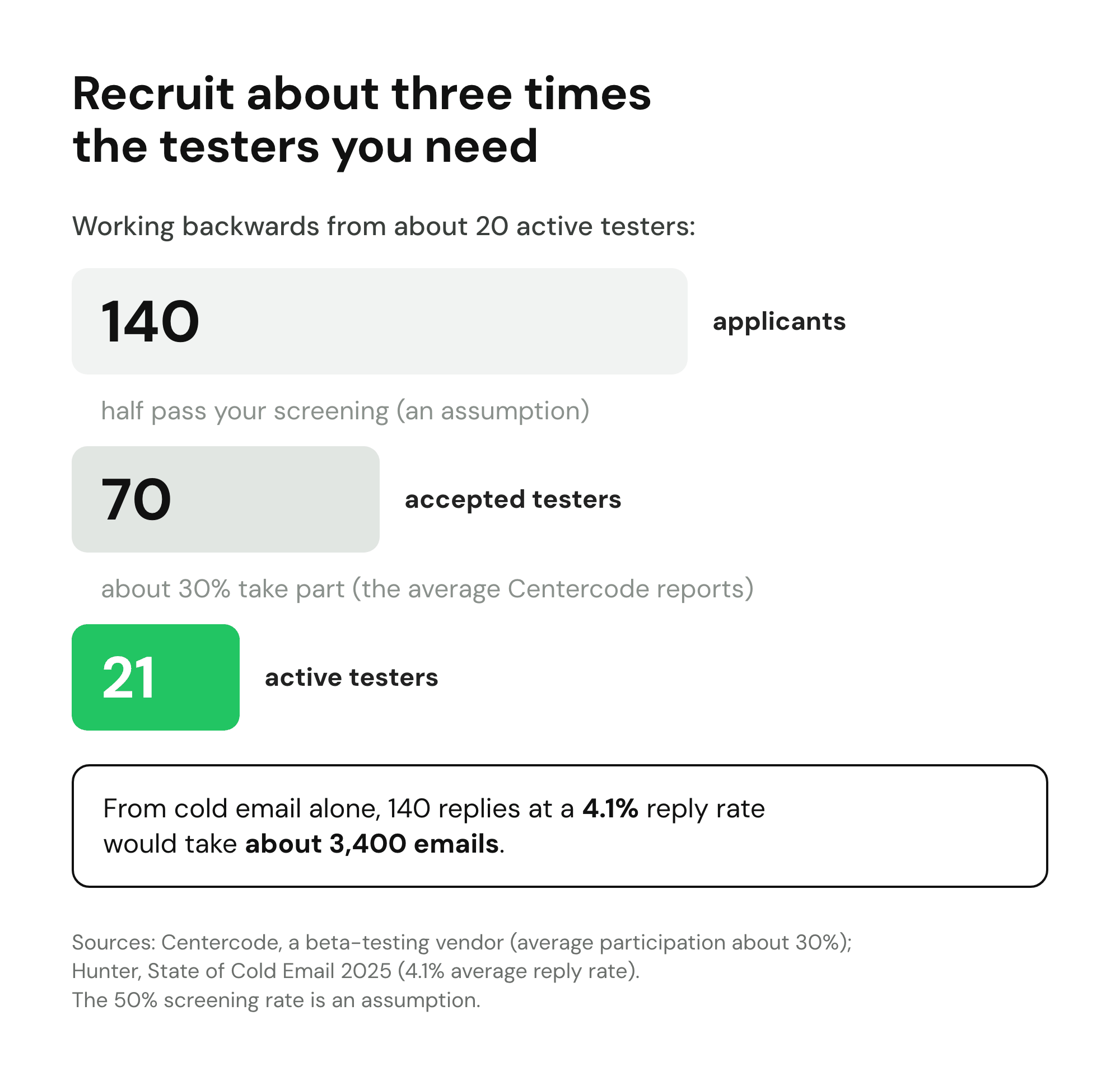
Now the uncomfortable part. If those 140 applicants had to come from cold email, and every reply became an applicant (it will not), you would need about 3,400 emails at the 4.1% average reply rate in Hunter's State of Cold Email 2025, which analyzed 11 million cold emails sent in 2024. The same report found that small, personal campaigns do better: 5.8% for campaigns sent to 50 people or fewer, against 2.1% for 1,000 or more.
The lesson is not "never cold email". It is that no single channel gets you there when you have no audience. You need several channels running at once, each contributing a few dozen people, and a place where all of them land.
Where to find beta testers: 12 channels compared
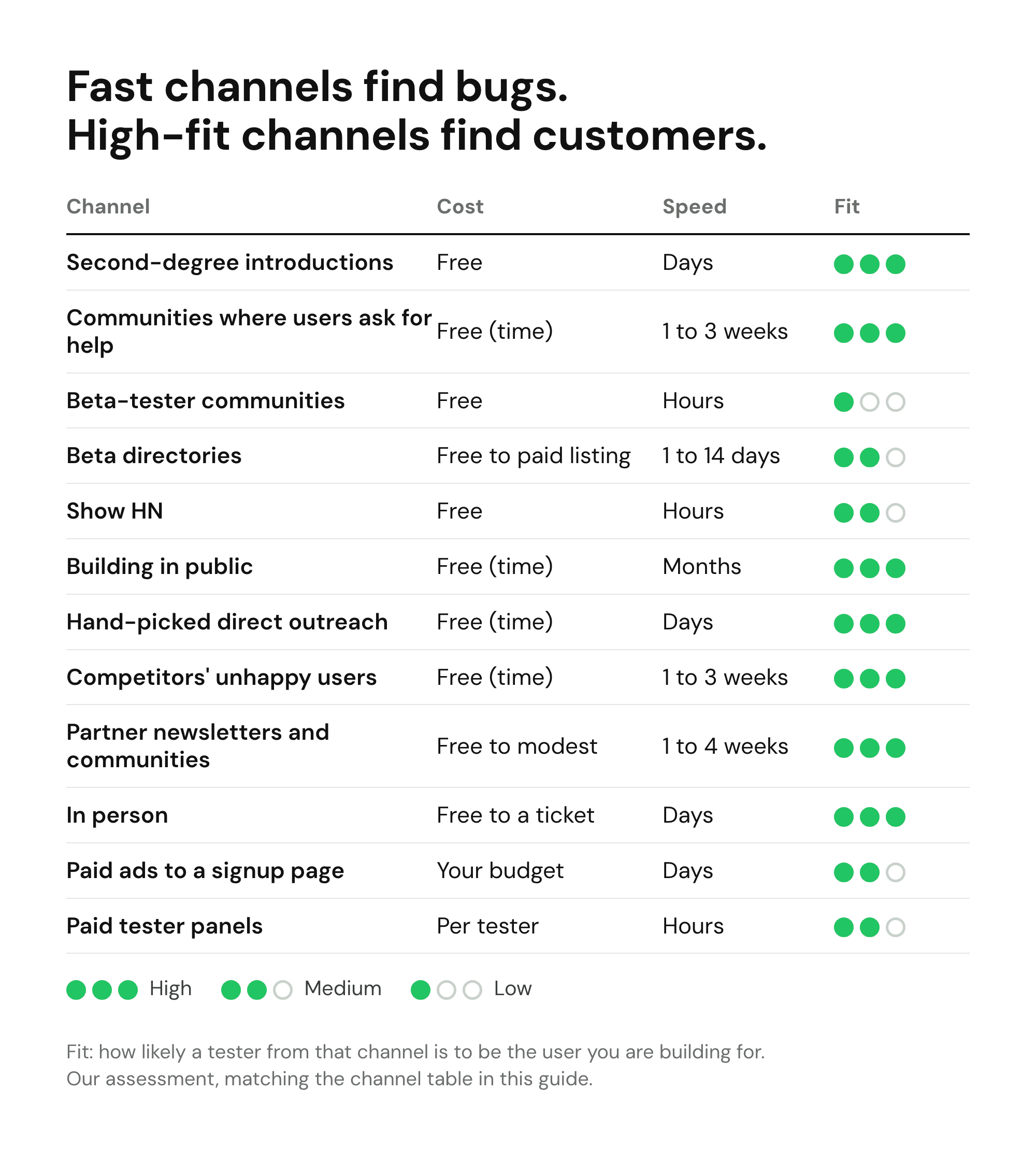
This is how to find beta testers across the main channels, and how those channels compare. "Fit" means how likely a tester from that channel is to be the user you are building for.
| Channel | Cost | Speed | Fit | Best for |
|---|---|---|---|---|
| Second-degree introductions | Free | Days | High | Your first 5 to 10 testers |
| Communities where users ask for help | Free (time) | 1 to 3 weeks | High | Niche B2B and consumer |
| Beta-tester communities | Free | Hours | Low | Bugs, devices, Google Play's 12 |
| Beta directories | Free to paid listing | 1 to 14 days | Medium | SaaS and maker tools |
| Show HN | Free | Hours | Medium | Developer tools you can try instantly |
| Building in public | Free (time) | Months | High | Founders with months before launch |
| Hand-picked direct outreach | Free (time) | Days | High | B2B with a clear buyer |
| Competitors' unhappy users | Free (time) | 1 to 3 weeks | High | Replacing an existing tool |
| Partner newsletters and communities | Free to modest | 1 to 4 weeks | High if matched | Niche audiences |
| In person | Free to a ticket | Days | High | Local, B2B, events |
| Paid ads to a signup page | Your budget | Days | Medium | Consumer apps, testing your message |
| Paid tester panels | Per tester | Hours | Medium | Usability sessions, device coverage |
First, check who already knows you
"No audience" rarely means nobody. Before you look for strangers, check the people who already know your work:
- Customers or users of something you built before. People who used your last product, a client project or an open-source library already trust that you ship. Email them one by one, say what you are building now, and if it is not for them, ask who they know.
- Your email list or newsletter. Even 50 subscribers is a start. Send one plain email that says who the beta is for and links to your signup form with the screening questions, so the list sorts itself.
- In-product prompts. If you already run an app, a "Join the beta" banner, a switch in settings or a one-question prompt after someone finishes a key task reaches people who use your work every week. Ask active users, at a good moment, never on first launch.
- Your own social accounts. Post once with a specific ask ("eight freelance designers who send invoices by hand"), not "anyone want to test?".
Screen these people like everyone else. They like you, which makes them kinder than strangers, so weigh their praise the way you would a friend's and their bug reports at full value.
1. Second-degree introductions
Your own network is small, but your network's network is not. Do not ask friends to test. Ask each of them one specific question: "Who do you know who [has the problem] and would give me 20 minutes?" One good introduction from someone trusted beats ten cold messages, and it is how most first testers are found.
Stripe's founders took this to an extreme. Paul Graham describes the "Collison installation" in Do Things That Don't Scale: when anyone agreed to try Stripe, the Collison brothers would say "Right then, give me your laptop" and set them up on the spot, instead of promising to send a link later. The same essay names recruiting users manually as the most common unscalable thing founders have to do at the start.
2. Communities where your users ask for help
This is the highest-fit free channel, and the slowest to get right. Find the three places where your target users ask questions about the problem: a subreddit for their profession, a Slack or Discord group, a forum, a Stack Exchange site, a Facebook group. Then answer questions for a week before you mention your product.
When you do post, read the rules first, say plainly that you are the founder, say what you need ("eight people who reconcile invoices by hand to try a first version for two weeks") and what they get. Many communities ban promotion but allow a clear, honest request for testers once you are a known contributor. Christina Willner, the founder of a productivity app, told Chanty in 2018 that her team got about 1,000 beta testers from Reddit by leaving helpful comments in well-matched subreddits, and warned that accounts should be established first.
3. Beta-tester communities
Some communities exist only to swap and find testers. As of 31 October 2026, all of these had new posts that day:
- r/alphaandbetausers, about 51,000 members, for web and app products of every kind.
- r/TestMyApp, about 33,000 members, mostly mobile apps.
- r/betatests, about 19,000 members, including "test for test" swaps.
- r/AndroidClosedTesting, about 48,000 members, started on 14 November 2023 (the day after the cutoff date in Google's testing rule, below), where most posts are looking for those 12 Google Play testers.
- r/SideProject, about 887,000 members, for showing what you built and asking for feedback.
These are fast and free, and they are good at finding crashes, confusing screens and device bugs. They are weak on fit: the people there are testing because they like testing, not because they have your problem. Use them for coverage, never to decide what to build.
4. Beta directories
Directories that list products before launch send a burst of curious, mostly technical visitors. The best known is BetaList, which features around 20 startups a day on its site and in a newsletter it says has 70,000+ subscribers. It has paid plans (featured within about 14, 3 or 1 days depending on the plan), requires your own domain, and edits every listing by hand.
Results vary a lot. Upvoty reported 63 beta signups over five days from a $99 listing in 2019. In June 2026, the founder of DadOS, a consumer iOS app, shared that the $99 Standard listing brought 5 email signups in its first 24 hours and concluded that the platform skews technical. For a wider list, see our audit of startup directories, a ranking of where to launch your startup, the Product Hunt alternatives that still send traffic, and these places to promote your startup for free.
5. Show HN
Hacker News's Show HN is one of the fastest ways to get technical people to try something, but only if they can actually try it. The Show HN rules ask you to make it easy to try "ideally without barriers such as signups or emails", and say sign-up pages and landing pages are off topic. So it fits a developer tool with a live demo, not a beta behind a form. Post it when people can use the thing in one click, and put the beta signup inside.
6. Building in public
Sharing what you are building on X, LinkedIn or Indie Hackers, week after week, is the slowest channel and the one that compounds. The people who follow along for two months are the most invested testers you will ever get, because they watched the problem being solved. It only works if you start well before you need testers. A public build in public changelog gives those posts somewhere to point.
7. Hand-picked direct outreach
For B2B products, this is often the best channel. Build a list of 30 to 50 named people who match your tester profile: from LinkedIn, from conference speaker lists, from people who wrote about the problem. Message each one personally, with a reason you picked them. Keep the ask small: a 20-minute call or two weeks of use, not "join our beta program".
Expect it to take many tries. Stewart Butterfield told Stanford GSB that "for the first three or four external teams using it, it took dozens of tries", including going to their offices to show them. Months later, Slack's preview release signed up 8,000 companies in 24 hours. The early, unscalable work came first.
8. Your competitors' unhappy users
People who already pay for a competitor and complain about it are the most qualified testers there are: they have the problem, a budget and a specific frustration. They show the same signals as early adopters, the people most likely to stay and pay. Look at one- to three-star reviews on app stores and review sites, "alternative to [competitor]" threads, and feature requests that have sat unanswered on a competitor's public roadmap. Reply where the platform allows replies, answer the question honestly and offer a test spot. Do not scrape emails from review sites; it is unwelcome and often against their terms.
9. Partner newsletters and communities
Someone already has your audience: a niche newsletter, a community manager, a course creator, a podcast host. Many will share a call for testers if it is useful to their readers and you offer something in return, such as early access for their members or a write-up of what you learned. One well-matched newsletter mention can fill a beta.
10. In person
Meetups, coworking spaces, conferences and trade events let you watch someone use your product for five minutes, which is worth more than a week of written feedback. Bring the product on a phone or laptop, ask people to try one task, and ask for an email address only from those who were interested. For local or B2B products, one event can produce your first ten testers.
11. Paid ads to a signup page
A small ad budget aimed at a precise audience gets testers in days and tests your message at the same time: if nobody clicks "I have this problem", you learn something before you write more code. Send ads to a page that explains the beta and asks your screening questions, never straight to an app store. Ad-recruited testers have the lowest commitment of any channel, so screen harder.
12. Paid tester panels
Panels give you a set number of people who will do a task, fast. Prolific, a research panel, says it has 300,000+ active participants, a minimum participant pay of $8 an hour, recommended pay of at least $12, and a platform fee of 42.8% for corporate customers (Prolific pricing). Beta testing services such as BetaTesting and Beta Family (which claims 80,000+ testers and lists Google Play closed-test testers from $49) recruit by device, country and demographic.
Panels are the right call for usability sessions, device and country coverage, and when you need a fixed number of completed tasks by a date. They are the wrong call for finding your first customers.
How to find beta testers for free with no audience: a two-week plan
If you are starting from zero, this is how to find beta testers without spending money: the plan below gets most founders to their first 20 active testers. It assumes about two hours a day.
Days 1 to 2: decide and set up.
- Write one sentence: "I need [number] people who [have this problem] and currently [use this workaround]."
- Put up a page that says what the beta is, who it is for, what testers get and what you will ask of them. A waitlist landing page works well, and if you are still testing the idea itself, an idea validation landing page is the same page with a different question (these idea validation tools help with the rest).
- Add a short waitlist signup form with your screening questions (below), and a way to tell which channel each person came from.
Days 3 to 7: start three channels at once.
- List 30 named people and send five personal messages a day.
- Join the three communities where your users ask for help, and answer questions every day.
- Ask five friends for one introduction each.
Days 6 to 8: add the fast channels.
- Post in one or two beta-tester communities for bug coverage.
- If your product can be tried instantly and suits a technical audience, prepare a Show HN.
- Submit to one or two free directories.
Days 8 to 14: let people in and learn.
- Score applicants and invite the best five first, so you can fix the obvious problems before the next group.
- Do a 15-minute call with as many of the first five as will talk to you.
- Post your honest request for testers in the communities you have now contributed to.
- Count where your active testers came from, and put next week's hours into the two channels that produced them.
This is not the same as growing a waitlist: you want 70 well-matched people, not 1,000 curious ones. When you are ready to grow the list itself, our guide to your first 100 waitlist signups covers that.
Screening questions that find the right testers
Screening is what turns 140 applicants into the 70 worth inviting. Keep it to four or five questions, because every extra field costs signups. These work for most SaaS products and apps:
- "What do you use today for [problem]?" Options: a named competitor, a spreadsheet, something I built, nothing yet, other. Anyone with a workaround already spends effort on the problem.
- "When did you last run into [problem]?" This week, this month, in the last six months, not sure. Recency predicts useful feedback.
- "What best describes you?" Four or five roles, company sizes or devices. This is the field you will filter on most. For mobile apps, ask for the phone and OS version.
- "How much time could you give in the next three weeks?" Under an hour, one to three hours, more. Be honest about what you will ask.
- "Would you do a 15-minute call?" Yes or no. The yes group gives you most of your learning.
- Optional open question: "What would you want this to do for you first?" Specific answers ("export to my accountant's format") beat vague ones ("make it easier").
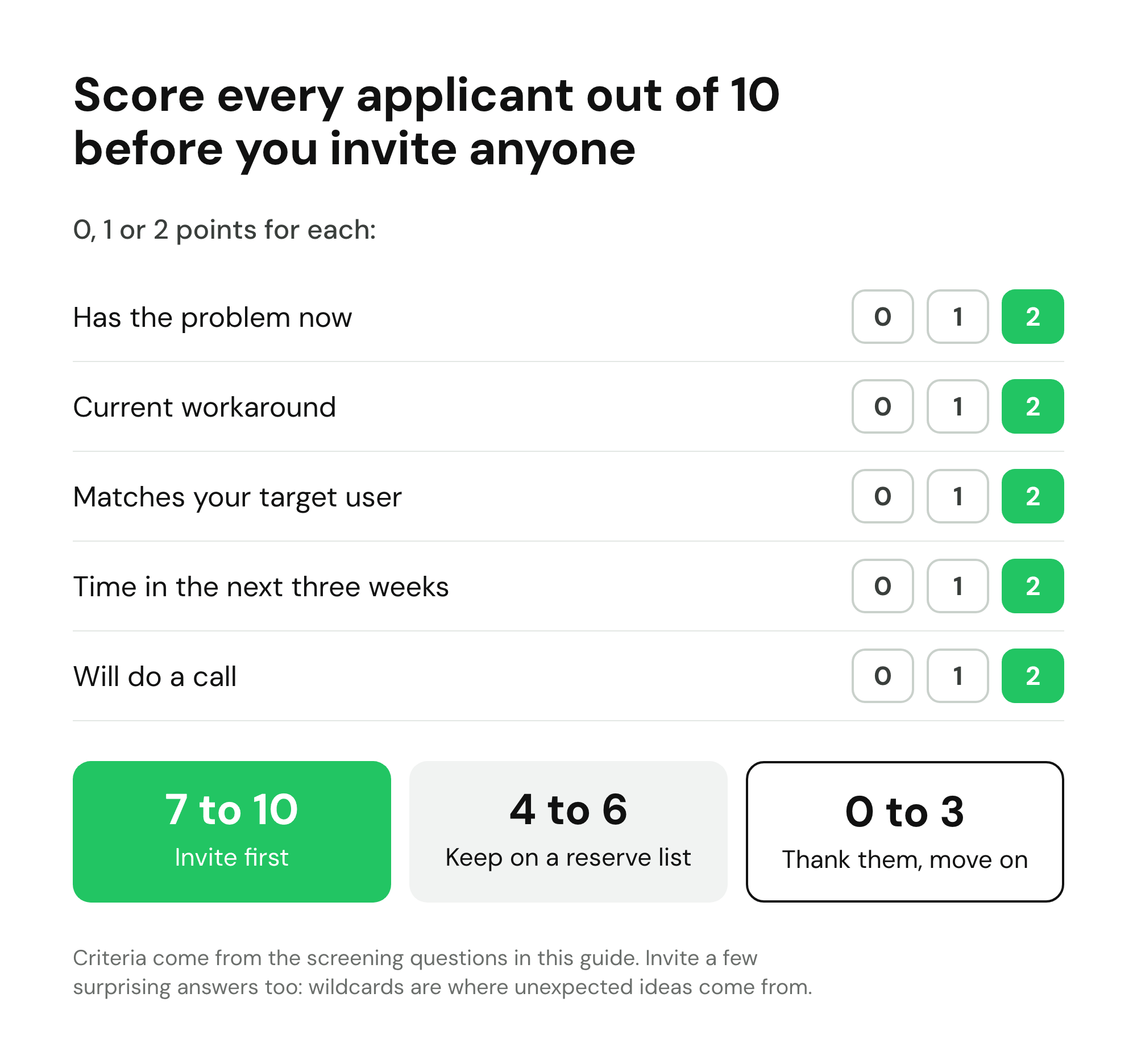
Then score each applicant from 0 to 2 on five things and invite the highest scores first:
| Criterion | 0 points | 1 point | 2 points |
|---|---|---|---|
| Has the problem now | Not sure | In the last six months | This week or this month |
| Current workaround | Nothing | Something informal | A named tool or a process they maintain |
| Matches your target user | No | Partly | Exactly |
| Time in the next three weeks | Under an hour | One to three hours | More |
| Will do a call | No | Maybe | Yes |
Invite 7 or more first. Keep 4 to 6 as a reserve for later groups. Below 4, thank them and move on. A few wildcards with surprising answers are worth inviting too: some of the best product discoveries come from users you would not have picked.
Beta tester incentives that do not bias feedback
Most people who test an early product do it because they want the product, want to shape it or like being first. Incentives should reward that, not replace it. Centercode's guide to tester incentives recommends matching the reward to the effort asked, and warns that paying testers cash can bias their feedback.
| Incentive | Works for | Watch out for |
|---|---|---|
| Early access | Everyone; it is why most people sign up | Means little if the beta is open to anyone |
| Founding member price | Testing willingness to pay | Write down the price, the plan and for how long |
| Extra time or credit on a paid plan after launch | SaaS | Say exactly how much, and when it starts |
| A direct line to the founder | B2B, power users | Only offer what you can keep up |
| Credit in your changelog or on a "thank you" page | Communities, developer tools | Ask before naming anyone |
| A small gift card | Time-heavy tasks such as a recorded session | Attracts reward hunters if it is the headline |
| Cash through a panel | A fixed number of completed sessions | Panel testers rarely become customers |
One rule is not optional in the US: the FTC's final rule on fake reviews, announced 14 August 2024, bans compensation or other incentives conditioned on writing reviews, whether the review is positive or negative. So reward taking part, never a rating or a testimonial. If a tester later wants to write a review, that is their choice.
Beta tester outreach messages to copy
Five plain-text messages cover most of the recruiting. Replace everything in brackets, keep them short and send them from your own name.
1. A personal message to someone you picked
Subject: [Their problem], quick question

Hi [First name],

I saw your [post / talk / comment] about [specific problem]. I'm building
[Product], which [does one thing] for [type of person], and I'm looking
for 10 people to try the first version for two weeks.

It's free during the beta. In return I'd ask for one 15-minute call and
honest notes on what breaks.

Would you be up for it? If not, no reply needed.

[Your name]
[One line on who you are]
2. A post in a community where your users ask for help
Title: Looking for [number] [role] who [have the problem] to test a new tool

I'm the founder of [Product]. It [does one thing], and I'm looking for
[number] people who currently [use workaround] to try it for two weeks.

What you get: free access during the beta and [founding price / credit],
written down.
What I'd ask: use it for [real task], and one 15-minute call.

It's rough in places: [known gap]. If that's fine, the signup takes
a minute and asks four questions: [link]

Happy to answer anything here.
3. A post in a beta-tester community
Title: [Platform] [app type] looking for testers: [one-line pitch]

Platform: [iOS / Android / web], [OS version or browser]
What it does: [one sentence]
What I need: [crash testing on older phones / first-run feedback]
Time: about [20 minutes]
How to join: [link]
Test for test: [yes, link your app below / no]
4. The welcome message once someone is in
Subject: You're in: [Product] beta

Hi [First name],

Thanks for joining. Here's everything in one place:

Start here: [link]
Your first task: [one task they can finish in 10 minutes]
Report problems: reply to this email, or [one feedback channel]
Known gaps: [what is not built yet]

I'll check in on [day]. If you'd do a 15-minute call, pick a time:
[link]

[Your name]
5. The nudge for someone who has gone quiet
Subject: Still keen on [Product]?

Hi [First name],

I noticed you haven't had a chance to try [Product] yet. No pressure.
If now isn't a good time, tell me and I'll give your spot to someone
on the list.

If you do have 10 minutes, this is the one thing I'd love you to try:
[task + link]

[Your name]
For a designed version of the welcome, these waitlist email examples are ready to send, and the waitlist email templates post covers the messages that come after.
Onboarding beta testers and keeping them engaged
Recruiting is half the job. With participation averaging about 30%, the difference between a beta that teaches you something and one that fizzles is what happens in the first week.
- Make the first 48 hours count. Send the welcome message the same day they are accepted, with one task they can finish in ten minutes. People who do something in the first two days are far more likely to keep going.
- Give one task a week. "Try everything" produces nothing. "This week, import your last invoice and tell me what was confusing" produces a page of notes.
- Use one feedback channel. Email replies, a form or a small chat group: pick one. Centercode's advice on maintaining participation is blunt: testers who juggle many tools and logins take part less.
- Make reporting a problem take seconds. A shared form with three fields (what you did, what you expected, what happened) works for any product. For apps, an in-app feedback widget that attaches a screenshot and device details saves testers from describing their setup, and a crash reporter catches the problems testers never mention. TestFlight covers both for iOS betas: testers can send marked-up screenshots, and crash reports come to you.
- Close the loop. When you fix something a tester reported, tell them by name. People who see their feedback shipped give more of it.
- Nudge quickly, then free the seat. Send the quiet-tester nudge after five to seven days. If there is still no reply, give the seat to someone on your reserve list.
- Tell the people waiting where they stand. Not everyone gets in at once. A short note every two weeks keeps them warm for the next group.
Letting people in in groups, deciding who goes next and knowing when to end the beta are a separate job, covered step by step in how to run an early access program.
Mobile apps: TestFlight and Google Play testing tracks
If you need to find beta testers for an app, the stores decide part of the process for you. Recruit on your own page first, then move people into the store's testing track.
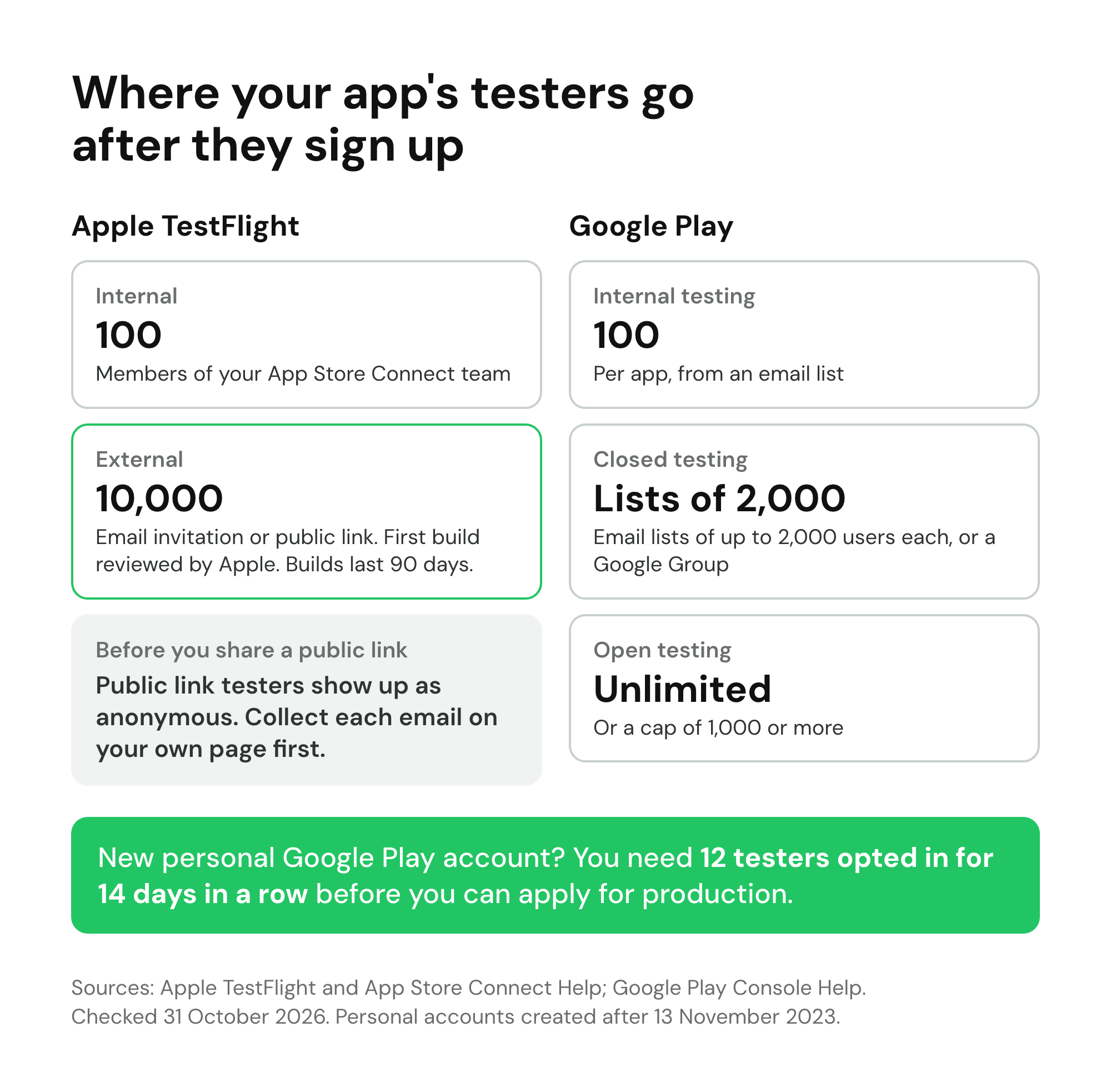
| Track | Max testers | How people join | Notes |
|---|---|---|---|
| TestFlight internal | 100 | Members of your App Store Connect team | For your own team only |
| TestFlight external | 10,000 | Email invitation or public link | First build reviewed by Apple |
| Google Play internal testing | 100 per app | Email list, link from you | May not go through standard Play reviews |
| Google Play closed testing | Email lists of up to 2,000 users each, or a Google Group | Opt-in link | The track the 12-tester rule uses |
| Google Play open testing | Unlimited, or a cap of at least 1,000 | Anyone, from the store or a link | Public, so expect less committed testers |
TestFlight for iOS
Apple's TestFlight lets you invite up to 10,000 external testers by email or with a public link you can post anywhere. The first build you add to an external group goes to App Review for TestFlight; later builds may not need a full review. Each build is available for 90 days, testers install it through Apple's TestFlight app, and a public link can be limited to a set number of testers and filtered by device and OS version.
One detail matters for recruiting: testers who join through a public link appear as anonymous in App Store Connect. You see their sessions and crashes, but not who they are, so you cannot email them, ask for a call or tell them you fixed their bug. The DadOS founder reached the same conclusion in the BetaList post above: "always own the email list, never just send people to TestFlight directly." Collect an email address on your own page, then send the TestFlight link.
Google Play testing tracks and the 12-tester rule
Google Play has three testing tracks: internal (up to 100 testers per app), closed (email lists or a Google Group) and open (anyone can join). Test feedback does not affect your public rating.
If your personal developer account was created after 13 November 2023, there is an extra step. You must run a closed test with at least 12 testers who have been opted in for at least 14 days in a row before you can apply for production access. Testers who leave before 14 days do not count.
This is why services that sell "12 testers" exist, and why they are a poor deal. When you apply, Google asks how easy it was to recruit testers, whether testers used the app the way real users would, what feedback you got and how you collected it, and what you changed as a result. It can turn the application down for "insufficient tester engagement". Twelve people who installed the app and never opened it again give you nothing to write in those answers. Recruit 20 to 30 real testers through the channels above, so that 12 are still active on day 14.
Chrome extensions
The Chrome Web Store has three visibility settings: public, unlisted (anyone with the link can install it) and private (only trusted testers you add by email or Google Group). Unlisted is the simplest way to run a beta from your own signup page.
For the launch itself, the mobile app launch checklist covers store listings, screenshots and launch week, and a mobile app waitlist collects interest before the app is in either store.
Paid panels or free channels: which to use
Free channels cost time. Paid panels cost money. Most founders need both at different moments:
- Use free channels when you are looking for future customers, when you need to learn what to build, and when you want testers who will stay for months.
- Use a paid panel when you need five usability sessions by Friday, coverage of specific devices or countries, or a fixed number of completed tasks. It is also the honest answer when your audience is hard to reach, such as doctors or procurement managers.
- Never use paid testers to decide what to build. They are paid to finish tasks, not to have your problem.
Common mistakes when recruiting beta testers
- Recruiting before you know who you want. Without the one-sentence profile, you will accept everyone and learn from no one.
- Collecting only an email address. You cannot choose well later without screening answers, and you cannot reach anonymous TestFlight or store testers at all.
- Inviting everyone at once. The first five testers find the obvious problems. Let them find those before the next 20 arrive.
- Using one channel. Each channel gives you a few dozen people at best. Run three.
- Paying for sentiment. Rewards tied to positive feedback or reviews corrupt the feedback and, in the US, break the FTC rule.
- Asking testers to "try everything". Give one task a week.
- Going silent. Testers who never hear what happened to their feedback stop giving it.
Finding and managing beta testers with LaunchList
Knowing how to find beta testers is half the work; the other half is keeping track of who applied, who you picked and who showed up. LaunchList does not find testers for you, and it does not run TestFlight or Google Play testing. What it does is give every channel above one place to send people, and then help you choose and invite them. It is pre-launch waitlist software for founders, and a beta is one of the things founders use it for.
- One signup page for every channel. A hosted page or an embedded form on your own site, with screening questions as dropdowns, single or multiple choice, or long text. A hidden field records where each person came from without asking: give it the key
source, and a link ending in?source=redditfills it in. - Choose by fit. Every signup lands in stages: Waitlist, Invited, Joined, Converted and Declined. You can tag the people you pick by hand, and a segment can match on screening answers (building your own segments is on the Launch plan and the Grow plan). The waitlist management view shows where everyone stands.
- Invite in groups. Personal invites are on every plan; the Free plan includes a fixed number, and pricing has the details. Invite one person or select up to 1,000 at once, using a filter or a segment. Each person gets an email linking to their private waitlist status page, where their code waits beside a "Claim access" button. Codes expire after 14 days unless you set otherwise. Early access invite codes explains the details.
- See who used their invite. Analytics shows each batch you invited together and what share used its code. Shared codes and automatic invites are on the Launch plan and the Grow plan.
- Keep the people waiting warm. A referral link, live position and leaderboard work on every plan, and from the Collect plan you can email your waitlist with updates between groups.
If you are setting up a signup page for testers today, an early access signup page is the closest starting point.
Beta testers FAQ
How do I find beta testers if I have no audience?
Start with the people who already have the problem, not the people who already know you. Write one sentence describing who the product is for, put up a short signup form with two to four screening questions, then spend two weeks answering questions in the communities where those people ask for help, messaging 30 hand-picked people one by one, and posting in beta-tester communities for bug coverage. A small directory listing helps once the page is ready.
Where can I find beta testers for free?
The free channels that work best are second-degree introductions from your own network, niche communities where your users ask for help (subreddits, Slack and Discord groups, forums), beta-tester subreddits such as r/TestMyApp, r/betatests and r/alphaandbetausers, Show HN for things people can try without signing up, and direct messages to a hand-picked list. Free costs time instead of money, so plan for a few hours a day for two weeks.
How many beta testers do I need?
It depends on the goal. For usability, five people per round finds most problems, and three rounds of five beats one round of fifteen (Nielsen Norman Group). For catching major bugs, Centercode, a beta-testing vendor, suggests 30 to 50 testers, and 75 to 100 for a stable product. A new personal Google Play developer account needs at least 12 testers opted in for 14 days in a row. Then recruit about three times the active number you need, because only about 30% of beta testers typically take part.
Should I pay beta testers?
Usually not in cash for an early product. Cash attracts people who want the money rather than the product, and Centercode warns it can bias feedback. Pay when you need people you cannot otherwise reach, a fixed number of completed sessions or specific devices, through a panel such as Prolific, whose minimum participant pay is $8 an hour and recommended pay is at least $12. For your own testers, offer access, a written founding price and a direct line to you.
What are good beta tester incentives?
Early access, a founding member price written down with its terms, extra time or credit on a paid plan once you launch, a direct line to the founder, and credit in your changelog. For time-heavy tasks like a recorded session, a small gift card is fair. Tie every reward to taking part, never to what someone says: in the US, the FTC's 2024 rule bans incentives conditioned on writing a review.
How do I find beta testers for an iOS app?
Recruit them on your own signup page first, then send them a TestFlight invitation. TestFlight allows up to 10,000 external testers by email or public link, after your first build passes Apple's beta review, and each build stays available for 90 days. Capture each tester's email before sending them to TestFlight: people who join through a public link show up as anonymous in App Store Connect.
How many testers does Google Play require?
If you have a personal developer account created after 13 November 2023, you must run a closed test with at least 12 testers who have been opted in for at least 14 days in a row before you can apply for production access. Google also asks how you recruited testers, how engaged they were and what you changed, and can turn you down for insufficient tester engagement, so 12 idle testers is a risk.
What questions should I ask potential beta testers?
Ask what they use today for the problem, when they last ran into it, what best describes their role or device, how much time they can give in the next few weeks, and whether they would do a 15-minute call. Keep it to four or five questions and score the answers: someone with the problem this month and a current workaround is worth more than someone who is merely curious.
Are friends and family good beta testers?
They are good for your first smoke test, because they will forgive a broken signup and tell you it is broken. They are poor for deciding what to build, because they are polite and usually not the user you are building for. Use them for a day, then ask each of them for one introduction to someone who has the problem.
How long should a beta test last?
Long enough for testers to use the product the way they would in real life, which for most apps means at least two weeks and often four to six. Google Play's 14-day minimum for new personal accounts is a sensible floor for any product. Run it in short rounds with a fix between each, rather than one long test where feedback piles up unread.