Kickstarter Email List: How to Build One Before You Launch
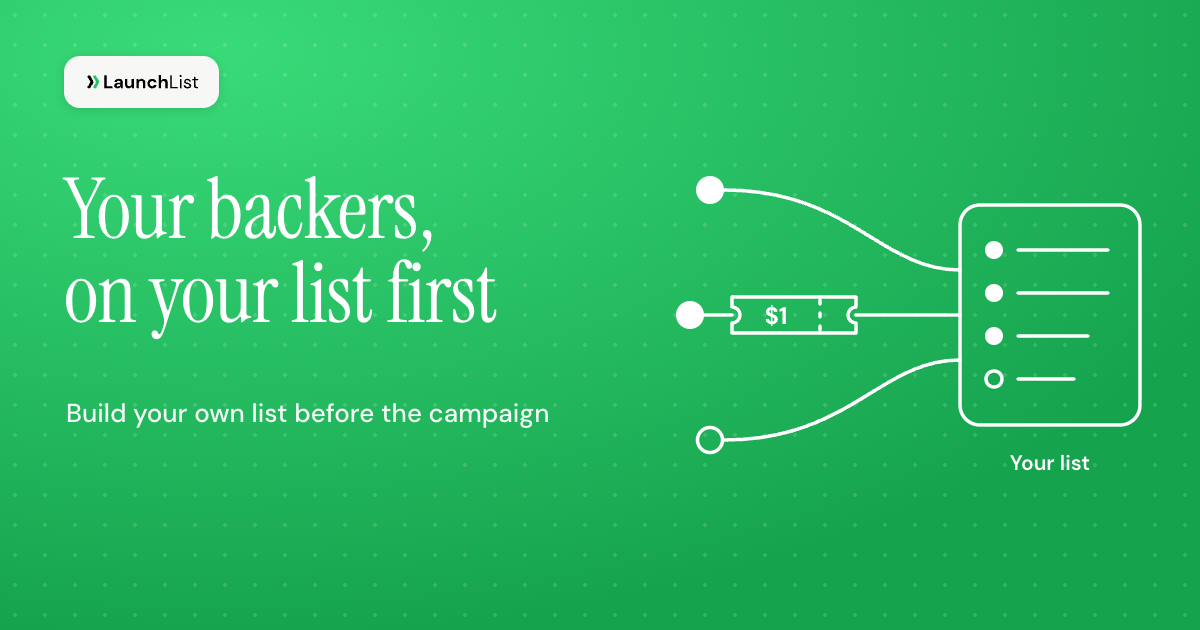
TL;DR: A Kickstarter email list is the list of people you collect yourself, on a page you control, before your campaign goes live. If you pay for ads, the math is unforgiving: at the $3 target per lead that LaunchBoom, a crowdfunding ad agency, sets, and the 1% of plain leads it says go on to back, each backer from plain leads costs about $300. So the math pushes you toward four things: a refundable $1 reservation, a list with no fake signups, referral signups that cost no ad money, and emailing the people who reserved first on launch day. Below is each step, with the numbers.
This guide is for hardware and consumer-product creators building a list before a Kickstarter campaign. It is about growing your own list, not buying one and not Kickstarter's account emails. Every figure links its source and was checked on November 4, 2026.
What counts as a Kickstarter email list
Three different things go by the name, and only one of them is worth building:
- Your own list. People who signed up on your page and gave you their email. You hold the addresses, you can email them whenever you choose, sort them into groups, and use them to build ad audiences. It can open months before Kickstarter approves your project.
- Kickstarter followers. People who pressed follow on your Kickstarter pre-launch page. Since its April 2026 update, Kickstarter lets you message them "at any stage of your campaign". You do that inside Kickstarter, though, so you don't get their addresses to segment, send a sequence to or build an ad audience from.
- A bought list. Addresses of strangers. They never agreed to hear from you, so skip it (more in the FAQ).
Your own list and Kickstarter's followers are not rivals. Kickstarter reported in October 2025 that "on average, 32% of pre-launch followers pledge once the campaign goes live, compared with 17% of post-launch followers." Your list is where most of those early followers come from: you build it first, then send it to Kickstarter's page to follow once that page exists. How the two pages fit together is on our Kickstarter pre-launch page and waitlist page; this post is about the list itself.
What one email lead is worth: the cost-per-backer math
Most crowdfunding lists are built with paid ads, and an ad lead has a price. The clearest public numbers come from LaunchBoom's Kickstarter advertising guide (October 27, 2026). LaunchBoom runs these campaigns for clients, so read them as an agency's own figures:
- "Your first target is a $3 CPL" (cost per lead).
- About 3-5% of leads pay a small reservation while you test.
- "On average, 30% of VIPs back the campaign, and only 1% of non-VIPs do." A VIP is someone who paid the reservation.
- While you test, each reservation costs $60-100. In its worked example, the goal is a cost per reservation under $30.
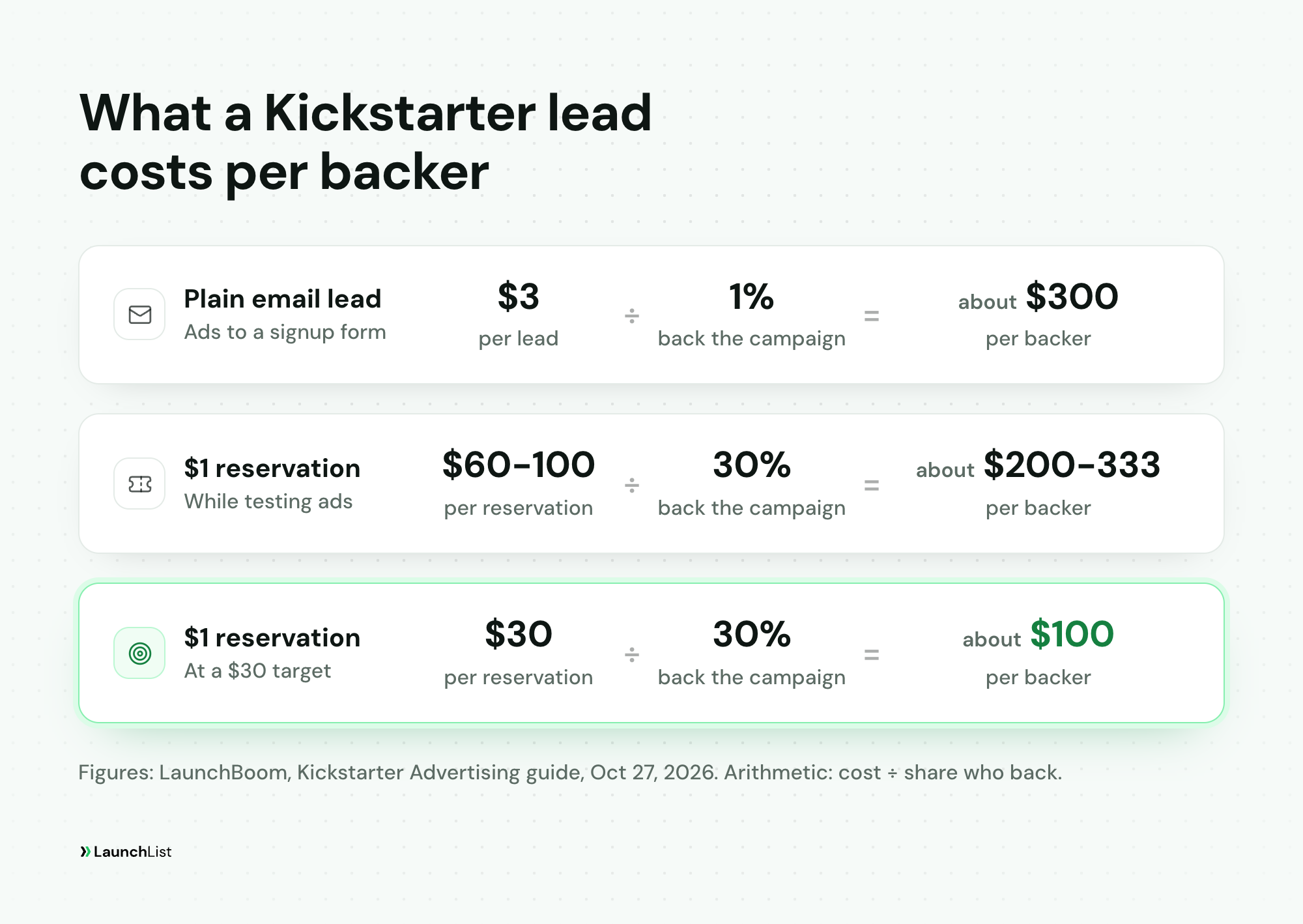
Put those together and the cost of a backer looks very different depending on where the lead ends up:
| Where the lead ends up | Cost to get it | Share who back | Cost per backer (arithmetic) |
|---|---|---|---|
| Plain email lead | $3 | 1% | about $300 |
| Reservation, while testing | $60-100 | 30% | about $200-333 |
| Reservation, at a $30 target | $30 | 30% | about $100 |
Source for the inputs: LaunchBoom, October 27, 2026. The last column is division, not a promise.
A quick way to check your own numbers: what you can pay for a lead is roughly your average pledge times the share of leads who back. As arithmetic, with a $150 average pledge and 1% of plain leads backing, a lead is worth about $1.50 in pledges, before your costs. Pay $3 for it and you lose money on every plain lead that never reserves. That is the whole case for the reservation step, for keeping fakes out and for signups that cost nothing.
Other sources give wider ranges. In a guest post on Kickstarter's own blog (July 14, 2026), Andrea Baldereschi writes that depositors "generally convert into backers at a rate between 20% and 40%", while for plain list signups the rate "typically falls somewhere between 0.5% and 5%." Same shape: people who paid a little back at many times the rate of people who only typed an email.
Why the first days matter so much: Kickstarter's stats page, as of January 1, 2026, showed 685,397 projects launched and 42.73% funded, and said "79% of projects that raised more than 20% of their goal were successfully funded" while "9% of projects finished having never received a single pledge." It doesn't say why. But a list you can email the hour you launch is one way to get there that is in your hands.
If you've read our advice to skip cold paid traffic before launch, this is the exception. A software founder doesn't yet know what a customer is worth. A hardware creator does: the pledge is the price, so the math above tells you when an ad pays.
Where Kickstarter email leads come from, and what each costs
Ads are one source. The cheaper sources are the ones that lower your blended cost per lead.
Paid ads. Meta ads pointing to a pre-launch page, the approach LaunchBoom's guide is built on, with its $3 target per lead. Put your ad pixel on the page and give every ad its own UTM link, so you know which ad brought which signup. LaunchBoom also recommends a unique Kickstarter referral link for each ad once you are live, so you can compare real pledges per ad with what the ad platform reports.
Your own audience. Your newsletter, social accounts, forums and the community around the problem you solve. No ad cost, and these people know you already.
Press and creators. Kickstarter's list-building advice suggests you "give influencers a first look at your product or an exclusive giveaway for their audience." Give each creator their own UTM link too, so you can see whose audience actually joined.
Referrals. Every signup gets a personal link, and moves up the line or earns a reward when friends join through it. LaunchBoom plans on about 30% of sales coming from sources other than ads (organic, PR, referrals). The referral share of your list depends on your product and rewards, and no public figure exists for crowdfunding, so here is arithmetic, not a forecast: if 1 in 5 of 1,000 signups came from referrals, you would pay for 800 leads instead of 1,000, $2,400 instead of $3,000, and your blended cost per lead would fall from $3 to $2.40.
The mechanic behind that is the two-sided reward Dropbox made famous; our Dropbox referral program case study breaks it down. For a physical product, rewards need more thought than free storage: a sticker pack at 3 referrals, early-bird pricing at 10, a free unit only at the top. The reward design section of our referral guide goes through the options.
In LaunchList, referral links and a leaderboard come with every plan, and each signup gets a status page with their place in line and their link. Rewards and milestones are on the Collect plan and up.
Keep fake and giveaway signups off your list
When every lead costs you $3, a fake one costs $3 too. It also lowers the share of your list that backs, so every number you plan with is off. And LaunchBoom's playbook builds new ad audiences as a lookalike of your email list. A list padded with throwaway addresses and bots gives the ad platform worse examples of who your buyer is.
Two kinds of bad signup show up on crowdfunding lists:
- Fakes. Disposable mailboxes, typos, and scripts farming referral rewards. The higher your rewards, the more of them you get.
- Prize hunters. Real people who joined for a giveaway, not for your product. Their inboxes work, but they make the list look like more people want your product than really do.
What works against both:
- Ask people to verify their email. A fake signup then costs a working mailbox. In LaunchList this is the form switch "Ask people to verify their email", on every plan.
- Give referral credit only when the friend verifies. Throwaway addresses then earn nothing. Our referral guide has a full section on keeping a referral leaderboard honest.
- Make the prize your product. A giveaway of the thing you are launching brings people who want it.
- Check before you send or export. Remove the fakes before your launch email and before you upload a list to build a lookalike.
LaunchList gives every signup a trust verdict: Verified, Valid, Unknown, Risky or Fake. It combines proof that they own the address, the address itself, device and network clustering, and behavior, with rate limits and disposable-address detection running on every signup. It is on every plan, Free included. Before a big send or an ad upload, filter your signups by trust tier: leave out the Fake ones, look at the Risky ones by hand, and for the cleanest lookalike seed export only the Verified.
The $1 reservation: take it through Stripe or Shopify, then tag it on the list
A reservation is a small refundable deposit, often $1, that holds the best price for someone before the campaign opens. Kickstarter's own list-building post names "$1 Campaign Reservations" as a way to grow a list, and the numbers above show why: in LaunchBoom's data, 30% of people who reserved back the campaign, against 1% of everyone else.
LaunchList takes no payments, pre-orders or deposits. The money goes through your own checkout, and the list keeps track of who paid. Here is the setup:
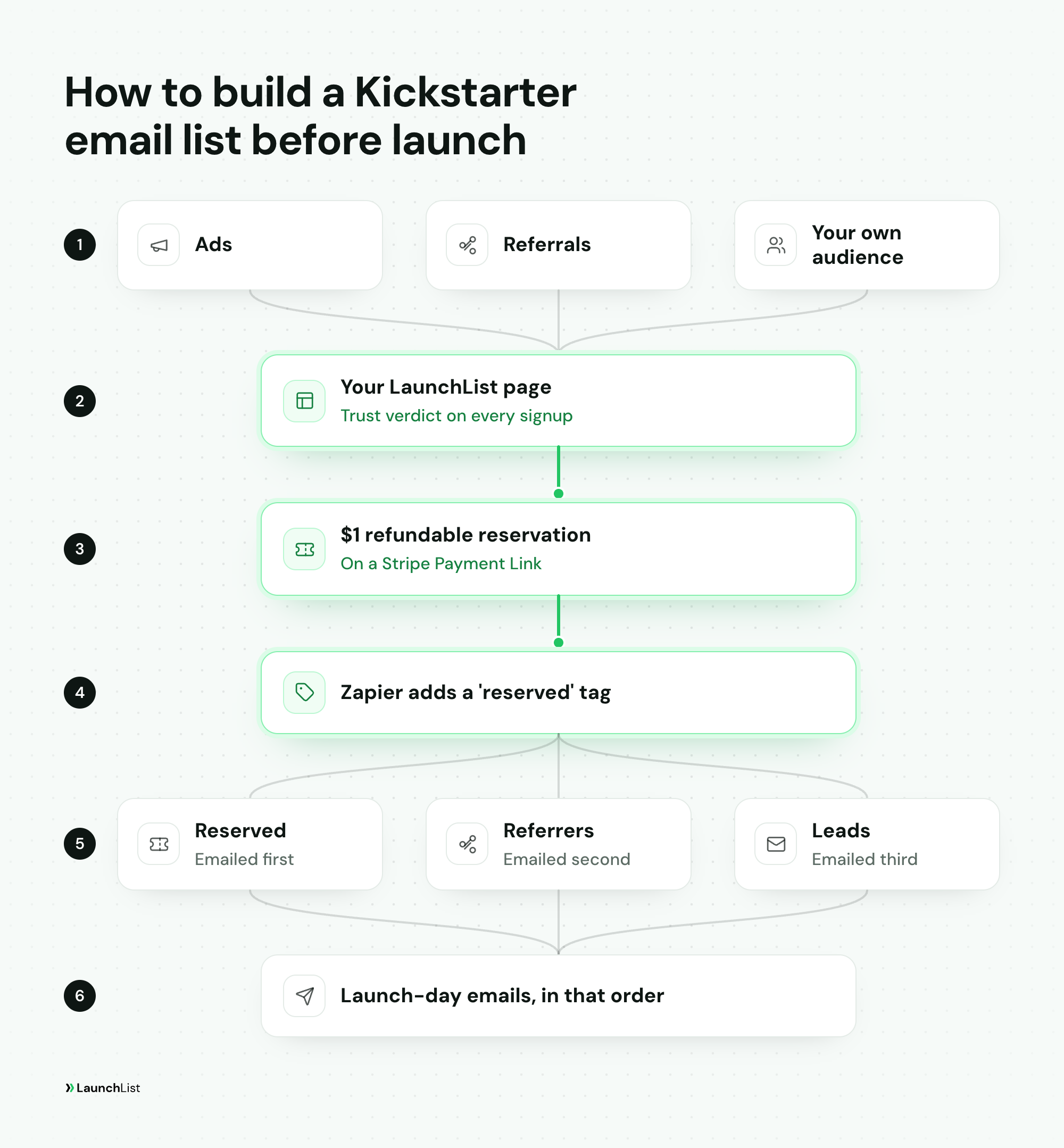
- Make the checkout. Create a Stripe Payment Link (or a Shopify product) for the reservation. Say on it what the $1 holds (the price, which edition), that it is fully refundable, and roughly when the campaign opens.
- Send every new signup there. In LaunchList, set what people see after they sign up to Link and paste the Payment Link. Everyone joins the list first, then sees the offer. The ones who skip it stay on your list as leads. The Link option is on the Collect plan and up.
- Tag the people who paid. With the LaunchList Zapier app, a Zap that starts when Stripe records a payment can find the contact by email and add a "reserved" tag. The Zapier and Make apps are on the Launch plan and up; a webhook or the API does the same if you write code.
- Keep the promise. Refund anyone who asks, without questions. A reservation that is hard to cancel costs you more in trust than it brings in pledges.
How the money moves (card holds, refunds, when a Payment Link charges) is covered in the payment mechanics section of our pre-selling guide. The steps there apply to a $1 reservation as much as to a full pre-order.
One caution: not every audience likes reservations. Parts of the tabletop community have called them pushy and unfair to people who find the campaign later, complaints LaunchBoom, which runs reservation funnels, answers in its own post. If your backers are that crowd, consider a free email signup with an early-bird tier instead, or say very plainly what the $1 buys.
Split the list: reservers, leads and referrers
Once some people have paid and some haven't, they should not get the same emails. Four groups are worth keeping apart:
| Group | Who they are | What they need from you |
|---|---|---|
| Reserved | Paid the $1 | Confirmation of the price they hold, the launch date and hour, and a nudge to follow your Kickstarter pre-launch page |
| Leads | Signed up, didn't reserve | Progress updates, and a clear reason to reserve before launch |
| Referrers | Brought friends | Thanks, their reward, and their link again before launch |
| By edition | Answered which version they want | Updates about that version, and its tier on launch day |
The last group comes from one question on the signup form. A "Single choice" question asking which edition or color they want tells you how to set your reward tiers, and every answer becomes a filter on your list.
In LaunchList, tags and form questions work on every plan. Building your own segments, such as "tagged reserved", "came from this ad" or "referred 3 or more", is on the Launch plan and up.
Emails from signup to launch day
An ad lead who hears nothing for two months forgets why they signed up. A simple rhythm keeps them warm:
- Right away: a welcome email with their referral link and, for leads, the reservation offer.
- Every two weeks or so: a real update. A prototype photo, a factory visit, a design choice you'd like their vote on.
- A week before launch: the launch date and hour, and for reservers, what their $1 gets them.
- The day before: a short reminder.
- At go-live: the campaign link, nothing else competing for the click.
Our waitlist email templates include the launch-date announcement, the 24-hour warning and the launch-day email, ready to adapt, and the launch email examples page has more.
On launch day, send in order. Reservers first, because they were promised the best price and, in LaunchBoom's numbers, they are the most likely to back. Then your top referrers. Then the leads.
In LaunchList, email broadcasts are on the Collect plan and up. The welcome and reminder emails can run as automations, the Launch Day page counts down to your date and lists what to do, and you can send from your own domain; all three are on the Launch plan and up.
After the campaign: late pledges and your store
The list keeps its value after the campaign ends. The people who signed up but never backed are the first to tell when you open late pledges or a store, and the backers are the ones you want for your next product. Once your pledge manager tells you who backed, tag them, so the next emails go to the right group: a thank-you and delivery news for backers, the late-pledge or store link for everyone else.
Building your Kickstarter email list in LaunchList
LaunchList is pre-launch waitlist software for founders. Here is the whole setup, from first signup to launch-day email:
- Put up the page. Start from Mesa, the pre-order template, built around a product photo, or Vesper, the referral template, with the line, the count and a leaderboard. Add your photos and video. Every plan.
- Ask one question. Add a "Single choice" question for the edition or reward people want, and leave "Ask people to verify their email" on. Every plan.
- Track every ad. Add your Meta, Google Ads or TikTok pixel to the page and give each ad its own UTM link; each signup keeps its source. Every plan. A breakdown of signups by source in Analytics is on the Grow plan.
- Turn on referrals. Every signup gets a link and a status page, and a leaderboard widget can sit on your own site. Rewards at 3 or 10 referrals are on the Collect plan and up.
- Send signups to your $1 reservation. Set the page people see after joining to your Stripe Payment Link (Collect plan and up), and tag the people who paid with the Zapier or Make app (Launch plan and up).
- Keep the list clean. Check the trust verdict, remove what's marked Fake and look at what's marked Risky, before every send and every ad audience upload. Every plan.
- Email the list. Broadcasts for updates (Collect plan and up), automations for the welcome and reminders, segments for reservers and leads, Launch Day for the countdown (Launch plan and up).
LaunchList doesn't take the money: the reservation and the pledges happen in Stripe, Shopify and Kickstarter. What it holds is the list, who joined from which ad, who reserved, who brought friends, and the emails that get them to your campaign on launch day. Free holds 100 contacts, enough to build the page and test the whole flow; the plans and sizes are on pricing (beta pricing, subject to change).
Kickstarter email list FAQ
Can I buy a Kickstarter backer email list?
Don't. The people on a bought list never agreed to hear from you, so they ignore or report the email, and most email services forbid sending to purchased lists. Build your own list on a page you control instead: people who chose to join are the ones worth emailing.
How big should my email list be before Kickstarter?
Work backward from the backers you need. As arithmetic: a $30,000 goal at a $150 average pledge is 200 backers. At the 0.5% to 5% of plain list signups who usually back, that is 4,000 to 40,000 signups; at the 20% to 40% of depositors who back, it is 500 to 1,000 reservations. The list does not have to carry the whole goal, but it should carry the first day.
Can I message my Kickstarter followers before launch?
Yes. Since April 2026, Kickstarter lets creators message their followers "at any stage of your campaign". You do it inside Kickstarter, though, so you don't get their addresses to sort into groups, send a sequence to or build an ad audience from. That is why most creators run both: their own list and Kickstarter's pre-launch page.
Should I run a giveaway to grow my Kickstarter list?
Only if the prize is your product. A prize anyone would want brings people who joined for the prize, and they make your list look bigger than the demand behind it. Ask entrants to verify their email, give referral credit only for friends who verify, and remove the signups marked Fake before you email or build an ad audience.
Can LaunchList take the $1 reservation?
No. LaunchList takes no payments, pre-orders or deposits. The $1 goes through your own Stripe Payment Link or Shopify checkout; LaunchList can send each new signup to that link right after they join (Collect plan and up) and tag the people who paid through Zapier (Launch plan and up).