
Waitlist software
for AI startups
LaunchList runs the waitlist for an AI app or agent before it opens to everyone, so you can let people in only as fast as your capacity grows.
Free for your first 100 contactsNo credit card needed
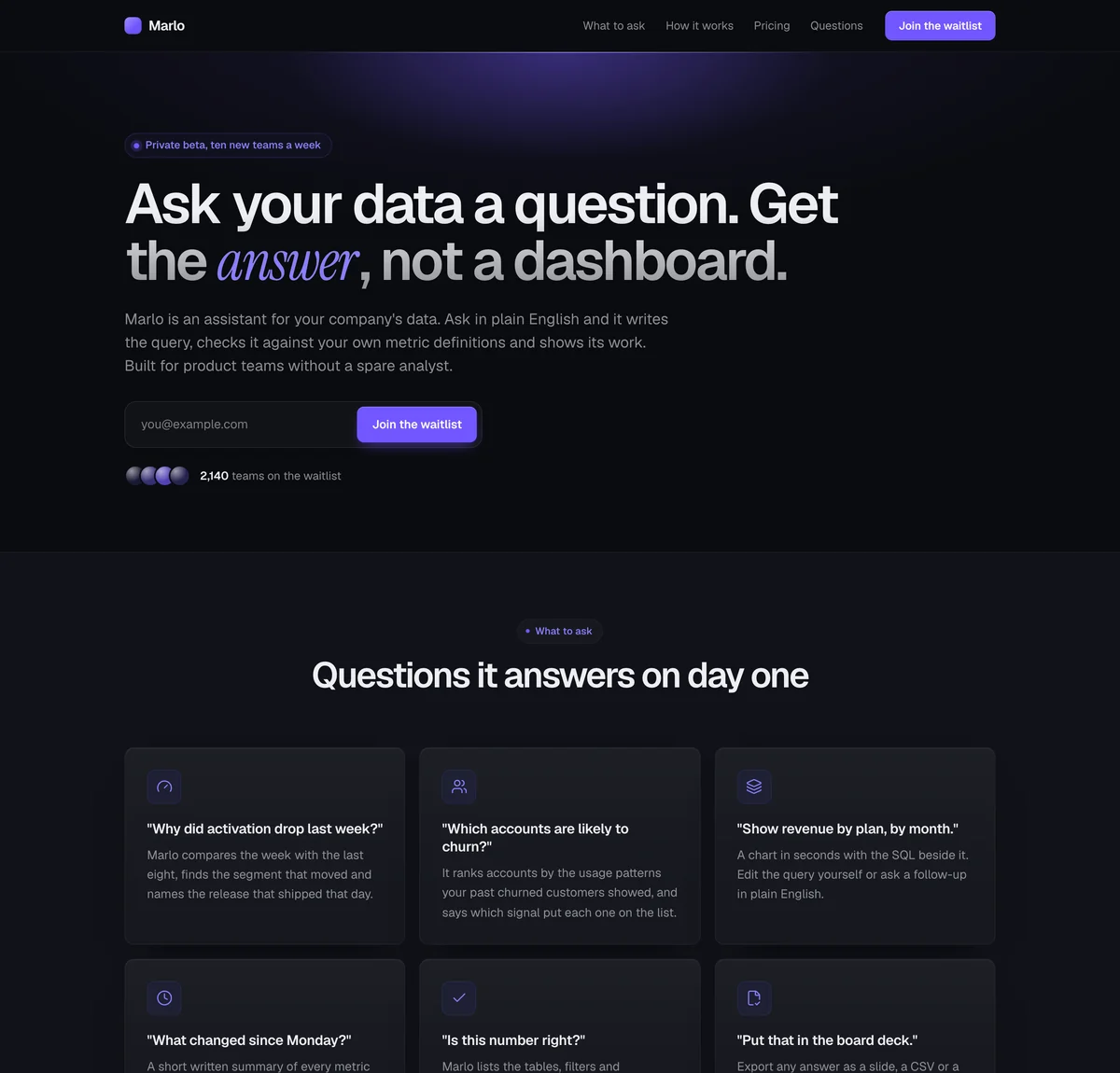
Midnight. Dark and focused: a near-black page with a soft glow behind the headline and cards that read as lit surfaces. Suits AI, developer and fintech products.
Marlo is a made-up assistant for company data, so its answers, numbers and prices are examples. Start from it and the words describe your product, from its name and one sentence of yours.
At a glance
Updated
- What it is
- The line in front of an AI app or agent: who is waiting, what they want it for, and who goes next.
- Starting page
- Marlo, the AI tool template: a text-led page with a product demo, the questions it answers as cards, and pricing.
- Access
- Up to 1,000 people a press, each with an invite that works once; the Free plan includes the first 100 invites.
- Works with
- Your own app, where one API call checks each code, and Claude or ChatGPT, which can run the list through LaunchList's MCP server. Accounts, usage limits and billing stay in your product.
- Price
- The first 100 contacts are free, and a bigger list is billed by its size, monthly or yearly.
How an AI launch opens, from a waitlist to open signup.
Every user an AI product lets in costs compute and shows you how it gets used, so the question is how fast to open the door.
A waitlist, then waves
You let in a few people, learn what each one costs and does, then let in more. OpenAI opened GPT-4 to developers this way, inviting them gradually to balance capacity with demand.
Source: OpenAI, GPT-4, March 14, 2023
Use it when
Each user costs real inference and you can only take so many a week.
Open signup with a usage limit
Anyone can sign up, and an allowance of requests or credits caps what each person costs you. Nobody waits, but nobody gets unlimited use either.
Use it when
You can afford every user, just not unlimited use, and the product is ready.
A developer preview
Builders get in first, with a limited number of places, and their feedback shapes the product. GitHub ran Copilot as a technical preview for a year, with more than 1.2 million developers in it, before it opened to all.
Sources: GitHub blog, June 29, 2021 and GitHub blog, June 21, 2022.
Use it when
Your first users build on your model or API.
Where LaunchList fits
A usage limit or a developer preview needs no waitlist; reach for one only when access itself is scarce.
Waitlist or open signup for an AI product: how to choose.
A good fit when
- Your inference budget sets how many people you can serve each week.
- You want to see what people will use it for before you open it to everyone.
- Your agent acts on people's accounts or data, and you want to watch the first users closely.
- You want the people who share it to get in first.
Not the right fit when
- Each user costs you little and the product is ready: let everyone in with a usage cap instead.
- You want to charge for early access: LaunchList takes no payments.
- You only want to tell people when you launch, with no access to give: a newsletter is enough.
AI waitlist batches sized to what your models can serve.
Ask what they will use it for
Give your signup form two questions: the use case as a "Single choice", the company as "Short text". Both answers become filters on Signups.On every planInvite as many as you can serve
Filter Signups by use case, select as many people as this week's capacity allows and press "Invite". Each of them gets an invite code by email.On every planRun it from your own agent
Connect LaunchList to Claude or ChatGPT through its MCP server, then ask for today's signups, or have it invite named people, up to 50 at a time.On every plan
In the docs: connecting your AI agent, adding questions to your form and how invites work.
How DALL·E and Notion AI let people in.
What they did
A research preview for 200 artists, researchers and trusted users in April; from July, invitations to 1 million people from the waitlist over the following weeks; by September, no waitlist and more than 1.5 million users.
Take from it
Open in steps you choose, and say when the next step comes. Each batch in LaunchList is one press of "Invite", sized to what you can serve that week.
What they did
A private alpha open by waitlist only from November 2022, then ten weeks of testing on an invite-only basis, then open to everyone in February 2023, after nearly two million waitlist signups.
Take from it
An AI feature added to an existing product can open from a waitlist too. Invite the users you already know first, and ask them what they would use it for.
Guardrails and hand-offs for an AI waitlist.
Bots held at the door
Each device and each IP address can only send so many signups, and a device behind several of them raises each one's spam score.On every planYour own CAPTCHA
Bring keys for Turnstile, reCAPTCHA or hCaptcha and turn the challenge on for the forms scrapers will find first.On every planA form inside your app
Collect signups from your own React or Next.js frontend with a headless form, or from your backend through the API.On every planRewards your product gives
Set a reward at 3 or 10 referrals. A jump up the line or bonus points happen on their own; credits in your product are yours to hand out, and a reward.granted webhook tells your app who earned them.From the Collect planSaved use-case segments
Save "Researchers" or "Teams over 50" as segments that keep themselves up to date, and open either one to pick the next batch.From the Launch planA note before each wave
Tell the next batch what has changed since they signed up, by email from the same list, before their codes go out.From the Collect plan
Questions about running an AI waitlist.
Why do AI startups use waitlists instead of open access?
How do I rate-limit access to my AI product?
Can I prioritize users by use case or company?
What referral reward works for AI products?
Does LaunchList handle abuse and bots on an AI waitlist?
Can I run the waitlist from Claude or ChatGPT?
How much does it cost to run an AI waitlist?
An AI waitlist that opens at your pace.
Your capacity sets the pace, and you choose who comes through the door in each batch.
Free for your first 100 contactsNo credit card needed