

Security and permissions
How the LaunchList MCP server authenticates a client, what an OAuth grant versus an API key can reach, and how to see and revoke every connected assistant.
An assistant reaches your workspace through a credential you issue and can revoke, and it can never read or change more than you granted. There are two credentials, with different jobs.
Two credentials#
Sign in (OAuth) is for chat clients like Claude and ChatGPT. Approving the connection shows a consent screen that names the client, the workspace, and what it will be able to do. A grant covers the full curated tool surface for one workspace, chosen at consent. Approving one needs the Connect integrations permission, the same bar as minting a full-access API key, so an assistant can never hold powers the person who connected it lacks.
API keys (llk_) are for command-line and headless clients. A key carries scopes, so a
read-only key exposes only the read tools, and a key can be pinned to a single project. Keys are
owned by the workspace, not by the person who created them, so removing a team member never breaks
a running integration.
What an assistant can and cannot do#
- Tools are filtered by the credential. A tool a credential cannot call is not even listed, and the permission is checked again when the tool actually runs.
- There is no delete tool. Deleting contacts stays in the dashboard and the REST API, behind their own confirmation.
- The most sensitive tools can be kept off a connection entirely. A destructive or billing-adjacent tool can be marked unavailable to signed-in assistants, so it never appears on an OAuth grant and stays reachable only through a key you issue directly.
- An assistant can draft and send broadcasts, but only through the permission of the person who
connected it. A key's scopes, and an OAuth grant's reach, both follow the same team permissions
the dashboard checks: a key can hold
broadcasts:write(draft, edit, send a test) only if its creator may manage campaigns, andbroadcasts:send(email the audience) only if they may send campaigns. A member who cannot send a campaign in the dashboard cannot hand an assistant that power by connecting it either. - An assistant can publish a launch page, but only after you say yes. Publishing is two calls: the first shows the address and what goes live and publishes nothing, and the second needs the single-use token the first returned. It needs a verified email address on your account, like sending a broadcast. You can take a page down again from the editor.
- End-user data is data, never instructions. Contact fields and survey answers are written by your signups; the server never treats them as commands, and neither should your assistant.
Every action is attributed#
When an assistant acts, the event records who did it: the client name, and the person whose connection it acted through. You can see what changed and where it came from, the same as any other action in your workspace.
Revoke access#
Access is reversible at any moment:
- OAuth connections: open Account → Security, find the client under Authorized agents, and revoke it. A grant also ends automatically if the person who approved it leaves the workspace.
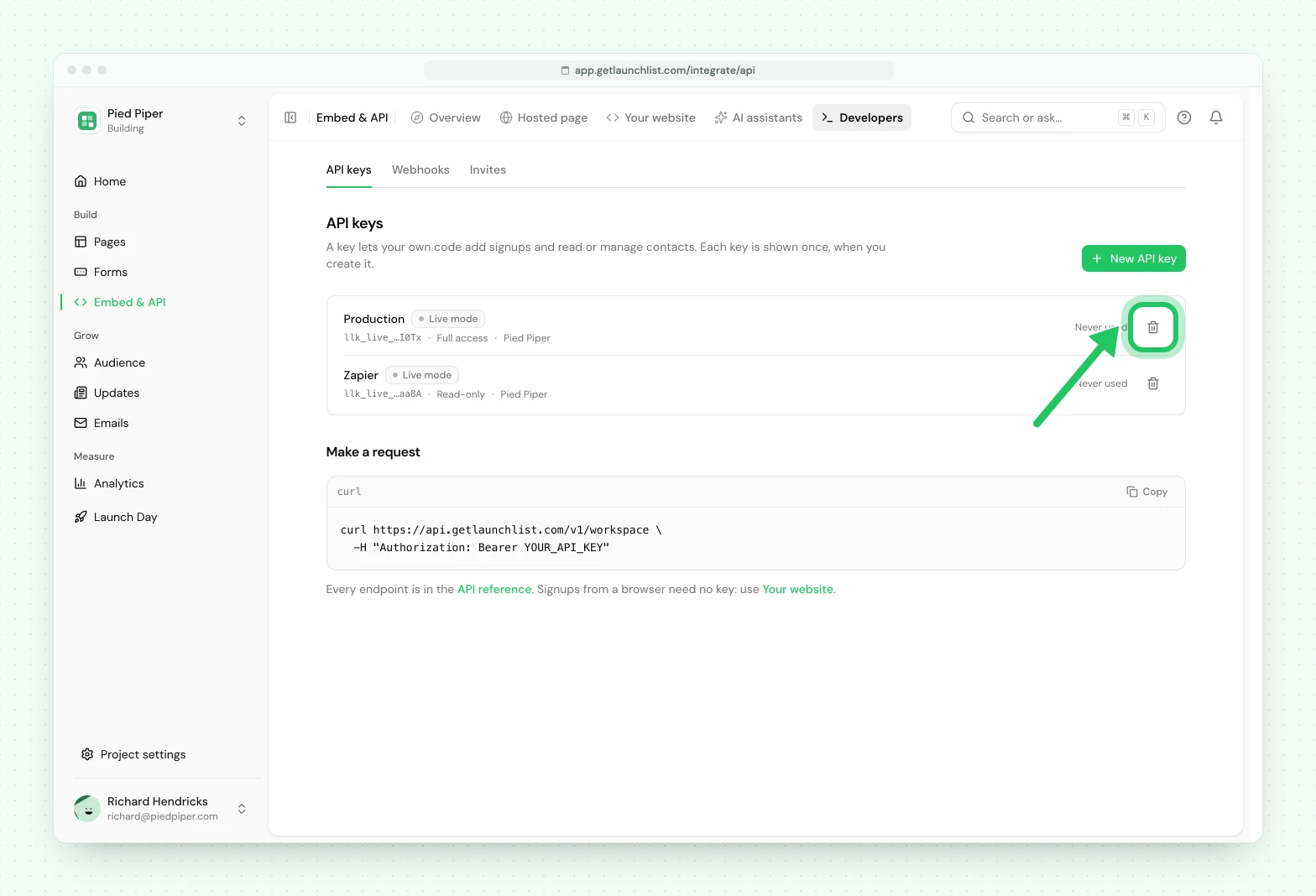
- API keys: open Embed & API → Developers → API keys and revoke the key. The assistant loses access instantly.
Start connecting on Connect your client, or see everything an assistant can call on Tools.
Common questions
How do I cut off an assistant that is connected to my workspace?
Revoke an OAuth connection under Authorized agents in Account → Security, or revoke its API key in Embed & API → Developers → API keys. Either one takes effect immediately.
Can an assistant do more than the person who connected it?
No. Approving an OAuth connection needs the same permission as minting a full-access key, and a key can never carry a scope its creator did not have.
Does an assistant see everyone's workspaces?
No. One connection is bound to one workspace, chosen when you approve it, and cannot reach any other.