` at a chosen spot on the page through Custom Code, so this
method is for a **popup** that opens on its own: after a few seconds, after the visitor scrolls, or
when they move to leave the page.
1. In your Wix dashboard, go to **Settings**, then **Custom Code** in the **Advanced** section.
2. Click **+ Add Custom Code**, give it a name, and paste:
```html
```
3. Under **Add Code to Pages**, choose **All pages**, or only the pages that should show it.
4. Under **Place Code in**, choose **Body - end**.
5. Click **Apply**, then open the live site and wait for the popup.
`data-trigger` takes `time` (with `data-delay` in seconds, 5 if you leave it out), `scroll` (with
`data-scroll` as a percentage of the page, 50 if you leave it out) or `exit` (the pointer leaving the
top of the window, on desktop only). A visitor sees it at most once every 7 days, or every
`data-cap` days if you set it, and never again after they sign up.
Because the script runs on the real page, it reads a `?ref=` code from the address, so a signup
through this popup credits the referrer. A signup through an Embed HTML form does not: that form runs
in its own iframe and cannot read what this script stored.
> [!WARNING] Custom Code does not run in the editor or the preview
> Wix only runs Custom Code on the published site. Test it on the live address.
## Link to your hosted page
Every LaunchList project has a hosted launch page at a public address. A Wix button that links to it
needs no code.
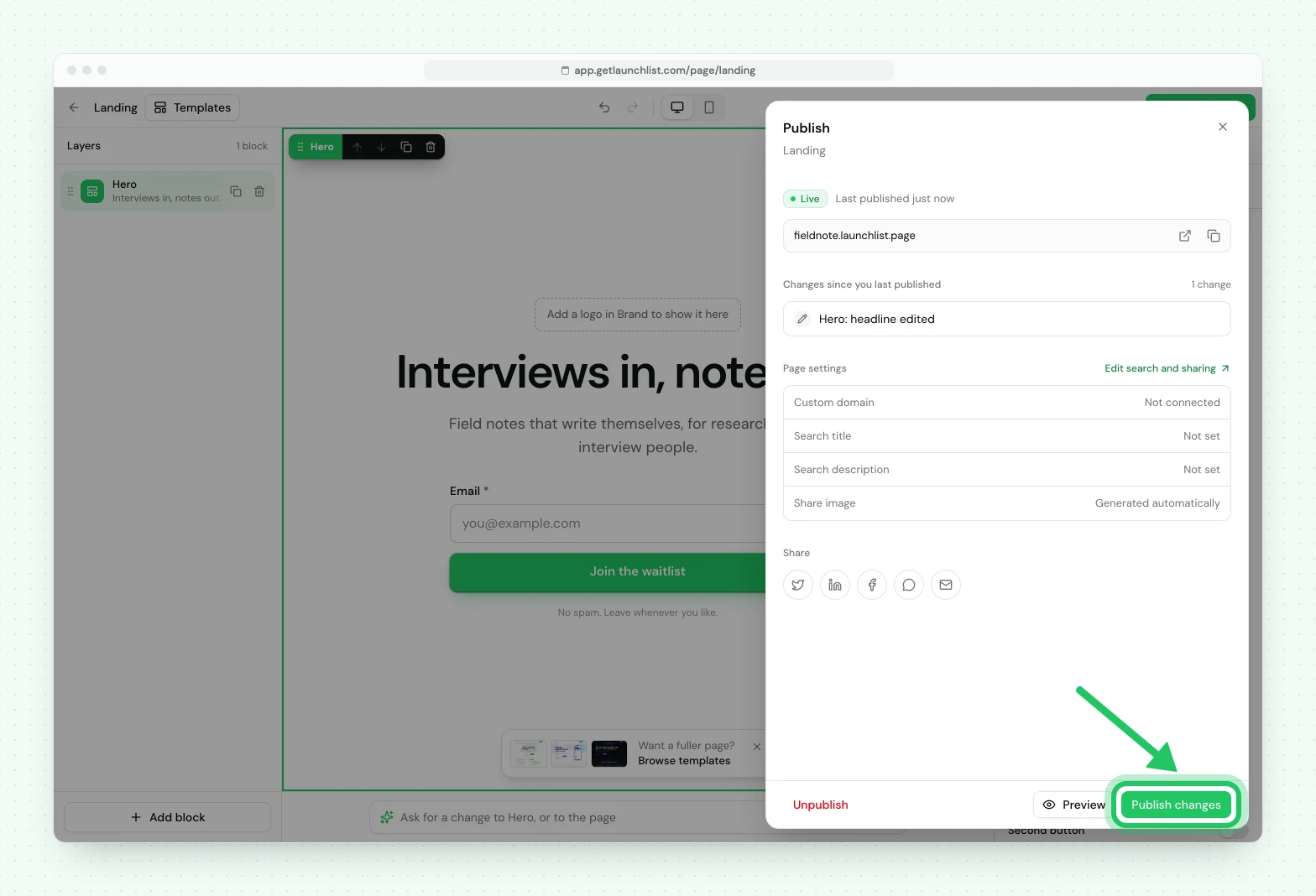
1. In LaunchList, open your launch page and click **Publish**. The publish panel shows the page's
address; copy it.
2. In the Wix Editor, select a button or a piece of text, and click **Link**.
3. Choose **Web Address**, paste the address, and save.
4. Publish your Wix site and click the button to check it.
Referral codes, the status page and every success setting work there as they do on any page
LaunchList hosts.
## If something is not working
| What you see | What to do |
| -------------------------------------------------- | ---------------------------------------------------------------------------------------------------------------------------------------------------------------------------- |
| The form is cut off or has a scrollbar | The Embed HTML box has a fixed size. Drag it taller in the editor, and check the mobile view separately. |
| The status page opens inside the small box | In the form editor, set **After signup** to **Message**, which shows in place of the form inside the box. |
| Nothing shows in the Embed HTML element | Check you pasted the snippet as code, not as a website address, and that the script address starts with `https://`. If the site is on the free plan, use a hosted-page link. |
| The Custom Code popup never opens | Check the site is published on a connected domain and that you are on the live address. A visitor who already saw it waits 7 days; test in a private window. |
| A referral is not credited | The Embed HTML iframe cannot read `?ref=` from your Wix page. Use the Custom Code popup, or send referral links to your hosted page. |
| The form looks different from the rest of the site | Wix's theme does not reach into the form. Change its look under **Design** in the LaunchList form editor. |
## Using the classic LaunchList dashboard
A waitlist made in the classic LaunchList dashboard has its own snippet: a Wix form that sends to `getlaunchlist.com/s/` with its form key. That snippet
keeps working for now and sends signups to the classic dashboard's waitlist, not to a project here.
A classic form key does not work with the snippet on this page.
To bring that waitlist here, [import it into a project](/help/docs/getting-started/import-from-v1),
then replace the classic snippet on your Wix site with the one from **Embed & API → Your website**.
Your signups are copied, and the classic waitlist is not changed.
---
Next: [every way to integrate](/help/docs/integrations/overview) ·
[How to add a waitlist to Squarespace](/help/docs/integrations/squarespace)
## Common questions
### Which Wix plan do I need to add a waitlist?
It depends on the method. Site-wide Custom Code needs a published site with a connected domain, and connecting a domain takes a Wix Premium plan. Wix states no plan requirement for the Embed HTML element, so check it on your own site if it is on the free plan. A button that links to your LaunchList hosted page works on any Wix site.
### Why is the LaunchList form cut off or scrolling inside Wix?
Wix runs the Embed HTML element in an iframe with a fixed size, and the box does not grow with what is inside it. Drag the element taller in the editor, and check its size again in the mobile view.
### Does a referral link to my Wix page credit the referrer?
Not through the Embed HTML element. The form in that iframe cannot read your Wix page's address, so it never sees the referral code. Collect signups with the Custom Code popup instead, or send referral links to your hosted page.
### Can I use Wix's own waitlist instead?
Wix Bookings and Wix Events have waitlists for full classes and full events. They manage seats on something already scheduled, which is a different job from a pre-launch waitlist.