# How to add a waitlist to Squarespace
> Put a LaunchList signup form on Squarespace with a Code block, or site-wide via Code Injection. Both need a Core, Plus or Advanced plan to run JavaScript.
Source: https://getlaunchlist.com/help/docs/integrations/squarespace
---
Squarespace takes LaunchList in a **Code block**. JavaScript in a Code block, and in Code Injection,
needs a **Core, Plus or Advanced** plan. On **Basic**, a Code block takes HTML and CSS only.
> [!NOTE] On the Basic plan, use the hosted page
> Link a button to your LaunchList hosted launch page. It needs no code and works on every
> Squarespace plan.
## Add the form with a Code block
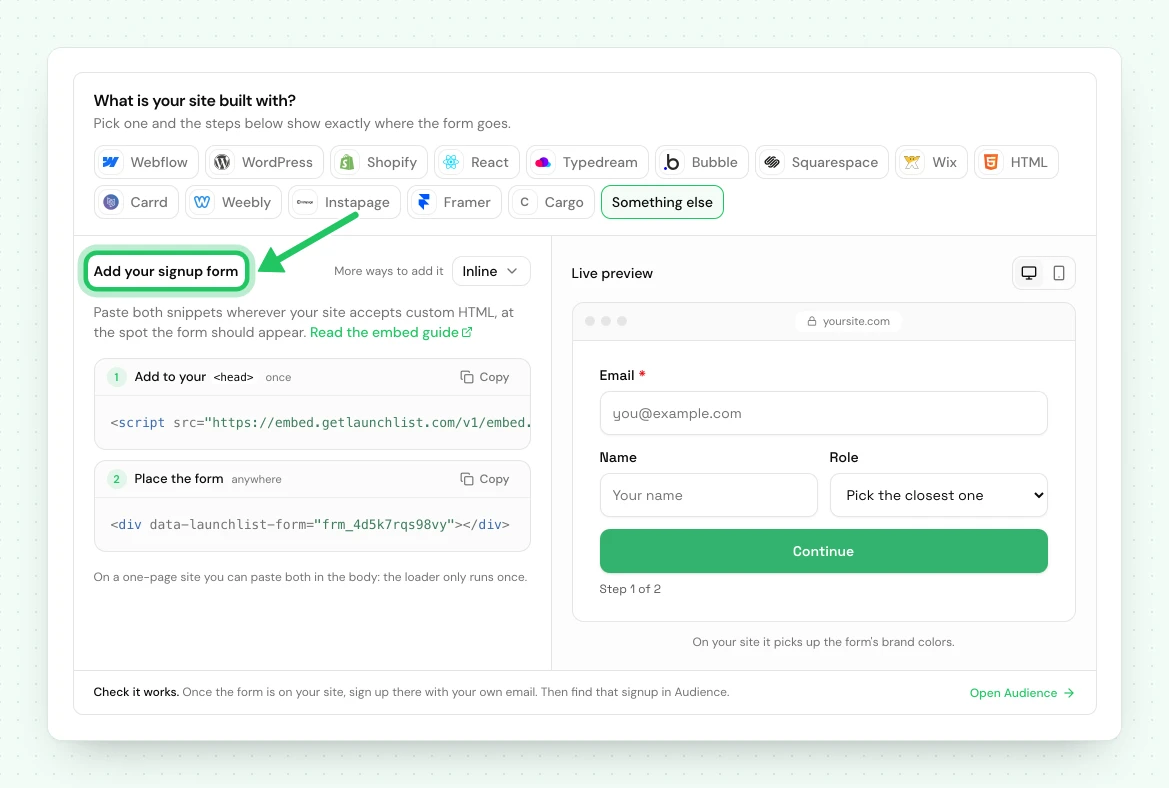
1. In LaunchList, open **Embed & API → Your website**, choose **Squarespace** under **What is your site built with?**, pick your form if you have more than one, and copy the **Inline** snippet it shows.
2. In the Squarespace editor, click **+** to add a block and choose **Code**.
3. Set the block's mode to **HTML** and leave "Display Source" unchecked.
4. Paste the snippet.
```html
```
5. Click **Apply**, then **Save**.
> [!WARNING] The editor will not render the form
> Squarespace does not run embedded scripts inside the editor, so you will see a gray placeholder
> saying the code is not executed. That is expected. View the live site or the preview.
## Site-wide, for more than one form
If you want forms, popups or widgets on several pages, load the runtime once rather than repeating
it in every Code block.
Go to **Settings → Advanced → Code Injection** and paste into **Header**:
```html
```
Every Code block after that only needs the target:
```html
```
## Adding a live signup counter
To show your live signup total beside the form, add this in a Code block:
```html
```
The counter reads your real signup total and styles itself from your **Branding** settings. It shows
aggregate numbers only, never anybody's details.
## If something is not working
| What you see | What to do |
| ------------------------------------------------ | ------------------------------------------------------------------------------------------------------------------------------------------------ |
| "This code block will not execute" in the editor | Expected. Squarespace never runs embeds in the editor; check the live site. |
| Nothing renders on the live site | Check the site is on Core, Plus or Advanced. On Basic, a Code block runs no JavaScript: link a button to your hosted page instead. |
| The form is cramped inside a narrow column | Squarespace Code blocks inherit column width. Move it to a wider section or a full-width block. |
| The form shows twice | The form block is on the page twice; each renders its own form. Remove the duplicate. A script in both Code Injection and the block is harmless. |
## Using the classic LaunchList dashboard
A waitlist made in the classic LaunchList dashboard has its own snippet: a `` in a Code block, with `widget.js` in Code Injection. That snippet
keeps working for now and sends signups to the classic dashboard's waitlist, not to a project here.
A classic form key does not work with the snippet on this page.
To bring that waitlist here, [import it into a project](/help/docs/getting-started/import-from-v1),
then replace the classic snippet on your Squarespace site with the one from **Embed & API → Your website**.
Your signups are copied, and the classic waitlist is not changed.
---
Next: [every way to integrate](/help/docs/integrations/overview) ·
[How to install LaunchList on WordPress](/help/docs/integrations/wordpress)
## Common questions
### Which Squarespace plan do I need to add a waitlist?
Core, Plus or Advanced. Those plans run JavaScript in a Code block and in Code Injection. On the Basic plan a Code block takes HTML and CSS but no JavaScript, so link a button to your LaunchList hosted page instead, which needs no code. Personal, Business and Commerce are Squarespace's older plans, closed to new sites since February 2026.
### Why does my Squarespace Code block show a placeholder?
Squarespace does not execute embedded scripts inside the editor. Save and view the live site, or open the preview, and the form renders.
### Can I add a signup counter to Squarespace?
Yes. The counter widget is one div in a Code block and shows your live signup total, styled from your brand settings.